
Sr Technical Content Strategist and Team Lead
Introduction
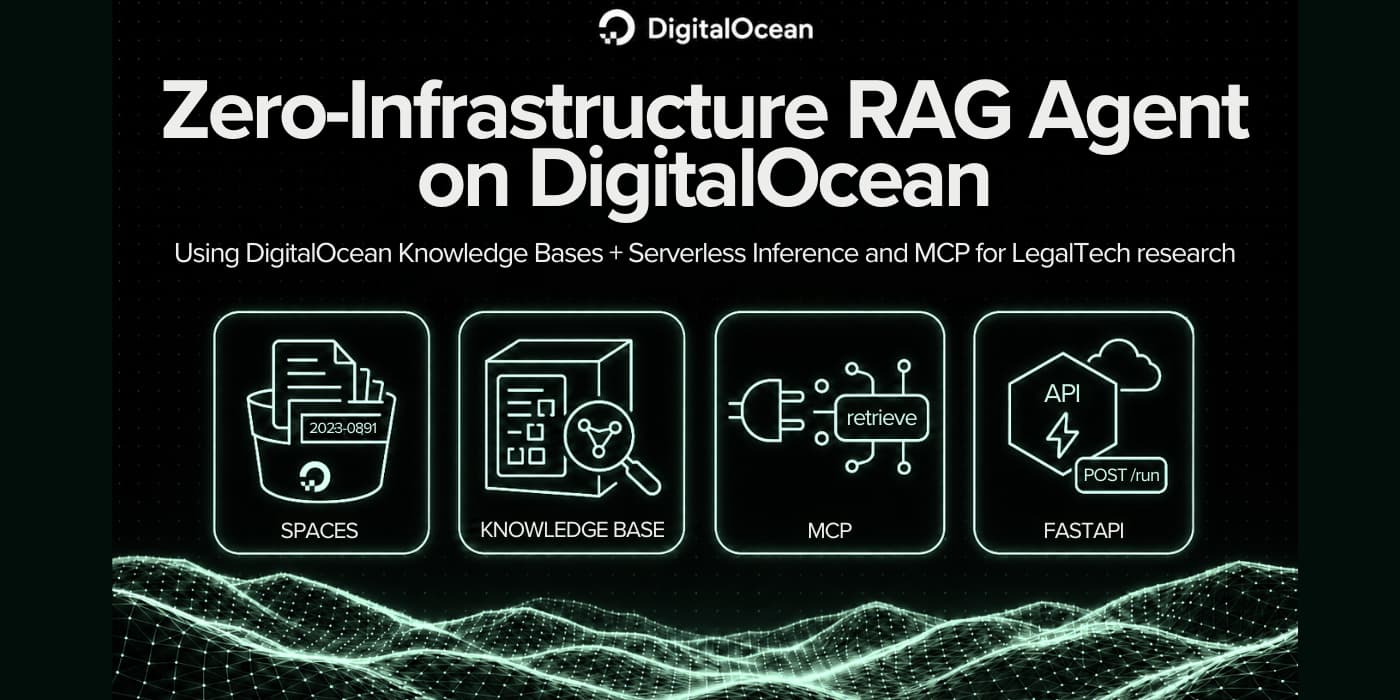
A solo LegalTech founder has 10,000+ internal case files. The product needs an AI assistant that returns grounded answers with source references. The founder does not want to operate a vector database, an embedding service, or a reranker on day one.
DigitalOcean Knowledge Bases is a managed RAG pipeline. You point at files in Spaces, and the platform handles chunking, embedding, and storage in Managed OpenSearch. Retrieval is exposed as an MCP tool at https://kbaas.do-ai.run/v1/mcp, so agent frameworks call one function instead of wiring five services.
This tutorial differs from older RAG walkthroughs that assemble LangChain + Chroma yourself. Here you use DigitalOcean native infrastructure only: Spaces, Knowledge Bases, MCP, Serverless Inference, and a small FastAPI service you deploy to App Platform.
Key takeaways
- Knowledge Bases indexes PDF, Markdown, HTML, and 15+ text formats from Spaces buckets without you running vector infrastructure.
- The Knowledge Bases MCP endpoint exposes
retrieve_knowledge_basefor hybrid search with 1 to 25 results per call. - MCP retrieval billing matches the Knowledge Base retrieve API: you pay embedding tokens for query vectorization plus optional reranking tokens.
- Answer generation is separate. Your FastAPI service bills Serverless Inference per token (for example, Claude Sonnet 4.6 at $3.00 per 1M input tokens and $15.00 per 1M output tokens for prompts up to 200K tokens).
- Agent creation on the Agent Platform is free. You pay for model usage, indexing, storage, and retrieval.
- For production LegalTech workloads, start in TOR1. Most Agent Platform infrastructure runs there per Knowledge Base docs.
When to use Knowledge Bases + MCP and when not to
| Knowledge Bases + MCP is a good fit | Try something else |
|---|---|
| Static or semi-static document corpora (case files, manuals, policies) | Live transactional data (CRM rows, ticket state) |
| You want hybrid semantic + keyword retrieval with optional reranking | You only need a single API call with no document grounding |
| You want MCP-standard tool access for Cursor, LangChain, or custom agents | You need sub-10ms retrieval at massive QPS on custom hardware |
| You want managed OpenSearch and Spaces storage | You must run a self-hosted vector DB for policy reasons |
| Prototype to production on one cloud | You already operate a mature RAG stack you prefer to keep |
For the RAG vs MCP decision tree at the pattern level, see Guide to RAG and MCP. This tutorial uses RAG for document grounding and MCP as the tool transport.
Prerequisites
Before you start, confirm you have:
- A DigitalOcean account.
- Inference and Agent Platform access in the Control Panel.
- A personal access token with
GenAI:readfor retrieval and MCP, plusgenaiCRUD scopes to create the Knowledge Base via API. - A Model Access Key from INFERENCE → Serverless Inference → Model Access Keys, or a personal access token with Serverless Inference access (some accounts can use the same PAT as
MODEL_ACCESS_KEYwhen dedicated model keys are unavailable). - Knowledge Base Enhancements preview enabled for advanced chunking and the retrieve endpoint (recommended).
- Python 3.10+ and doctl for local testing and App Platform deploy.
Lab tip: Use a sandbox project. Do not upload real client PII for this walkthrough. The sample files in this repo are fictional.
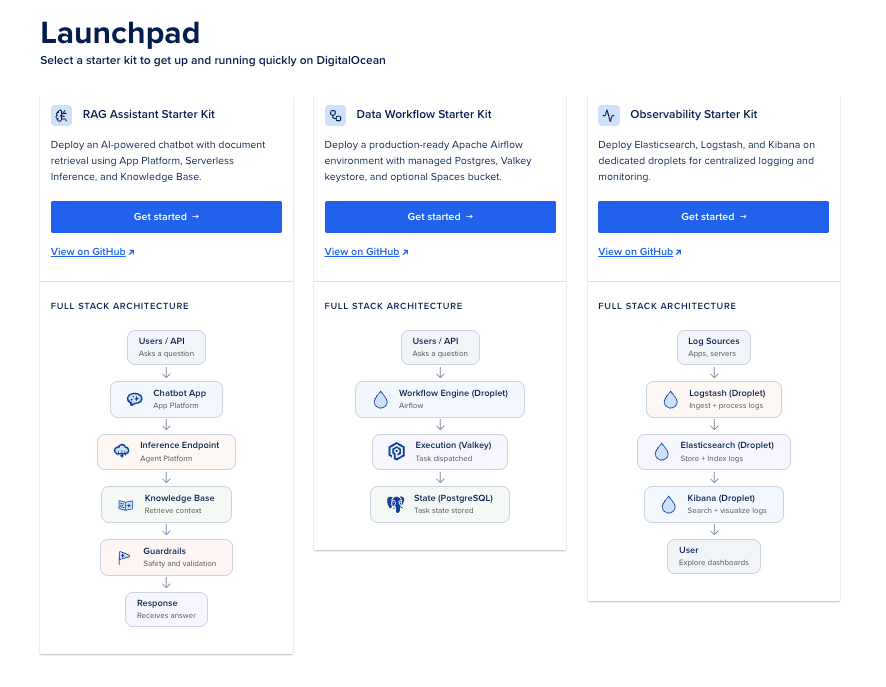
Note: You can also use the DigitalOcean Launch Pad in the Control Panel to deploy this RAG Agent under the RAG Assistant Starter Kit. It follows the same steps that we follow in this tutorial. But for ease of understanding and learning, we will be deploying everything manually.
A quick map of terms
| Term | Think of it as |
|---|---|
| RAG | Retrieve relevant document chunks, then ask the LLM to answer using those chunks |
| Knowledge Base | Managed index over your files or URLs |
| MCP | A standard way for an LLM agent to call tools like retrieve_knowledge_base |
| Spaces | S3-compatible object storage for your raw case files |
| Serverless Inference | Pay-per-token access to catalog models (Claude, Llama, and others) |
| FastAPI service | Your serve.py app: GET /health, POST /run with {"prompt": "..."} |
| App Platform | Managed hosting for the FastAPI container or Python buildpack |
| Reranking | Reorders retrieved chunks so the best passages rise to the top |
alpha |
Retrieval knob: 0 keyword, 1 semantic, 0.5 hybrid (default) |
What is RAG?
Retrieval-Augmented Generation (RAG) means the LLM does not answer from memory alone. Your app first finds relevant passages from your own documents, then asks the model to answer using only that material. That keeps answers grounded in case files, policies, or manuals instead of general training data.
Think of it like an open-book exam: the model gets the question plus the right pages from your library, then writes the answer with citations.
The pipeline has four phases. The diagram below shows how they connect in this tutorial:
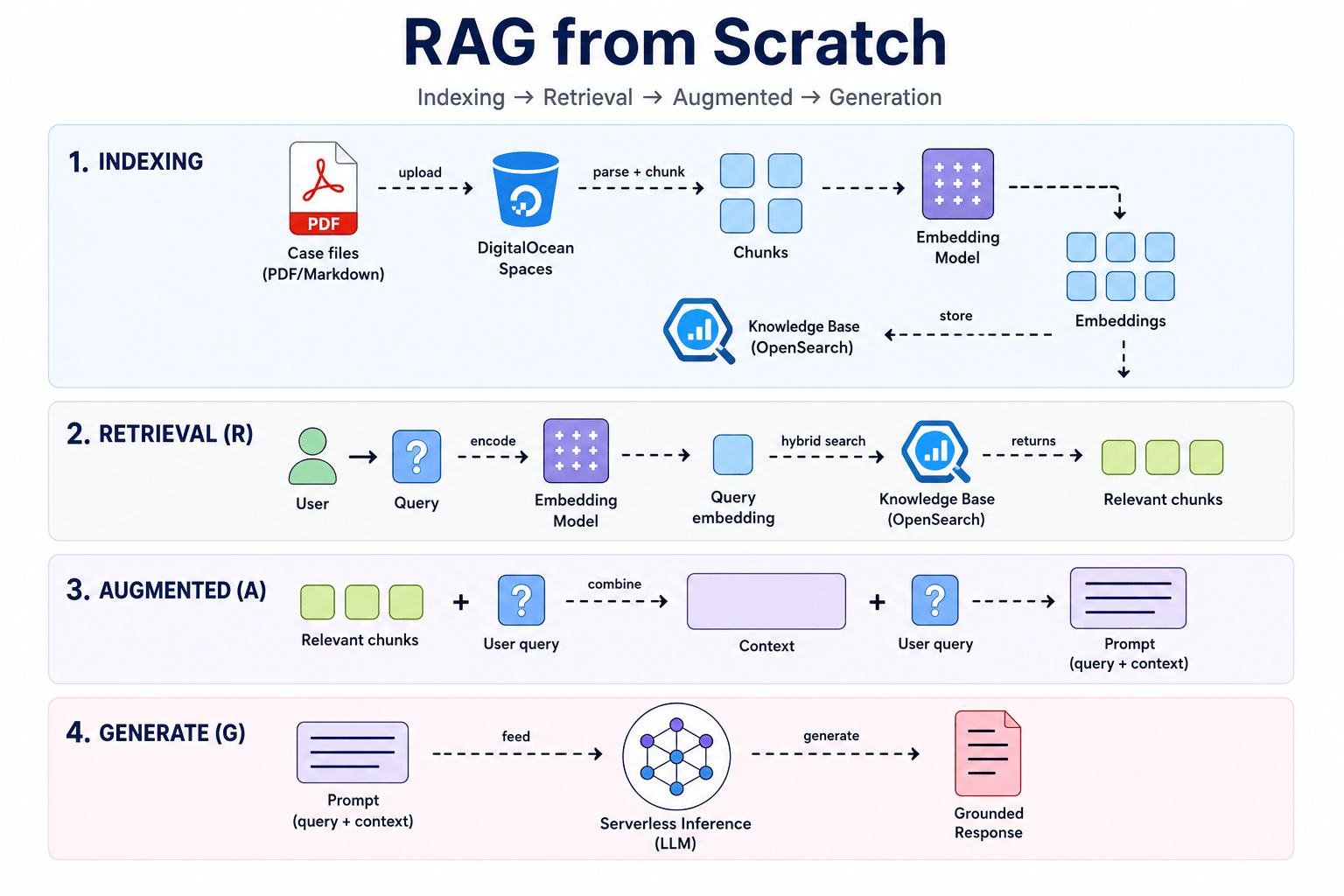
You can read more about What is Retrieval Augmented Generation (RAG).
What you will build
  sample case files (Markdown/PDF)
           |
           v
    DigitalOcean Spaces bucket
           |
           v
    Knowledge Base (chunk + embed + OpenSearch)
           |
     +-----+-----+
     |           |
     v           v
 MCP retrieve   REST retrieve (production default)
 https://kbaas.do-ai.run/v1/mcp
     |
     v
 FastAPI RAG service + Serverless Inference (Claude Sonnet or Llama)
     |
     v
 App Platform HTTPS URL for production queries
By the end you will have:
- A Spaces bucket with fictional LegalTech case files.
- A Knowledge Base with indexed chunks ready for retrieval.
- A working MCP retrieval call against
retrieve_knowledge_base. - A FastAPI service (
serve.py+rag_core.py) that retrieves from the Knowledge Base and answers through Serverless Inference. - A local
POST /runendpoint tested with curl. - The same service deployed on App Platform with a public HTTPS URL.
How to use this tutorial
- Start with
SETUP.mdin this folder for a numbered script pipeline you run copy by copy. - Copy
config.env.exampletoconfig.envbefore any script. Never commitconfig.env. - Wait for indexing to finish before MCP tests. Provisioning often takes five minutes or longer per Knowledge Base docs.
- Run
test_mcp_retrieval.shbefore you start the FastAPI service. Retrieval must work first. - If you already have a Knowledge Base, start at Step 3.
Repo layout
Zero-Infrastructure RAG Agent/
├── SETUP.md                          # Numbered runbook (start here)
├── config.env.example                # Copy to config.env
├── sample-case-files/                # Fictional LegalTech Markdown files
├── scripts/
│   ├── 01_discover_prerequisites.py  # List project UUID, models, VPCs
│   ├── 02_upload_to_spaces.py        # Upload sample files to Spaces
│   ├── 03_create_knowledge_base.py   # Create KB via API
│   ├── 04_wait_for_indexing.py       # Poll until indexing completes
│   ├── 05_test_retrieve_api.sh       # REST retrieval smoke test
│   └── run_all.sh                    # Run steps 01-06 in order
├── .do/app.yaml                      # App Platform spec (Python buildpack)
└── legaltech-rag-agent/
    ├── rag_core.py                   # Retrieval + Serverless Inference logic
    ├── serve.py                      # FastAPI app (local + App Platform)
    ├── requirements-serve.txt        # FastAPI dependencies
    └── test_mcp_retrieval.sh         # MCP retrieval smoke test
Also I have created a Github repo for this tutorial: Zero-Infrastructure RAG Agent which you can clone and follow the steps in the README.md file.
The six steps at a glance
| Step | Goal | Primary command or path |
|---|---|---|
| 0 | Configure secrets | cp config.env.example config.env |
| 1 | Stage case files in Spaces | python3 scripts/02_upload_to_spaces.py |
| 2 | Create and index a Knowledge Base | python3 scripts/03_create_knowledge_base.py |
| 3 | Test MCP retrieval | ./legaltech-rag-agent/test_mcp_retrieval.sh |
| 4 | Build the FastAPI RAG service | legaltech-rag-agent/serve.py + rag_core.py |
| 5 | Point the service at Serverless Inference | .env + model access key |
| 6 | Run locally and deploy | uvicorn serve:app → ./scripts/deploy_app_platform.sh |
Step 0: Configure your environment file
Every script in this tutorial reads from one file so you do not chase variables across terminals.
1. Copy the template:
cd "Zero-Infrastructure RAG Agent"
cp config.env.example config.env
2. Open config.env and set these values:
| Variable | Where to get it |
|---|---|
DIGITALOCEAN_API_TOKEN |
API Tokens with genai + GenAI:read |
DO_PROJECT_ID |
Output of 01_discover_prerequisites.sh (default project UUID) |
SPACES_ACCESS_KEY_ID |
Control Panel → Spaces → Access Keys, or MCP spaces-key-create |
SPACES_SECRET_ACCESS_KEY |
Shown once when you create the Spaces key |
MODEL_ACCESS_KEY |
INFERENCE → Serverless Inference → Model Access Keys |
Example for how to fill in your config.env file:
# DigitalOcean API Token (required for managing resources)
DIGITALOCEAN_API_TOKEN=your_do_api_token_here

# Project UUID (from the prerequisites script output)
DO_PROJECT_ID=your_project_uuid_here

# Spaces Object Storage Access Keys
SPACES_ACCESS_KEY_ID=your_spaces_access_key_id_here
SPACES_SECRET_ACCESS_KEY=your_spaces_secret_access_key_here

# Serverless Inference Model Access Key
MODEL_ACCESS_KEY=your_model_access_key_here
- Copy and fill in all values.
- Never commit this file to git or share its contents.
3. Load the file before each step:
source config.env
The template already includes verified defaults for this lab:
EMBEDDING_MODEL_UUID=22652c2a-79ed-11ef-bf8f-4e013e2ddde4(All MiniLM L6 v2)VPC_UUID=db9169a0-e935-4329-9add-3ee52359105a(default-tor1)KB_REGION=tor1
4. Discover your project UUID:
chmod +x scripts/*.sh legaltech-rag-agent/test_mcp_retrieval.sh
./scripts/01_discover_prerequisites.sh
Copy the default project UUID into DO_PROJECT_ID in config.env.
Step 1: Upload case files to a Spaces bucket
Your raw files live in DigitalOcean Spaces. The Knowledge Base pulls from the bucket and indexes supported formats (.md, .pdf, .html, .docx, and others listed in the Knowledge Base docs).
Prepare sample files for the lab
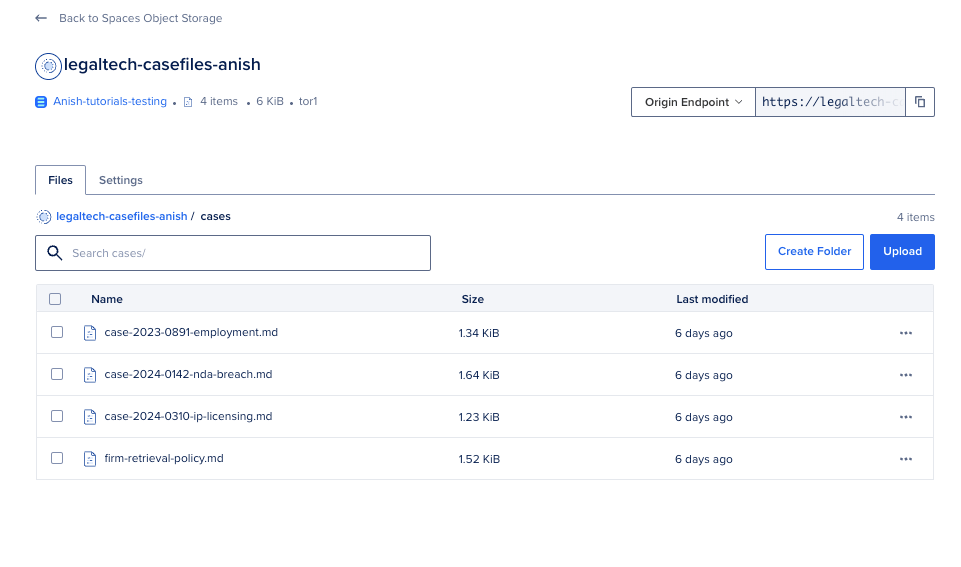
This tutorial includes four fictional Markdown files under sample-case-files/:
case-2024-0142-nda-breach.mdcase-2023-0891-employment.mdcase-2024-0310-ip-licensing.mdfirm-retrieval-policy.md
For a 10,000-file production corpus, the same pattern applies. Organize one bucket per client or per matter class. The docs recommend five or fewer buckets per knowledge base for indexing performance.
Create a Spaces bucket
- Open the Control Panel → Spaces Object Storage → Create Bucket.
- Choose a region. Use TOR1 if you plan to attach agents in Agent Platform.
- Name the bucket
legaltech-casefiles-tutorial(or your own name). - Upload the sample files from
sample-case-files/.
Upload with the included Python script
1. Install the upload dependency:
pip install -r scripts/requirements.txt
2. Run the upload script:
source config.env
python3 scripts/02_upload_to_spaces.py
You can access the 02_upload_to_spaces.py file in the legaltech-rag-agent folder.
What this script does: It connects to Spaces with your S3-compatible keys, creates the bucket if missing, and uploads all four .md files under cases/.
Expected output:
Bucket exists: legaltech-casefiles-tutorial
Uploading 4 files to s3://legaltech-casefiles-tutorial/cases/
  uploaded cases/case-2024-0142-nda-breach.md
  uploaded cases/case-2023-0891-employment.md
  uploaded cases/case-2024-0310-ip-licensing.md
  uploaded cases/firm-retrieval-policy.md
Upload complete.
Each file upload is a plain copy. No embedding happens until Step 2.
Verify with DigitalOcean MCP
If you use the DigitalOcean MCP server in Cursor, list Spaces access keys with spaces-key-list. Create a dedicated key with spaces-key-create if you need programmatic upload access.
Step 2: Create a Knowledge Base via API
Now you turn the bucket into a searchable index. This tutorial uses the DigitalOcean AI Platform API so every step is reproducible from your terminal.
What gets created
The API call provisions:
- A Knowledge Base named
legaltech-cases-kb - A new OpenSearch database (auto-sized) in TOR1
- An indexing job over your Spaces bucket
- Optional reranking with
bge-reranker-v2-m3
Choose an embeddings model
You cannot change the embeddings model after creation.
| Model | UUID (catalog) | Indexing price (per docs) |
|---|---|---|
| All MiniLM L6 v2 (lab default) | 22652c2a-79ed-11ef-bf8f-4e013e2ddde4 |
$0.009 per 1M tokens |
| GTE Large EN v1.5 | 22653204-79ed-11ef-bf8f-4e013e2ddde4 |
$0.09 per 1M tokens |
| Bge M3 | 78836a83-26d0-11f1-b074-4e013e2ddde4 |
$0.02 per 1M tokens |
List models yourself:
source config.env
curl -sS "https://api.digitalocean.com/v2/gen-ai/models?usecases=MODEL_USECASE_KNOWLEDGEBASE" \
  -H "Authorization: Bearer $DIGITALOCEAN_API_TOKEN" | python3 -m json.tool
{
  "models": [
    {
      "uuid": "22652c2a-79ed-11ef-bf8f-4e013e2ddde4",
      "name": "All MiniLM L6 v2"
    }
  ]
}
Create the Knowledge Base
1. Run the create script:
source config.env
python3 scripts/03_create_knowledge_base.py
What this script does: It sends POST https://api.digitalocean.com/v2/gen-ai/knowledge_bases with your Spaces bucket as a data source, section-based chunking, and reranking enabled. On success, it writes KNOWLEDGE_BASE_ID into config.env.
2. Inspect the JSON payload (for learning):
The script sends a body equivalent to:
{
  "name": "legaltech-cases-kb",
  "embedding_model_uuid": "22652c2a-79ed-11ef-bf8f-4e013e2ddde4",
  "project_id": "YOUR_DO_PROJECT_ID",
  "region": "tor1",
  "vpc_uuid": "db9169a0-e935-4329-9add-3ee52359105a",
  "tags": ["legaltech-tutorial"],
  "datasources": [
    {
      "spaces_data_source": {
        "bucket_name": "legaltech-casefiles-tutorial",
        "region": "tor1"
      },
      "chunking_algorithm": "CHUNKING_ALGORITHM_SECTION_BASED",
      "chunking_options": { "max_chunk_size": 256 }
    }
  ],
  "reranking_config": {
    "enabled": true,
    "model": "bge-reranker-v2-m3"
  }
}
3. Expected output:
Knowledge base created.
  ID:     123e4567-e89b-12d3-a456-426614174000
  Name:   legaltech-cases-kb
  Status: provisioning
Saved KNOWLEDGE_BASE_ID to config.env
Replace the example UUID with the value from your account.
Alternative (curl only): If you prefer shell over Python for the create call:
source config.env
./scripts/03_create_knowledge_base_curl.sh
You can access the 03_create_knowledge_base_curl.sh file in the legaltech-rag-agent folder.
The curl script reads payloads/create_knowledge_base.json, injects your DO_PROJECT_ID, and saves the returned UUID to config.env.
Wait for indexing
1. Poll until the knowledge base is ready:
source config.env
python3 scripts/04_wait_for_indexing.py
The script checks status every 30 seconds for up to 45 minutes.
2. Confirm in the Control Panel (optional):
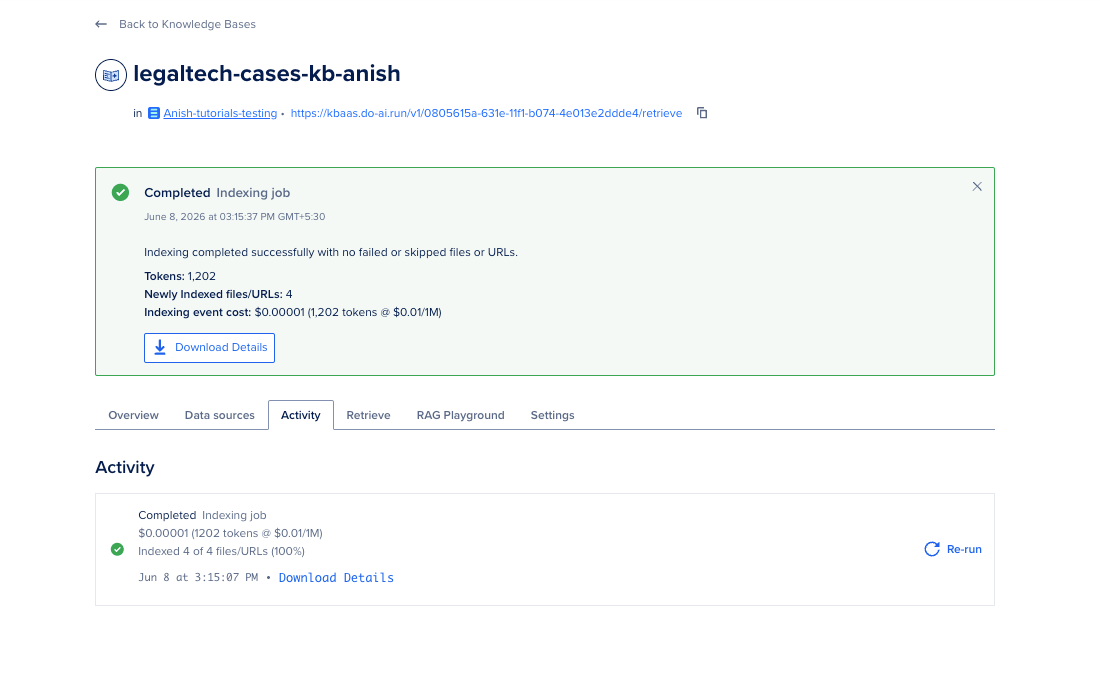
Data Services → Knowledge bases → legaltech-cases-kb → Activity
Status values include Completed, Partially Completed, and Failed.
Test REST retrieval before MCP
source config.env
./scripts/05_test_retrieve_api.sh
Pass a custom query:
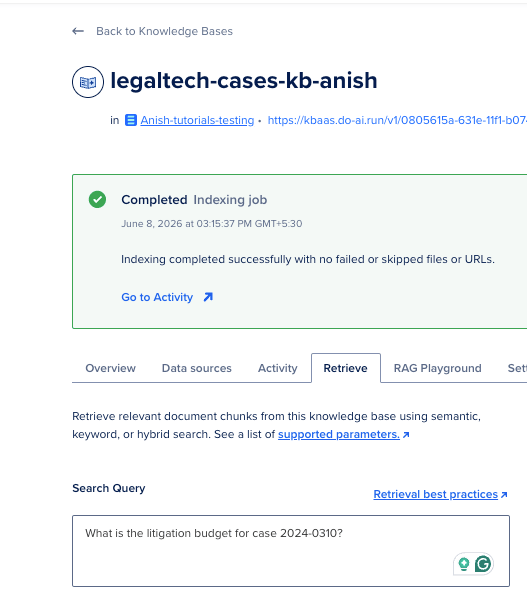
./scripts/05_test_retrieve_api.sh "What is the litigation budget for case 2024-0310?"
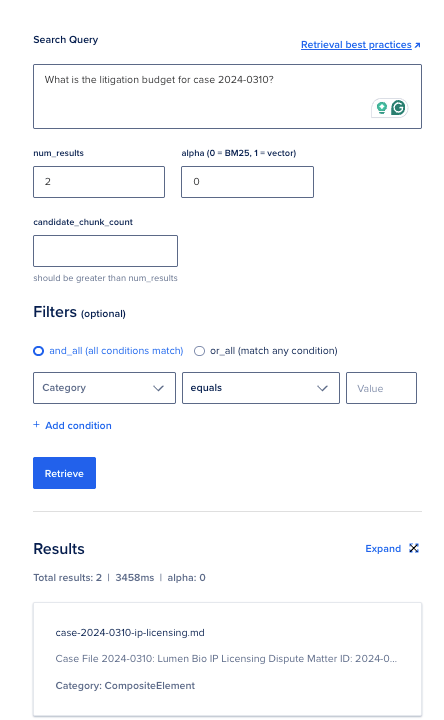
What a good response looks like: JSON with total_results greater than zero and chunks that mention $320,000 or Lumen Bio.
Control Panel alternative (optional)
You can also create the knowledge base manually using the Control Panel. If you prefer the UI, skip 03_create_knowledge_base.py and create the knowledge base manually:
- Data Services → Knowledge bases → Create Knowledge Base
- Select an embeddings model and optional reranking model
- Pull from a Spaces bucket or folder → select
legaltech-casefiles-tutorial - Create new OpenSearch database in TOR1
- Click Create knowledge base
Then copy the UUID from:
https://cloud.digitalocean.com/agent-platform/knowledge-bases/{UUID}
Add it to config.env:
export KNOWLEDGE_BASE_ID="your_uuid_here"
List knowledge bases with the API:
curl -sS -X GET "https://api.digitalocean.com/v2/gen-ai/knowledge_bases" \
  -H "Authorization: Bearer $DIGITALOCEAN_API_TOKEN" | python3 -m json.tool
You can also run the query from the Control Panel:
You will get the following output:
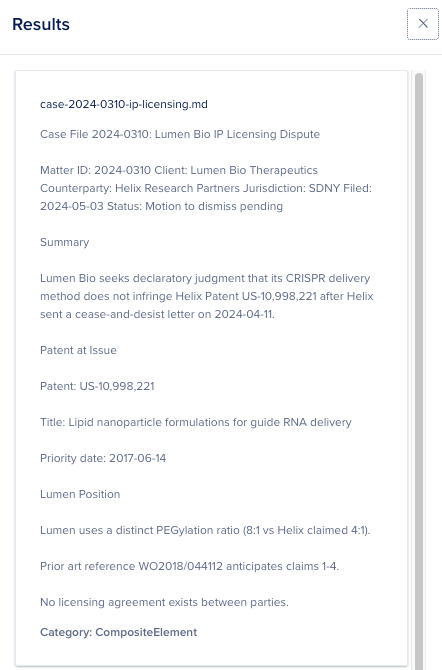
You can expand the results:
Step 3: Enable MCP integration and test retrieval
Knowledge Bases exposes retrieval through a dedicated MCP server. This endpoint is separate from the general DigitalOcean MCP servers (Droplets, Apps, and so on). The URL is:
https://kbaas.do-ai.run/v1/mcp
Auth requires a personal access token with GenAI:read scope. Retrieval through MCP is billed the same as direct retrieve API calls per pricing docs.
Supported MCP tool
| Tool | Purpose |
|---|---|
retrieve_knowledge_base |
Hybrid search over one knowledge base, 1 to 25 results |
Arguments:
knowledge_base_id(required): your UUIDquery(required): attorney question textnum_results(required): 1 to 25alpha(optional):0.5default hybridfilters(optional): metadata filters onitem_name,page_number, and other fields
Full reference: Knowledge Bases MCP Tools.
Configure MCP in Cursor (optional)
Add this block to your MCP client config per Configure Remote MCP:
{
  "mcpServers": {
    "knowledge-bases": {
      "url": "https://kbaas.do-ai.run/v1/mcp",
      "headers": {
        "Authorization": "Bearer <your_api_token_with_genai_read>"
      }
    }
  }
}
Smoke test with the included shell script
From legaltech-rag-agent/:
export DIGITALOCEAN_API_TOKEN="your_token"
export KNOWLEDGE_BASE_ID="your_kb_uuid"
./test_mcp_retrieval.sh
Here is the expected output:
Initializing MCP session...
event: message
data: {"jsonrpc":"2.0","id":1,"result":{"capabilities":{"logging":{},"tools":{"listChanged":true}},"instructions":"DigitalOcean Knowledge Bases MCP server. Use the retrieve_knowledge_base tool to search knowledge bases by UUID.","protocolVersion":"2025-03-26","serverInfo":{"name":"digitalocean-knowledge-bases","version":"1.0.0"}}}


Calling retrieve_knowledge_base...
event: message
data: {"jsonrpc":"2.0","id":2,"result":{"content":[{"type":"text","text":"Found 3 result(s):\n\n--- Result 1 ---\nCase File 2024-0142: Meridian Analytics NDA Breach\n\nMatter ID: 2024-0142 Client: Northwind Logistics LLC Opposing Party: Meridian Analytics Inc. Jurisdiction: Delaware Chancery Court Filed: 2024-03-18 Status: Discovery\n\nSummary\n\nNorthwind Logistics alleges Meridian Analytics disclosed confidential pricing models and customer pipeline data to a competitor after signing a mutual NDA on 2023-11-02.\nMetadata: map[chunk_category:CompositeElement ingested_timestamp:2026-06-08T09:45:23.292831+00:00 item_name:case-2024-0142-nda-breach.md page_number:\u003cnil\u003e]\n\n--- Result 2 ---\nSolo Founders Legal AI Retrieval Policy\n\nEffective: 2024-06-01 Owner: Founding partner Applies to: Internal case research assistant\n\nPurpose\n\nThis policy defines how the firm's AI assistant retrieves answers from internal case files stored in DigitalOcean Knowledge Bases.\n\nAllowed Uses\n\nSummarize matter status for attorneys assigned to the matter.\n\nSurface procedural deadlines from indexed case files.\n\nDraft internal research memos with source citations.\n\nProhibited Uses\n\nDo not use the assistant for client-facing advice without attorney review.\n\nDo not query across matters without explicit matter ID in the prompt.\n\nDo not upload client PII to non-production workspaces.\nMetadata: map[chunk_category:CompositeElement ingested_timestamp:2026-06-08T09:45:24.015805+00:00 item_name:firm-retrieval-policy.md page_number:\u003cnil\u003e]\n\n--- Result 3 ---\nClaims\n\nCalifornia Labor Code retaliation (whistleblower).\n\nFEHA retaliation.\n\nBreach of implied covenant of good faith.\n\nDamages Sought\n\nLost wages and benefits: $410,000 through trial date.\n\nEmotional distress: $150,000.\n\nPunitive damages requested if malice shown.\n\nDiscovery Status\n\nReceived personnel file 2024-01-05.\n\nPending IT logs for ethics portal submission timestamp.\n\nDeposition of HR director Denise Park set for 2024-08-14.\n\nSettlement Range (Internal)\n\nMediator brief suggests opening demand $650,000, expected bracket $275,000 to $425,000. Privileged.\nMetadata: map[chunk_category:CompositeElement ingested_timestamp:2026-06-08T09:45:19.820378+00:00 item_name:case-2023-0891-employment.md page_number:\u003cnil\u003e]\n\n"}],"structuredContent":{"results":[{"metadata":{"chunk_category":"CompositeElement","ingested_timestamp":"2026-06-08T09:45:23.292831+00:00","item_name":"case-2024-0142-nda-breach.md","page_number":null},"text_content":"Case File 2024-0142: Meridian Analytics NDA Breach\n\nMatter ID: 2024-0142 Client: Northwind Logistics LLC Opposing Party: Meridian Analytics Inc. Jurisdiction: Delaware Chancery Court Filed: 2024-03-18 Status: Discovery\n\nSummary\n\nNorthwind Logistics alleges Meridian Analytics disclosed confidential pricing models and customer pipeline data to a competitor after signing a mutual NDA on 2023-11-02."},{"metadata":{"chunk_category":"CompositeElement","ingested_timestamp":"2026-06-08T09:45:24.015805+00:00","item_name":"firm-retrieval-policy.md","page_number":null},"text_content":"Solo Founders Legal AI Retrieval Policy\n\nEffective: 2024-06-01 Owner: Founding partner Applies to: Internal case research assistant\n\nPurpose\n\nThis policy defines how the firm's AI assistant retrieves answers from internal case files stored in DigitalOcean Knowledge Bases.\n\nAllowed Uses\n\nSummarize matter status for attorneys assigned to the matter.\n\nSurface procedural deadlines from indexed case files.\n\nDraft internal research memos with source citations.\n\nProhibited Uses\n\nDo not use the assistant for client-facing advice without attorney review.\n\nDo not query across matters without explicit matter ID in the prompt.\n\nDo not upload client PII to non-production workspaces."},{"metadata":{"chunk_category":"CompositeElement","ingested_timestamp":"2026-06-08T09:45:19.820378+00:00","item_name":"case-2023-0891-employment.md","page_number":null},"text_content":"Claims\n\nCalifornia Labor Code retaliation (whistleblower).\n\nFEHA retaliation.\n\nBreach of implied covenant of good faith.\n\nDamages Sought\n\nLost wages and benefits: $410,000 through trial date.\n\nEmotional distress: $150,000.\n\nPunitive damages requested if malice shown.\n\nDiscovery Status\n\nReceived personnel file 2024-01-05.\n\nPending IT logs for ethics portal submission timestamp.\n\nDeposition of HR director Denise Park set for 2024-08-14.\n\nSettlement Range (Internal)\n\nMediator brief suggests opening demand $650,000, expected bracket $275,000 to $425,000. Privileged."}],"total_results":3}}}
The script does two calls:
initializethe MCP session.tools/callforretrieve_knowledge_basewith the queryWhat is the status of case 2024-0142?.
What a good response looks like: JSON with total_results greater than zero and chunks mentioning matter 2024-0142 or the Meridian Analytics NDA breach summary. Each result should include text_content and metadata such as source or page.
If you see zero results: Indexing is still running, the bucket path is wrong, or the query needs a lower alpha for exact matter ID keyword matching. Check the Activity tab first. Try alpha: 0 for ID-heavy lookups.
Manual curl example (single call)
curl -sS -X POST "https://kbaas.do-ai.run/v1/mcp" \
  -H "Content-Type: application/json" \
  -H "Accept: application/json, text/event-stream" \
  -H "Authorization: Bearer $DIGITALOCEAN_API_TOKEN" \
  -d '{
    "jsonrpc": "2.0",
    "id": 3,
    "method": "tools/call",
    "params": {
      "name": "retrieve_knowledge_base",
      "arguments": {
        "knowledge_base_id": "YOUR_KB_UUID",
        "query": "What damages are claimed in case 2024-0142?",
        "num_results": 5,
        "alpha": 0.5
      }
    }
  }' | sed -n 's/^data: //p' | jq '.result.structuredContent'
One line per source file:
curl -sS ... | sed -n 's/^data: //p' | jq '.result.structuredContent.results[] | {item_name: .metadata.item_name, text_content}'
{
  "results": [
    {
      "metadata": {
        "chunk_category": "CompositeElement",
        "ingested_timestamp": "2026-06-08T09:45:23.292831+00:00",
        "item_name": "case-2024-0142-nda-breach.md",
        "page_number": null
      },
      "text_content": "Case File 2024-0142: Meridian Analytics NDA Breach\n\nMatter ID: 2024-0142 Client: Northwind Logistics LLC Opposing Party: Meridian Analytics Inc. Jurisdiction: Delaware Chancery Court Filed: 2024-03-18 Status: Discovery\n\nSummary\n\nNorthwind Logistics alleges Meridian Analytics disclosed confidential pricing models and customer pipeline data to a competitor after signing a mutual NDA on 2023-11-02."
    },
    {
      "metadata": {
        "chunk_category": "CompositeElement",
        "ingested_timestamp": "2026-06-08T09:45:23.292831+00:00",
        "item_name": "case-2024-0142-nda-breach.md",
        "page_number": null
      },
      "text_content": "Key Facts\n\nNDA executed on 2023-11-02 with a 24-month confidentiality term.\n\nJoint evaluation period ran from 2023-11-15 through 2024-01-30.\n\nOn 2024-02-14, Northwind learned Meridian shared a slide deck containing Northwind unit economics with Apex Data Systems.\n\nThe slide deck filename was Northwind_Pricing_v3_confidential.pptx.\n\nMeridian employee Sarah Chen sent the file via personal Gmail on 2024-02-09.\n\nDamages Claimed\n\nLost enterprise contract with Harbor Freight Group: $1.2M annual value.\n\nRemediation and audit costs: $84,000.\n\nInjunctive relief requested to stop further disclosure."
    },
    {
      "metadata": {
        "chunk_category": "CompositeElement",
        "ingested_timestamp": "2026-06-08T09:45:24.015805+00:00",
        "item_name": "firm-retrieval-policy.md",
        "page_number": null
      },
      "text_content": "Solo Founders Legal AI Retrieval Policy\n\nEffective: 2024-06-01 Owner: Founding partner Applies to: Internal case research assistant\n\nPurpose\n\nThis policy defines how the firm's AI assistant retrieves answers from internal case files stored in DigitalOcean Knowledge Bases.\n\nAllowed Uses\n\nSummarize matter status for attorneys assigned to the matter.\n\nSurface procedural deadlines from indexed case files.\n\nDraft internal research memos with source citations.\n\nProhibited Uses\n\nDo not use the assistant for client-facing advice without attorney review.\n\nDo not query across matters without explicit matter ID in the prompt.\n\nDo not upload client PII to non-production workspaces."
    },
    {
      "metadata": {
        "chunk_category": "CompositeElement",
        "ingested_timestamp": "2026-06-08T09:45:23.656377+00:00",
        "item_name": "case-2024-0310-ip-licensing.md",
        "page_number": null
      },
      "text_content": "Case File 2024-0310: Lumen Bio IP Licensing Dispute\n\nMatter ID: 2024-0310 Client: Lumen Bio Therapeutics Counterparty: Helix Research Partners Jurisdiction: SDNY Filed: 2024-05-03 Status: Motion to dismiss pending\n\nSummary\n\nLumen Bio seeks declaratory judgment that its CRISPR delivery method does not infringe Helix Patent US-10,998,221 after Helix sent a cease-and-desist letter on 2024-04-11.\n\nPatent at Issue\n\nPatent: US-10,998,221\n\nTitle: Lipid nanoparticle formulations for guide RNA delivery\n\nPriority date: 2017-06-14\n\nLumen Position\n\nLumen uses a distinct PEGylation ratio (8:1 vs Helix claimed 4:1).\n\nPrior art reference WO2018/044112 anticipates claims 1-4.\n\nNo licensing agreement exists between parties."
    },
    {
      "metadata": {
        "chunk_category": "CompositeElement",
        "ingested_timestamp": "2026-06-08T09:45:19.820378+00:00",
        "item_name": "case-2023-0891-employment.md",
        "page_number": null
      },
      "text_content": "Claims\n\nCalifornia Labor Code retaliation (whistleblower).\n\nFEHA retaliation.\n\nBreach of implied covenant of good faith.\n\nDamages Sought\n\nLost wages and benefits: $410,000 through trial date.\n\nEmotional distress: $150,000.\n\nPunitive damages requested if malice shown.\n\nDiscovery Status\n\nReceived personnel file 2024-01-05.\n\nPending IT logs for ethics portal submission timestamp.\n\nDeposition of HR director Denise Park set for 2024-08-14.\n\nSettlement Range (Internal)\n\nMediator brief suggests opening demand $650,000, expected bracket $275,000 to $425,000. Privileged."
    }
  ],
  "total_results": 5
}
Filter retrieval to one case file
When an attorney works one matter, filter by filename metadata:
{
  "filters": {
    "equals": {
      "key": "item_name",
      "value": "case-2024-0142-nda-breach.md"
    }
  }
}
This pattern mirrors the Retrieve tab filters in the Control Panel described in test knowledge base retrieval docs.
Step 4: Build the FastAPI RAG service
With retrieval confirmed in Step 3, wire Knowledge Base retrieval and Serverless Inference into a small FastAPI app. This is the service you run locally and deploy to App Platform.
Understand the service flow
POST /run {"prompt": "..."}
    -> Knowledge Base retrieve (REST API by default)
    -> format chunks as context
    -> Serverless Inference chat completion
    -> {"response": "...", "retrieval_preview": "..."}
Step 3 proved MCP retrieval works. The hosted service uses the Knowledge Base retrieve REST API (RETRIEVAL_MODE=rest) because it is stable in production. Set RETRIEVAL_MODE=mcp only when you want to exercise the MCP transport from application code.
Core modules
| File | Role |
|---|---|
rag_core.py |
Retrieval (retrieve_context_rest or retrieve_context_mcp), generation (generate_answer), and run_rag() |
serve.py |
FastAPI app: GET /health, POST /run |
requirements-serve.txt |
FastAPI, uvicorn, httpx, LangChain clients |
1. Serverless Inference client (rag_core.py)
# This is an example of how the Serverless Inference client is initialized in your code.
# You will find (or need to add) this code inside `rag_core.py`, which is located in the `legaltech-rag-agent/` directory.
# Look for a function that sets up the language model client (it may be called inside `generate_answer()` or similar).
# Example usage in rag_core.py:

from langchain_openai import ChatOpenAI
import os

llm = ChatOpenAI(
    model=os.environ.get("INFERENCE_MODEL", "anthropic-claude-sonnet-4"),
    api_key=os.environ.get("MODEL_ACCESS_KEY"),
    base_url="https://inference.do-ai.run/v1",
    temperature=0.1,
    max_tokens=800,
)
Note: You do not run this directly in your terminal or a notebook. This Python code is part of the FastAPI backend—included (or to be included) in rag_core.py.
MODEL_ACCESS_KEY is the Serverless Inference credential. Prefer a dedicated key from INFERENCE → Serverless Inference → Create a Model Access Key. If the model-key API is retired on your account, a personal access token with inference access can work as MODEL_ACCESS_KEY in lab setups.
2. REST retrieval (production default)
await client.post(
    f"https://kbaas.do-ai.run/v1/{kb_id}/retrieve",
    headers={"Authorization": f"Bearer {token}", ...},
    json={"query": query, "num_results": num_results, "alpha": alpha},
)
3. FastAPI endpoints (serve.py)
@app.get("/health")
async def health() -> dict[str, str]:
    return {"status": "ok"}

@app.post("/run")
async def run(body: RunRequest) -> dict[str, Any]:
    return await run_rag(body.prompt.strip())
Your app calls POST /run with {"prompt": "your question"}. The response includes the grounded answer plus a truncated retrieval_preview for debugging.
Environment file
Copy .env.example to .env inside legaltech-rag-agent/:
cd legaltech-rag-agent
cp .env.example .env
Set these values (copy KNOWLEDGE_BASE_ID and tokens from config.env):
MODEL_ACCESS_KEY=your_model_access_key
DIGITALOCEAN_API_TOKEN=your_personal_access_token
KNOWLEDGE_BASE_ID=your_knowledge_base_uuid
INFERENCE_MODEL=anthropic-claude-sonnet-4
RETRIEVAL_MODE=rest
NUM_RESULTS=5
RETRIEVAL_ALPHA=0.5
.env is gitignored. Never commit tokens.
Install dependencies and run locally
cd legaltech-rag-agent
pip install -r requirements-serve.txt
set -a && source .env && set +a
uvicorn serve:app --host 0.0.0.0 --port 8080
Sample startup:
INFO:     Uvicorn running on http://0.0.0.0:8080 (Press CTRL+C to quit)
INFO:     Started server process
INFO:     Waiting for application startup.
INFO:     Application startup complete.
Confirm health:
curl http://localhost:8080/health
{"status":"ok"}
Test with curl:
curl -X POST http://localhost:8080/run \
  -H "Content-Type: application/json" \
  -d '{"prompt": "Summarize case 2023-0891 and list the next deposition date."}'
Output for the curl command above:
{
  "response": "Based on the retrieved case file context for Matter ID 2023-0891:\n\n## Case Summary - Matter ID 2023-0891\n\n• **Client**: Jordan Ellis vs. Vega Software Corp.\n• **Case Type**: Wrongful termination/retaliation claim\n• **Filed**: 2023-09-12 in California Superior Court, San Francisco County\n• **Current Status**: Mediation scheduled\n\n## Key Facts\n• Ellis was a senior product manager hired 2021-04-19\n• Terminated 2023-08-30 (cited as \"performance restructuring\")\n• Ellis filed internal ethics report on 2023-07-22 regarding unlicensed encryption module shipments to UAE reseller program\n• Termination occurred 39 days after whistleblower report\n• Severance offer: 8 weeks pay with broad release\n\n## Claims\n• California Labor Code retaliation (whistleblower)\n• FEHA retaliation\n• Breach of implied covenant of good faith\n\n## Next Deposition Date\n• **HR Director Denise Park deposition scheduled for 2024-08-14**\n\n## Damages Sought\n• Lost wages/benefits: $410,000\n• Emotional distress: $150,000\n• Punitive damages if malice proven\n\n*Source: Matter ID 2023-0891, case-2023-0891-employment.md*",
  "retrieval_preview": "{\n  \"results\": [\n    {\n      \"metadata\": {\n        \"chunk_category\": \"CompositeElement\",\n        \"ingested_timestamp\": \"2026-06-08T09:45:19.820378+00:00\",\n        \"item_name\": \"case-2023-0891-employment.md\",\n        \"page_number\": null\n      },\n      \"text_content\": \"Case File 2023-0891: Vega Software Wrongful Termination\\n\\nMatter ID: 2023-0891 Client: Jordan Ellis Employer: Vega Software Corp. ...\"\n    }\n  ]\n}",
  "knowledge_base_id": "0805615a-631e-11f1-b074-4e013e2ddde4",
  "model": "anthropic-claude-sonnet-4",
  "retrieval_mode": "rest"
}
Expected behavior: The response mentions Vega Software, Jordan Ellis, and the HR director deposition on 2024-08-14 if those chunks ranked highly.
Step 5: Point the agent at a Serverless Inference model
Retrieval quality and answer quality are separate choices. You pick the inference model for generation here.
Note: you do not deploy a Serverless Inference instance
If you expected a new GPU or inference app in the Control Panel, that is normal confusion. Serverless Inference is not provisioned like Dedicated Inference or App Platform.
| What you deploy in this tutorial | What you only call over HTTPS |
|---|---|
| Spaces bucket, Knowledge Base, FastAPI on App Platform | Serverless Inference at https://inference.do-ai.run/v1 |
On every POST /run, your FastAPI service runs two separate steps:
- Retrieve — Knowledge Base API (
DIGITALOCEAN_API_TOKEN) finds relevant case-file chunks. - Generate — Serverless Inference API (
MODEL_ACCESS_KEY) turns those chunks plus the user question into a natural-language answer.
DigitalOcean runs the shared model fleet for all customers. You do not reserve a GPU hour. You create a Model Access Key, set INFERENCE_MODEL in .env, and your code calls the API when a user asks a question. Billing is per token per Serverless Inference pricing.
In the Control Panel under INFERENCE → Serverless Inference, you see the model catalog and Model Access Keys, not a “Create instance” button. Token usage appears in inference usage and billing after your app calls inference.do-ai.run. Knowledge Base retrieval is billed separately (embedding and optional reranking tokens).
For steady production traffic on a private GPU, see Dedicated Inference. This tutorial uses Serverless because legal-research queries are bursty and pay-per-token is simpler for a first ship.
Choose a model
| Model | Input / output (per docs) | When to pick it |
|---|---|---|
| Claude Sonnet 4.6 | $3.00 / $15.00 per 1M tokens (≤200K prompt) | Default for nuanced legal summaries |
| Llama 3.3 Instruct 70B | $0.65 / $0.65 per 1M tokens | Lower cost drafts and internal tools |
List models with the DigitalOcean MCP inference-model-catalog-search tool or the Control Panel Model Catalog. During tutorial prep, a search for claude sonnet returned UUIDs for Anthropic Claude Sonnet 4 and related catalog entries.
Set the model slug in .env:
INFERENCE_MODEL=anthropic-claude-sonnet-4.6
Create or copy a Model Access Key
INFERENCE → Serverless Inference → Model Access Keys → Create Access Key
Export it for local runs:
export MODEL_ACCESS_KEY="your_key"
Direct Serverless Inference smoke test (optional)
curl -X POST "https://inference.do-ai.run/v1/chat/completions" \
  -H "Authorization: Bearer $MODEL_ACCESS_KEY" \
  -H "Content-Type: application/json" \
  -d '{
    "model": "anthropic-claude-sonnet-4",
    "messages": [{"role": "user", "content": "Reply with READY"}],
    "max_tokens": 10
  }'
Sample output (dedicated Model Access Key from Control Panel):
{
  "choices": [
    {
      "finish_reason": "stop",
      "index": 0,
      "message": {
        "content": "READY",
        "role": "assistant"
      }
    }
  ],
  "model": "anthropic-claude-sonnet-4",
  "object": "chat.completion",
  "usage": {
    "completion_tokens": 5,
    "prompt_tokens": 11,
    "total_tokens": 16
  }
}
If this fails with 401, fix the model access key before debugging MCP.
Step 6: Deploy the FastAPI service to App Platform
Local uvicorn proves the RAG pipeline works. App Platform gives you a public HTTPS URL your product can call.
Confirm local health first
With uvicorn still running (or restart it from Step 4):
curl http://localhost:8080/health
# {"status":"ok"}
Deploy with the included script
The repo ships .do/app.yaml (Python buildpack, source_dir: legaltech-rag-agent) and scripts/deploy_app_platform.sh, which injects secrets from config.env and creates or updates the app.
1. Push the repo to GitHub (App Platform clones from git):
# One-time: create a public repo and push (secrets stay in config.env, not Git)
gh repo create legaltech-rag-agent --public --source=. --remote=origin --push
2. Deploy:
source config.env
./scripts/deploy_app_platform.sh
The script writes .do/app.deploy.yaml (gitignored), runs doctl apps create or doctl apps update, and prints the app URL.
Manual alternative:
source config.env
# Edit .do/app.yaml: set KNOWLEDGE_BASE_ID and secret placeholders, then:
doctl apps create --spec .do/app.deploy.yaml --project-id "$DO_PROJECT_ID"
Required runtime env vars on App Platform:
| Variable | Purpose |
|---|---|
MODEL_ACCESS_KEY |
Serverless Inference (secret) |
DIGITALOCEAN_API_TOKEN |
Knowledge Base retrieve API (secret) |
KNOWLEDGE_BASE_ID |
Your KB UUID |
INFERENCE_MODEL |
e.g. anthropic-claude-sonnet-4 |
RETRIEVAL_MODE |
rest for hosted deploy |
NUM_RESULTS / RETRIEVAL_ALPHA |
Retrieval tuning |
Test the live endpoint
Replace the host with your App Platform default ingress:
curl https://legaltech-rag-agent-jjd7r.ondigitalocean.app/health

curl -X POST https://legaltech-rag-agent-jjd7r.ondigitalocean.app/run \
  -H "Content-Type: application/json" \
  -d '{"prompt": "What employment cases involve wrongful termination?"}' | jq .
Sample health response:
{"status":"ok"}
Output for the curl command above:
{
  "response": "Based on the retrieved case files, I found one employment case involving wrongful termination:\n\n• **Matter ID 2023-0891** - Vega Software Wrongful Termination\n  - Client: Jordan Ellis\n  - Employer: Vega Software Corp.\n  - Filed: 2023-09-12\n  - Claims: California Labor Code retaliation (whistleblower), FEHA retaliation, and breach of implied covenant of good faith\n  - Allegation: Wrongful termination in retaliation for reporting export control violations\n  - Timeline: Ellis reported ethics violations on 2023-07-22, terminated on 2023-08-30 (39 days later)\n  - Status: Mediation scheduled\n\nThis is the only employment wrongful termination case present in the indexed material provided.",
  "retrieval_preview": "{\n  \"results\": [\n    {\n      \"metadata\": {\n        \"chunk_category\": \"CompositeElement\",\n        \"ingested_timestamp\": \"2026-06-08T09:45:19.820378+00:00\",\n        \"item_name\": \"case-2023-0891-employment.md\",\n        \"page_number\": null\n      },\n      \"text_content\": \"Case File 2023-0891: Vega Software Wrongful Termination\\n\\nMatter ID: 2023-0891 Client: Jordan Ellis Employer: Vega Software Corp. Jurisdiction: California Superior Court, San Francisco County Filed: 2023-09-12 Status: Mediation scheduled\\n\\nSummary\\n\\nJordan Ellis, a senior product manager, alleges wrongful termination in retaliation for reporting export control violations related to Vega's UAE reseller program.\\n\\nKey Facts\\n\\nHire date: 2021-04-19.\\n\\nTermination date: 2023-08-30, cited as \\\"performance restructuring.\\\"\\n\\nEllis submitted an internal ethics report on 2023-07-22 regarding unlicensed encryption module shipments.\\n\\nVega eliminated Ellis's role 39 days after the report.\\n\\nSeverance offer: 8 weeks pay with broad release.\"\n    },\n    {\n      \"metadata\": {\n        \"chunk_category\": \"CompositeElement\",\n        \"ingested_timestamp\": \"2026-06-08T09:45:19.820378+00:00\",\n        \"item_name\": \"case-2023-0891-e",
  "knowledge_base_id": "0805615a-631e-11f1-b074-4e013e2ddde4",
  "model": "anthropic-claude-sonnet-4",
  "retrieval_mode": "rest"
}
A successful deploy returns a grounded answer with matter IDs from your indexed case files.
Tune reranking when precision is low
If answers cite the wrong matter:
- Open the knowledge base Settings tab in the Control Panel.
- Confirm reranking is enabled with your chosen reranking model.
- Re-run the same query against
POST /runand inspectretrieval_preview. - Tighten prompts with explicit matter IDs.
- Add
item_namefilters inrag_core.pyfor single-matter sessions.
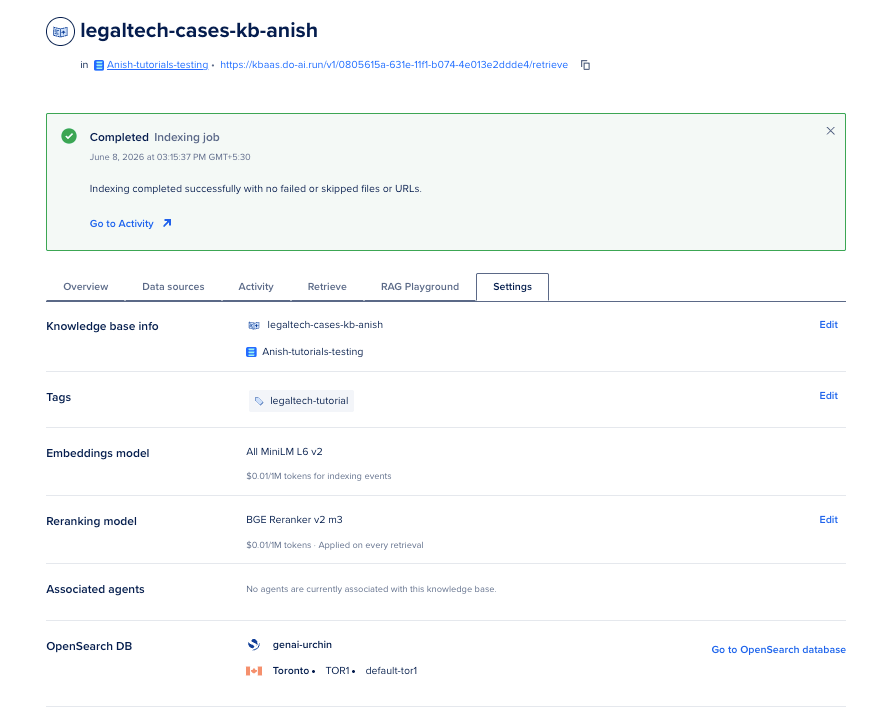
You can check out the Reranking documentation for more details.
Observability
You can observe the following:
- App Platform: Runtime logs under Apps → your app → Runtime Logs.
- Retrieval debug: Each
POST /runresponse includesretrieval_preview(first 1200 characters of retrieved JSON). - Control Panel: Knowledge bases → Retrieve tab for one-off retrieval tests without hitting your app.
Cost sketch for a solo founder
These figures come from DigitalOcean Inference pricing. Your invoice depends on file size, query volume, and model choice.
| Line item | Example math | Notes |
|---|---|---|
| Initial indexing | 10 MB corpus ≈ 3M tokens × $0.009/1M ≈ $0.03 with all-mini-lm-l6-v2 |
Scales linearly with tokens |
| OpenSearch storage | Depends on cluster size | See OpenSearch pricing |
| Retrieval query | 1 query vectorized per MCP call | Same price through MCP or REST |
| Reranking | Per reranking tokens when enabled | BGE Reranker v2 m3 at $0.01/1M tokens |
| Answer generation | 2K input + 500 output tokens on Sonnet 4.6 ≈ $0.0135 per answer | (($3×2) + ($15×0.5)) / 1000 |
For 10,000 files, run the indexing cost estimator in the Control Panel during knowledge base creation. The UI shows per-model token rates before you commit.
When things go wrong
Here are some common issues and their solutions which I personally encountered while working on this application.
| Symptom | Likely cause | What to try |
|---|---|---|
MCP 401 |
Token missing GenAI:read |
Create a new token with correct scope |
retrieve_knowledge_base returns 0 chunks |
Indexing incomplete or wrong bucket | Check Activity tab, re-run indexing |
| Answers cite the wrong matter | Hybrid search too broad | Lower temperature, add item_name filter, enable reranking |
| App Platform build fails | Missing requirements-serve.txt or wrong source_dir |
Confirm .do/app.yaml points at legaltech-rag-agent |
POST /run returns 500 on App Platform |
Missing env var | Set KNOWLEDGE_BASE_ID, MODEL_ACCESS_KEY, DIGITALOCEAN_API_TOKEN in app spec |
| App health check fails | Service not listening on port 8080 | http_port: 8080 and uvicorn ... --port 8080 must match |
KB create 400 on max_chunk_size |
Value exceeds embedding model limit | Use 256 for All MiniLM L6 v2 (not 500) |
Model errors on 401 |
Confused API token vs model access key | Use MODEL_ACCESS_KEY for inference only |
| Slow first query | Cold index or large num_results |
Start with num_results: 5, scale after profiling |
| Upload stalls | Batch too large | Upload fewer than 100 files per batch under 2 GB |
Cleanup (so lab spend stops)
- Delete the App Platform app: Apps → your app → Destroy.
- Delete the knowledge base: Knowledge bases → … → Destroy (destroys associated data sources and indexing).
- Delete the OpenSearch database if you created a dedicated one and no longer need it.
- Delete the Spaces bucket when you no longer need raw files.
- Revoke tutorial API tokens and model access keys.
OpenSearch clusters and stored embeddings accrue cost while resources still exist. You can delete them from the Control Panel.
FAQs
1. What is the difference between Knowledge Bases MCP and the DigitalOcean MCP server?
The DigitalOcean MCP server manages DO infrastructure like Droplets, Apps, and Spaces keys. The Knowledge Bases MCP endpoint at https://kbaas.do-ai.run/v1/mcp only exposes retrieval tools for indexed knowledge bases. You configure them separately.
2. Do I still need LangChain or Chroma if I use Knowledge Bases?
No Chroma or self-hosted vector DB is required for this path. You still use LangChain in agent code if you want LangChain agents, but retrieval runs on DigitalOcean managed OpenSearch through Knowledge Bases.
3. How does MCP billing work for retrieval?
Retrieval through MCP is billed the same as the retrieve API, including query vectorization tokens and optional reranking tokens per Knowledge Base pricing.
4. When should I enable reranking?
Enable reranking when recall looks good but ranked order is wrong, which is common when matter titles and party names overlap. You pay extra reranking tokens on each retrieval call.
5. Can I use Dedicated Inference instead of Serverless?
Yes for answer generation if you need a private GPU endpoint. Knowledge Base retrieval stays on the managed Knowledge Bases service. Many solo founders start on Serverless ($3.00 per 1M input tokens for Claude Sonnet 4.6) and move generation to Dedicated when traffic steadies. See Serverless vs Dedicated.
6. How do I ground answers across 10,000+ files without blowing token budgets?
Keep num_results between 5 and 8, filter by item_name when the matter is known, and use reranking instead of sending 25 large chunks every call. Test prompts against local POST /run before you ship production defaults.
Conclusion
Congratulations on building your own RAG Agent with DigitalOcean Knowledge Bases and Serverless Inference! If you’ve followed along, you now know how to deploy your agent to App Platform, test its endpoints, and troubleshoot common issues.
When I first stitched together my own RAG pipeline, having the right building blocks and clear steps made all the difference and hopefully, this tutorial helped you remove some of the mystery.
With your new RAG Agent, you’re ready to answer questions from your knowledge base and start building smarter, more responsive apps. As you explore and fine-tune your deployment, don’t hesitate to experiment and adapt these steps to your specific needs. If you run into roadblocks, remember: every great solution started with a tricky bug or an unanswered question. Happy building!
Here is the LegalTech RAG Agent repository which you can use to deploy your RAG Agent to App Platform in no time.
What to read next
You can also check out the following tutorials to learn more about RAG, DigitalOcean Inference Engine, and MCP:
- Deploy Fine-Tuned LLM to Prod with BYOM + Dedicated Inference - This tutorial shows you how to deploy a fine-tuned LLM to production with BYOM (Bring Your Own Model) and Dedicated Inference.
- Guide to RAG and MCP — when to use retrieval vs tool calling, and how the pieces fit together.
- How to Build an MCP Server in Python — build and connect a custom MCP server with FastMCP (complements the managed Knowledge Bases MCP endpoint).
- Serverless Inference with the DigitalOcean AI Platform — model catalog, access keys, and your first inference call.
- Using DigitalOcean’s Serverless Inference with the OpenAI SDK — same
ChatOpenAI+inference.do-ai.runpattern used inrag_core.py. - How to Use MCP with OpenAI Agents — wire MCP tools into agent frameworks beyond raw curl.
Thanks for learning with the DigitalOcean Community. Check out our offerings for compute, storage, networking, and managed databases.
About the author
Anish is a Sr Technical Content Strategist and Team Lead at DigitalOcean with 7+ years of experience as an DevOps SRE at Nutanix and Cloud consultant at AMEX, and technical writing at DOCN, and shipping deep infra and AI inference tutorials that help AI-Native Enterprises and teams deploy production‑ready applications on DigitalOcean.
Still looking for an answer?
 This work is licensed under a Creative Commons Attribution-NonCommercial- ShareAlike 4.0 International License.
Become a contributor for community
Get paid to write technical tutorials and select a tech-focused charity to receive a matching donation.

DigitalOcean Documentation
Full documentation for every DigitalOcean product.

Resources for startups and AI-native businesses
The Wave has everything you need to know about building a business, from raising funding to marketing your product.
The developer cloud
Scale up as you grow — whether you're running one virtual machine or ten thousand.

Start building today
From GPU-powered inference and Kubernetes to managed databases and storage, get everything you need to build, scale, and deploy intelligent applications.

