

By Amit Jotwani and Anish Singh Walia

Introduction
An MCP server in Python exposes tools, resources, and prompts to AI hosts through the Model Context Protocol (MCP). You write a small Python program. Cursor, Claude Desktop, or another MCP host starts the program and calls your functions when the model needs live data.
This tutorial builds a local SQLite query server with the official
MCP Python SDK and
FastMCP. You register one tool, connect the server to
Cursor and Claude Desktop,
and confirm the model reads your database at chat time.
For protocol background, start with DigitalOcean’s MCP 101: An Introduction to Model Context Protocol and Understanding Model Context Protocol (MCP).


Key takeaways
- An MCP server in Python uses the
mcppackage. Pinmcp>=1.27,<2until the stable 2.x release ships. FastMCP(from mcp.server.fastmcp import FastMCP) registers tools with@mcp.tool()and runs over stdio by default for local hosts.- MCP has three primitives: tools (model actions), resources (read-only data), and prompts (reusable templates). This tutorial focuses on tools.
- Local hosts start your server as a subprocess. Cursor reads
~/.cursor/mcp.json. Claude Desktop readsclaude_desktop_config.jsonunder bothmcpServerskeys. - Use absolute paths to your virtualenv Python binary and server script in every config file.
- On stdio transports, log to stderr. Never
print()to stdout or you break JSON-RPC messages. - After setup, the host shows a green status dot (Cursor) or a tools icon (Claude Desktop). Approve each tool call before the server runs.
Prerequisites
Before you start, confirm you have:
- Python 3.10 or newer (the official MCP Python quickstart requires 3.10+)
- pip and venv (bundled with current Python installers)
- Cursor with MCP enabled, or Claude Desktop for the second integration test
- A terminal on macOS or Linux, or PowerShell on Windows
- Network access to download the sample
community.dbfile
What is MCP and why do you need it?
MCP is an open protocol for connecting LLM hosts to external data and actions. Anthropic introduced MCP in November 2024. Hosts speak JSON-RPC over stdio or HTTP transports. Servers expose structured capabilities instead of custom one-off integrations per model.
Large language models predict text. They do not query your database or call your APIs unless a host routes a tool call to a server you control. MCP standardizes that bridge.
| Role | What it does | Example in this tutorial |
|---|---|---|
| Host | UI where you chat | Cursor or Claude Desktop |
| Client | MCP protocol layer inside the host | Built into the host app |
| Server | Your Python code with tools | sqlite-server.py |
| Tool | Function the model requests | get_top_chatters |
How the pieces fit together
When you chat in Cursor or Claude Desktop, the host is the app window. The MCP client inside the host lists available tools, sends your message to the model, and forwards approved tool calls to your server.
- You ask a question, for example “List the top chatters.”
- The model selects the
get_top_chatterstool if the description matches. - The host asks you to approve the tool call.
- The MCP client sends the call to your Python server over stdio.
- The server queries SQLite and returns JSON rows.
- The model formats the answer in the chat.
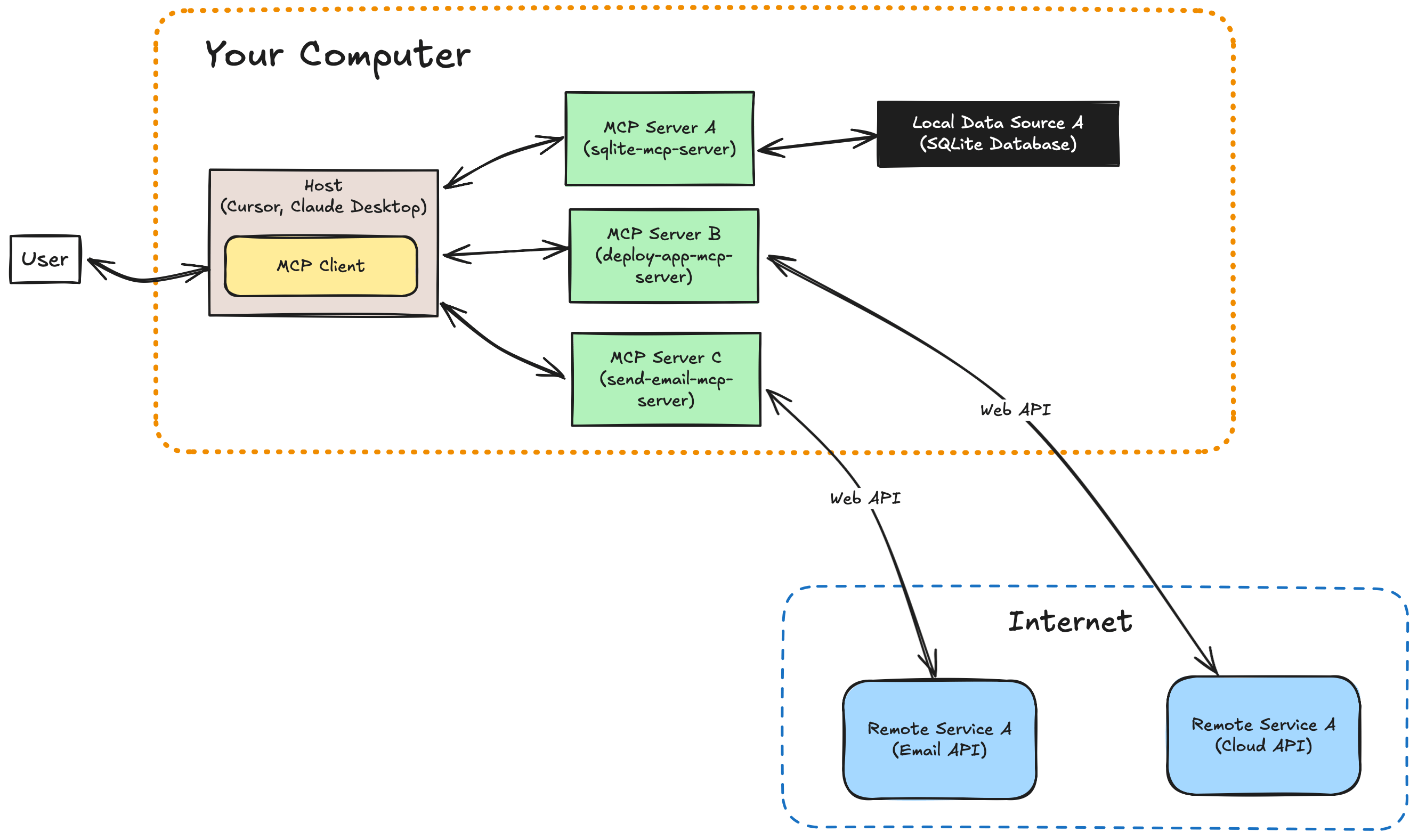
Everything in the diagram runs on your machine for this walkthrough. The host
spawns your server locally. The server opens community.db on disk.
Note: MCP also supports Streamable HTTP for remote servers. SSE-only transports are deprecated in current spec revisions. For a hosted deployment pattern, see From Prompt to App in Minutes with the DigitalOcean MCP Server and run your own Python server on a Droplet or App Platform.
Note: Host and client often share one process. To write a standalone MCP client, follow the Build an MCP client guide.
MCP server primitives at a glance
| Primitive | Who controls it | Purpose |
|---|---|---|
| Tool | Model (with user approval) | Run code: query a DB, call an API |
| Resource | Application | Expose read-only files or records |
| Prompt | User | Ship reusable prompt templates |
This project implements one tool. Resources and prompts follow the same
FastMCP decorators (@mcp.resource(), @mcp.prompt()). See the
MCP Python SDK server docs
for full examples.
Building your first MCP server in Python
You will create a virtual environment, install the SDK, download sample data, and
write sqlite-server.py.
Step 1: Set up your environment
Create and activate a virtual environment:
python3 -m venv mcp-env
source mcp-env/bin/activate
On Windows PowerShell:
python -m venv mcp-env
mcp-env\Scripts\Activate.ps1
Install the MCP Python SDK. Pin below 2.x while v2 is in alpha:
pip install "mcp>=1.27,<2"
Step 2: Download the sample database
Download community.db
into the same folder as your server script. The file contains a chatters table
with name and messages columns.
For SQLite fundamentals in a web app context, see How To Use an SQLite Database in a Flask Application.
Step 3: Write the MCP server
Create sqlite-server.py:
# sqlite-server.py
from pathlib import Path

import sqlite3
from mcp.server.fastmcp import FastMCP

DB_PATH = Path(__file__).resolve().parent / "community.db"

mcp = FastMCP("Community Chatters")


@mcp.tool()
def get_top_chatters(limit: int = 10) -> list[dict]:
    """Return chatters ranked by message count."""
    conn = sqlite3.connect(DB_PATH)
    cursor = conn.cursor()
    cursor.execute(
        "SELECT name, messages FROM chatters ORDER BY messages DESC LIMIT ?",
        (limit,),
    )
    rows = cursor.fetchall()
    conn.close()
    return [{"name": name, "messages": messages} for name, messages in rows]


if __name__ == "__main__":
    mcp.run()
FastMCP reads the function name, type hints, and docstring to build the tool
schema. mcp.run() starts the stdio transport, which local hosts expect.
Stdio logging: Do not use print() on stdout in stdio servers. Use
logging or print(..., file=sys.stderr) so JSON-RPC frames stay intact. See
the official server logging notes.
Test the query without the host:
python3 -c "import sqlite3; c=sqlite3.connect('community.db'); print(c.execute('SELECT COUNT(*) FROM chatters').fetchone())"
You should see a row count printed to the terminal.
Adding your MCP server to Cursor
Open Cursor → Settings → MCP and click Add a New Global MCP Server.
Cursor opens ~/.cursor/mcp.json.
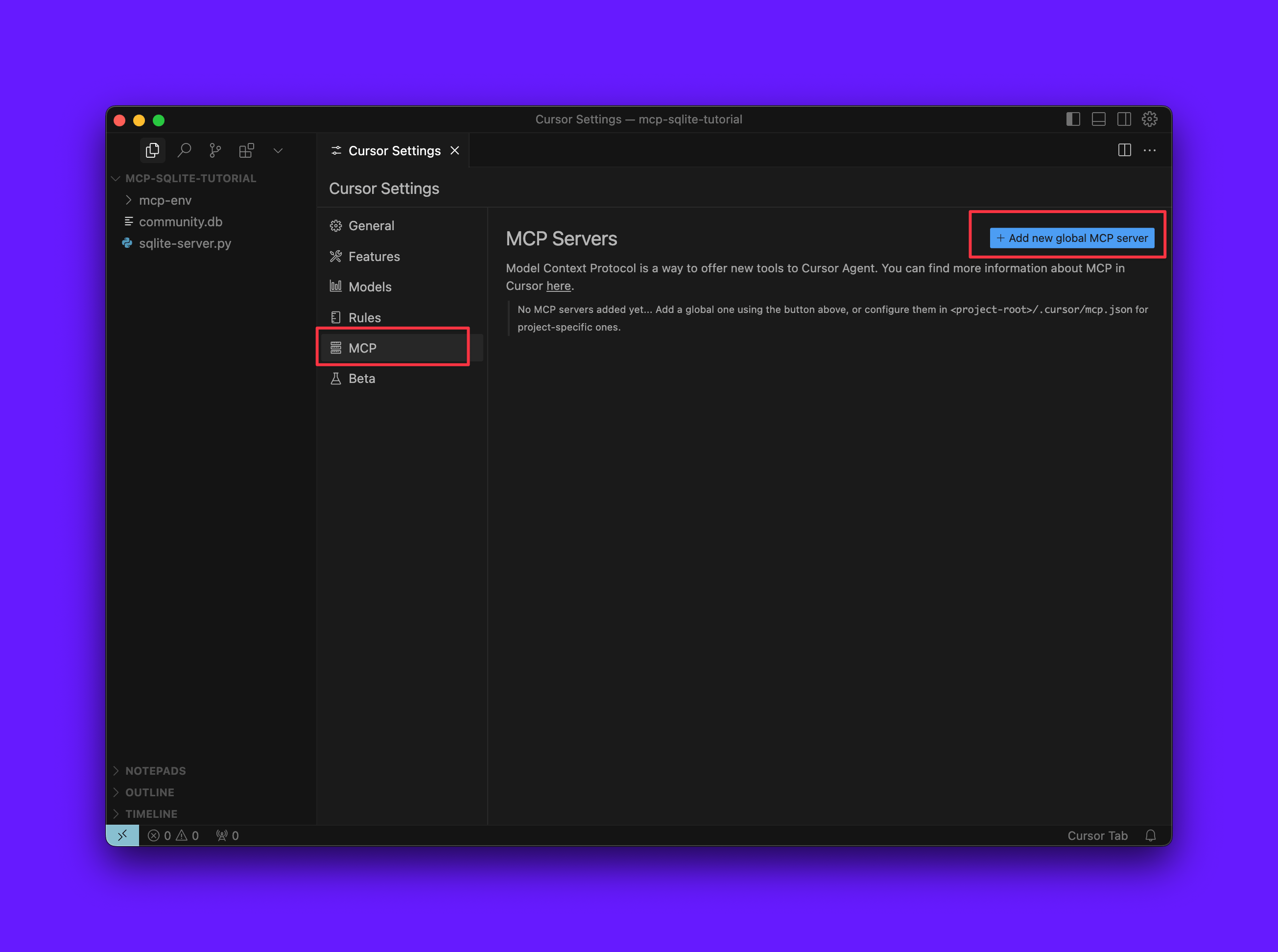
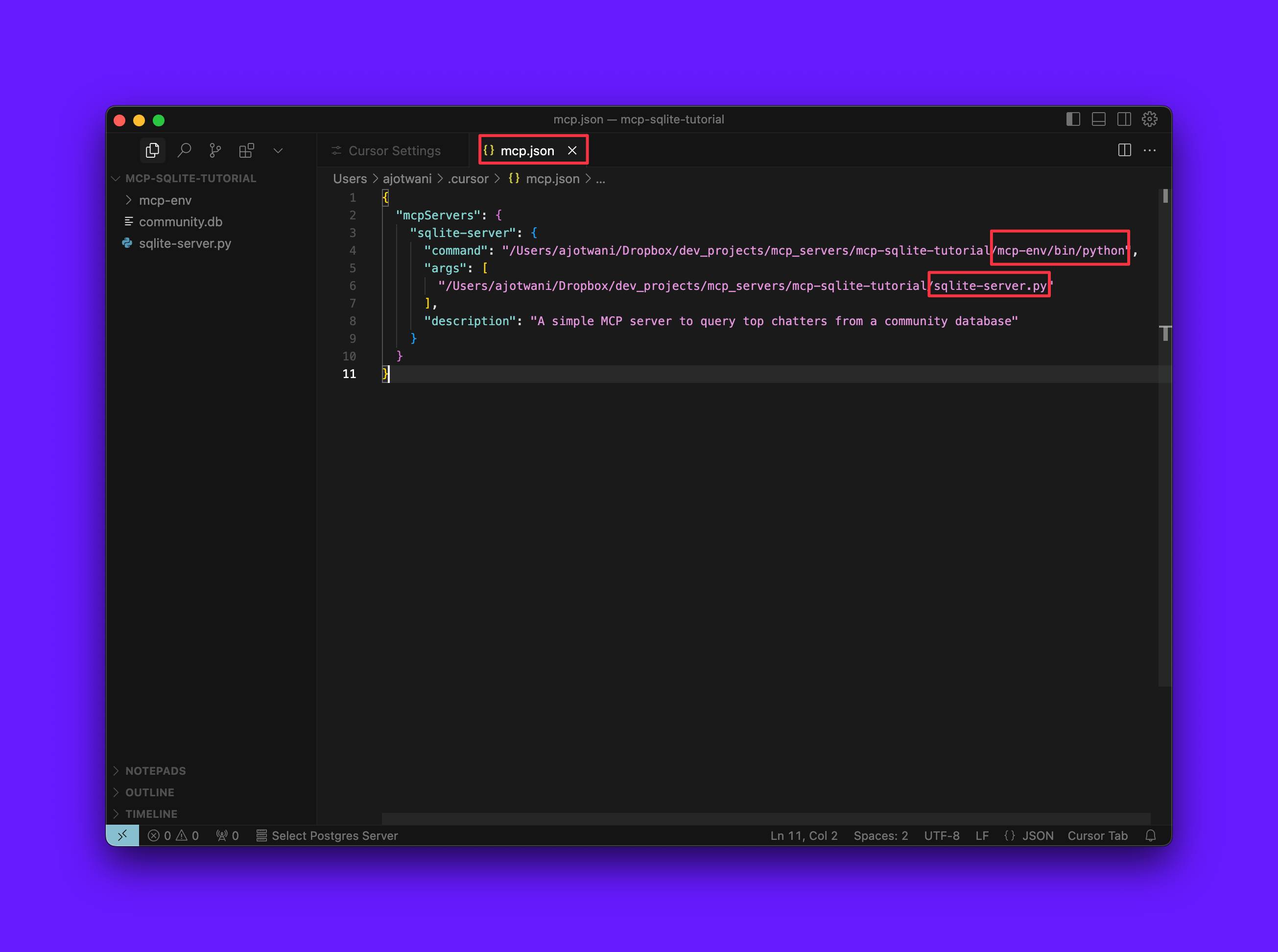
Replace the placeholder paths with your absolute paths. Run which python inside
your activated virtualenv to get the interpreter path.
{
  "mcpServers": {
    "sqlite-server": {
      "command": "/absolute/path/to/mcp-env/bin/python",
      "args": [
        "/absolute/path/to/sqlite-server.py"
      ],
      "description": "Query top chatters from the community SQLite database"
    }
  }
}
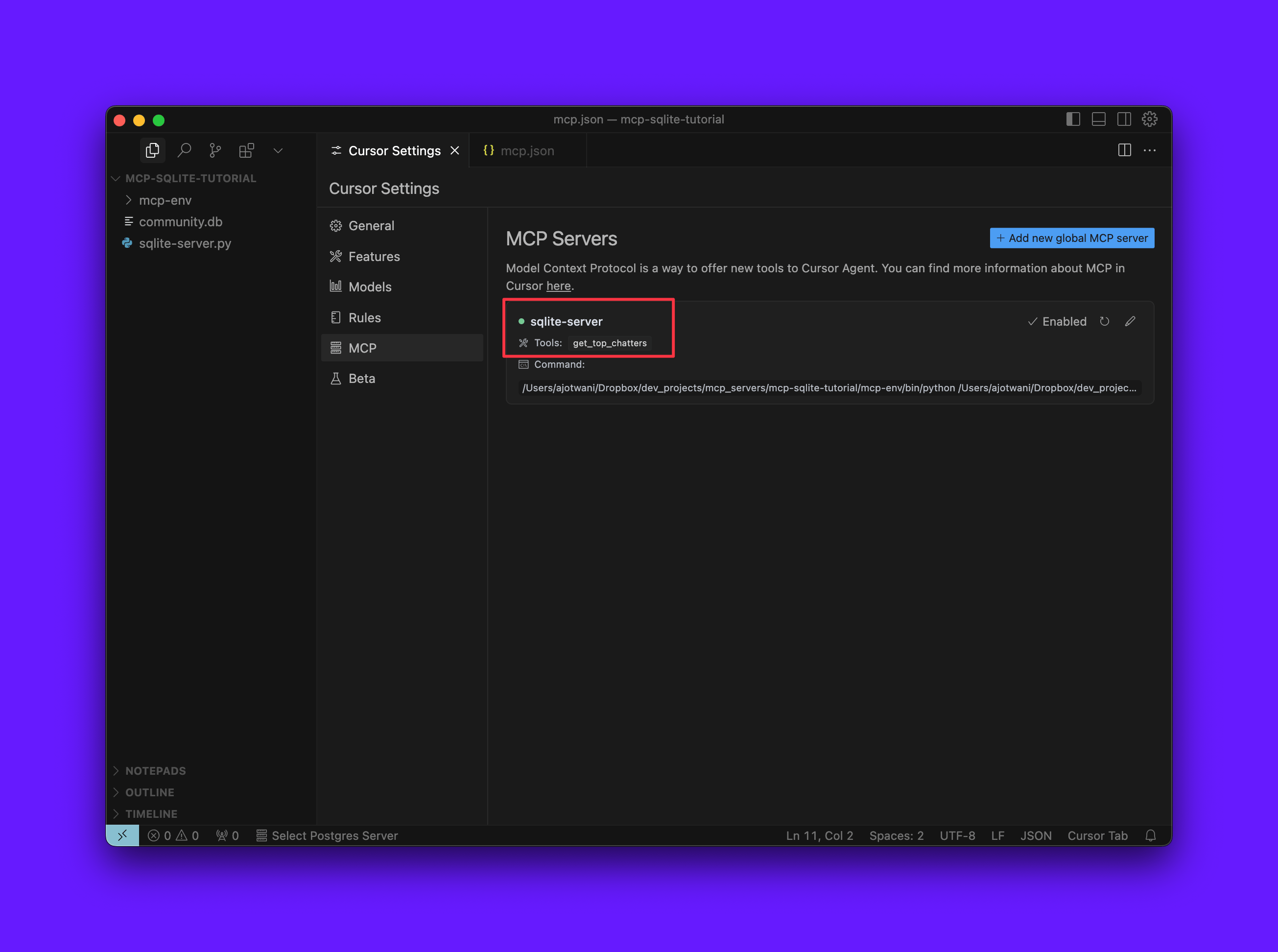
Save the file and return to MCP Settings. A green dot next to the server name means the process started cleanly.
Testing your MCP server in Cursor
- Open a chat and ask: “How many chatters are in the database?”
- Cursor proposes the
get_top_chatterstool. Approve the prompt. - The server returns rows. The model summarizes them in the reply.
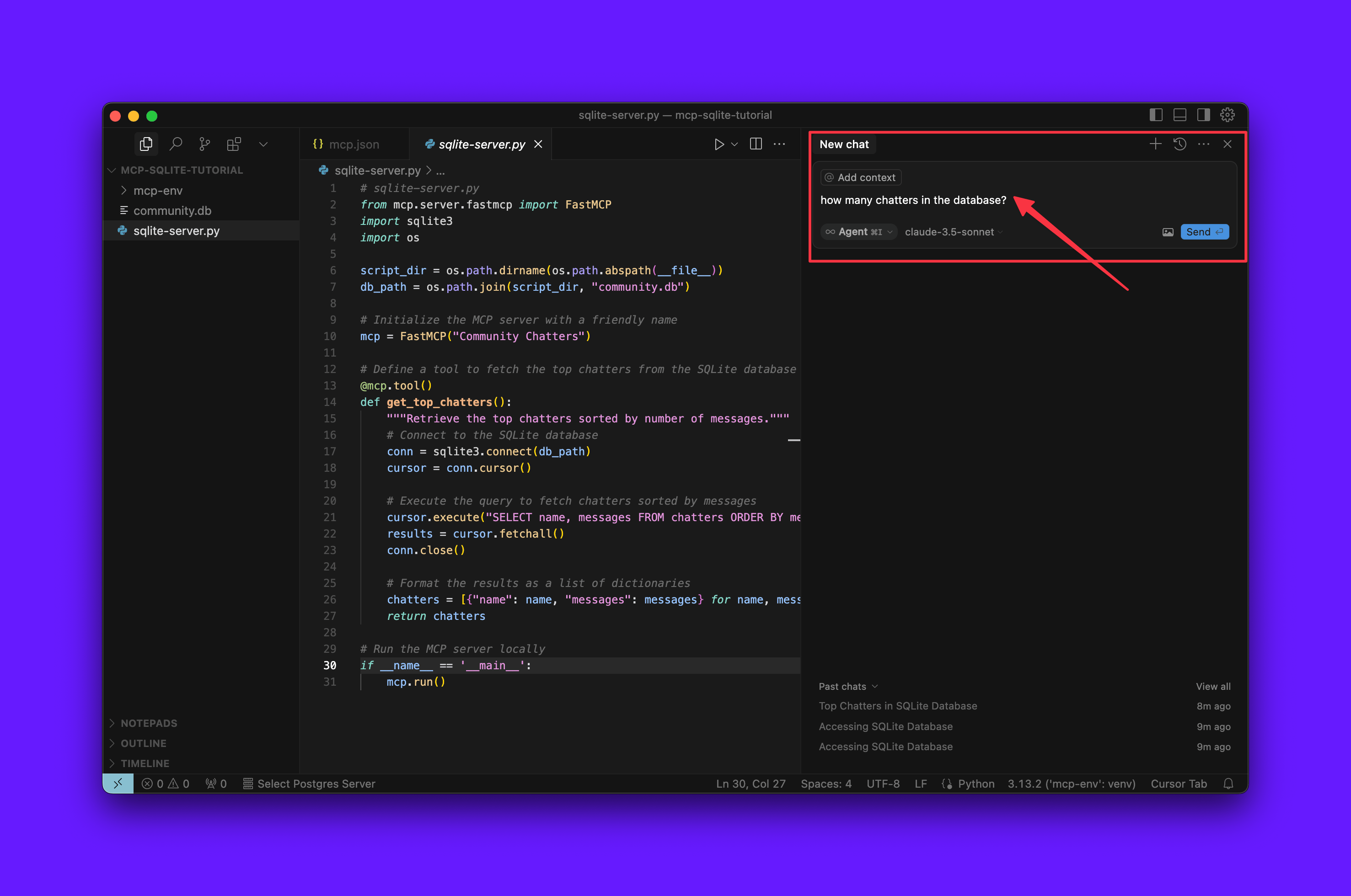
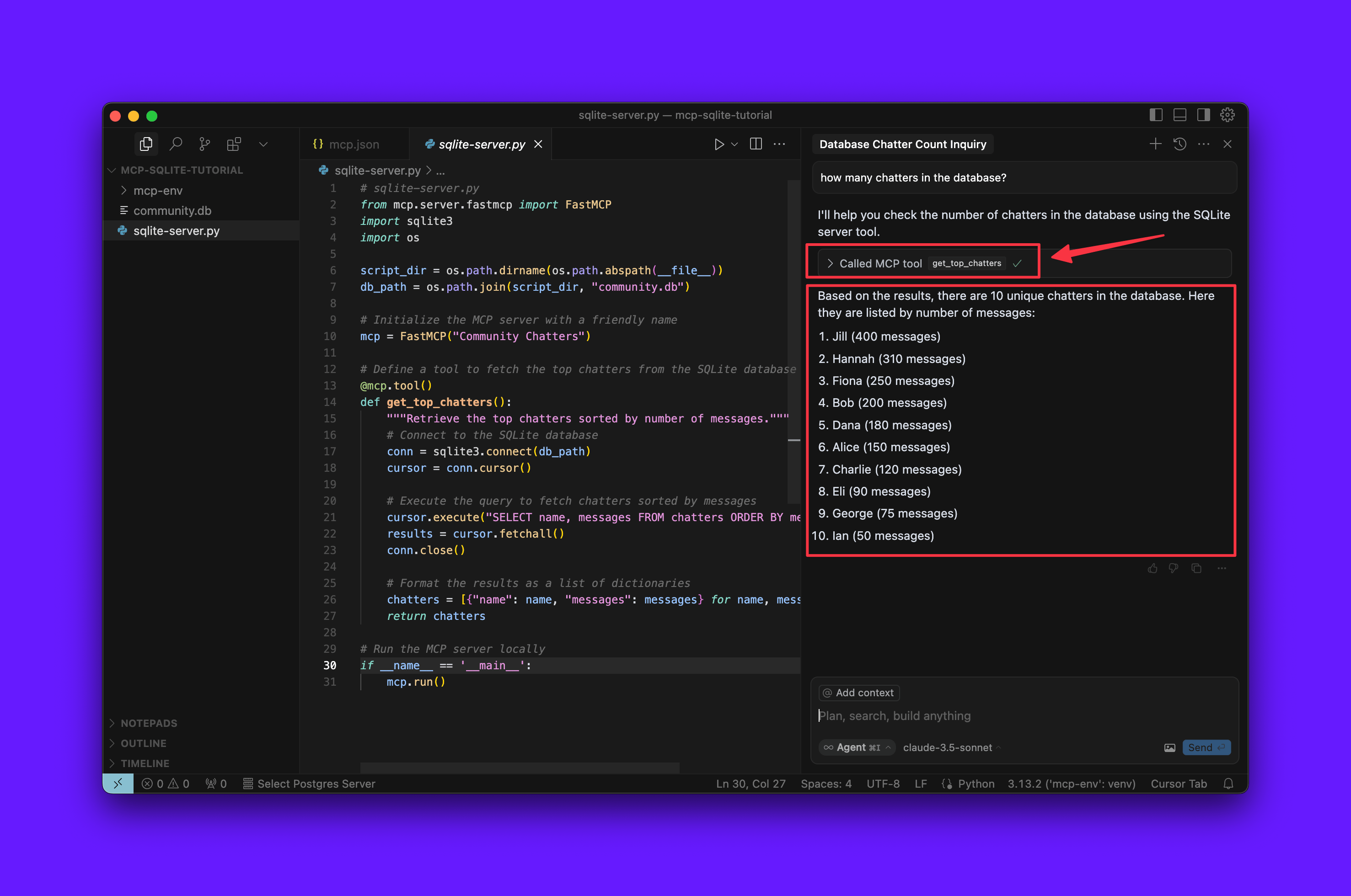
If the tool never appears, see Troubleshooting below.
Adding your MCP server to Claude Desktop
Claude Desktop uses the same mcpServers object shape as Cursor.
- Open Claude Desktop → Settings → Developer → Edit Config.
- Edit
claude_desktop_config.json(macOS:~/Library/Application Support/Claude/claude_desktop_config.json). - Add your server block with the same
commandandargspaths as Cursor. - Save, quit Claude Desktop completely, and reopen the app.
{
  "mcpServers": {
    "sqlite-server": {
      "command": "/absolute/path/to/mcp-env/bin/python",
      "args": [
        "/absolute/path/to/sqlite-server.py"
      ]
    }
  }
}

Ask Claude: “Show me the top five chatters.” Approve the tool call when prompted.
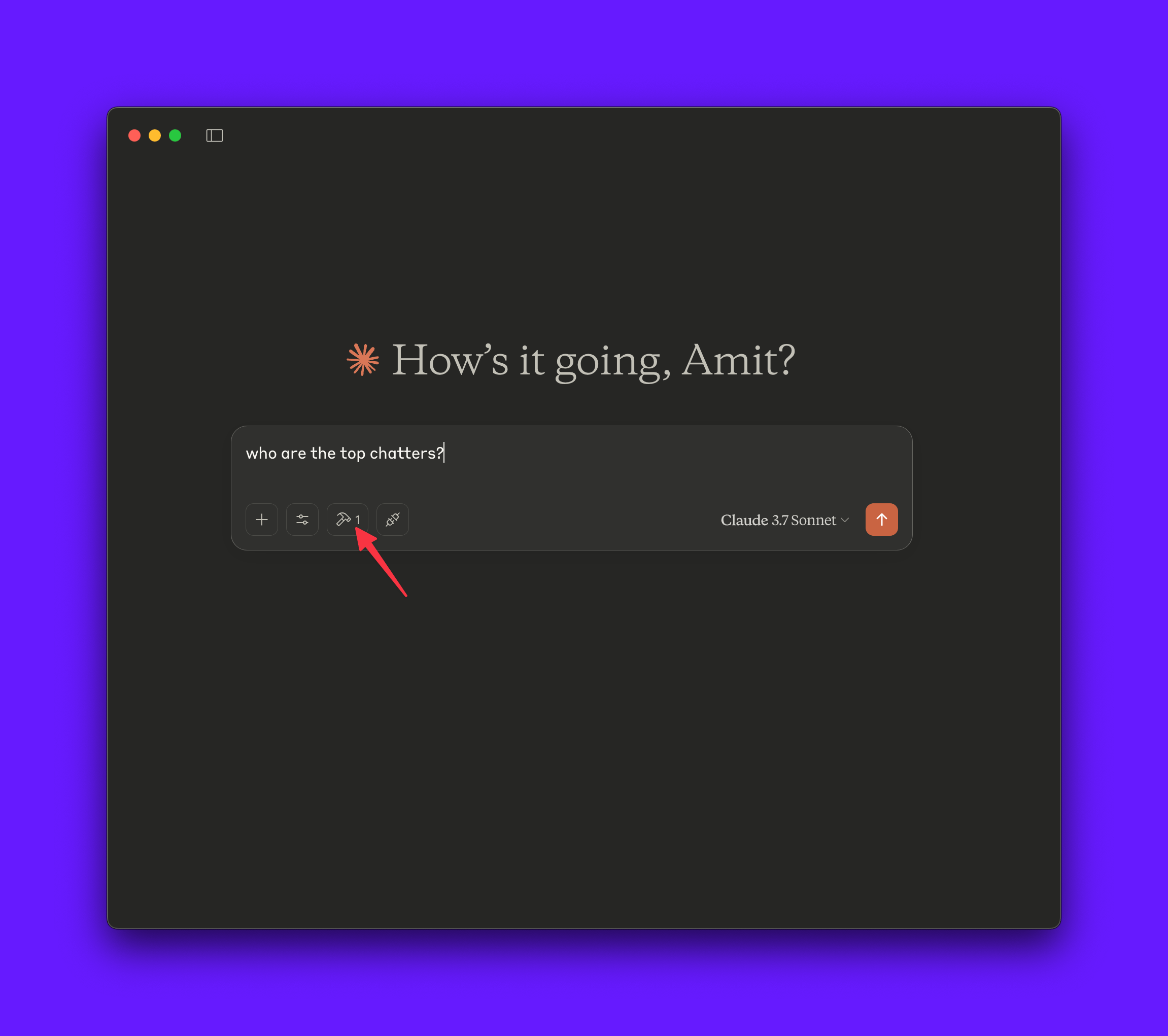
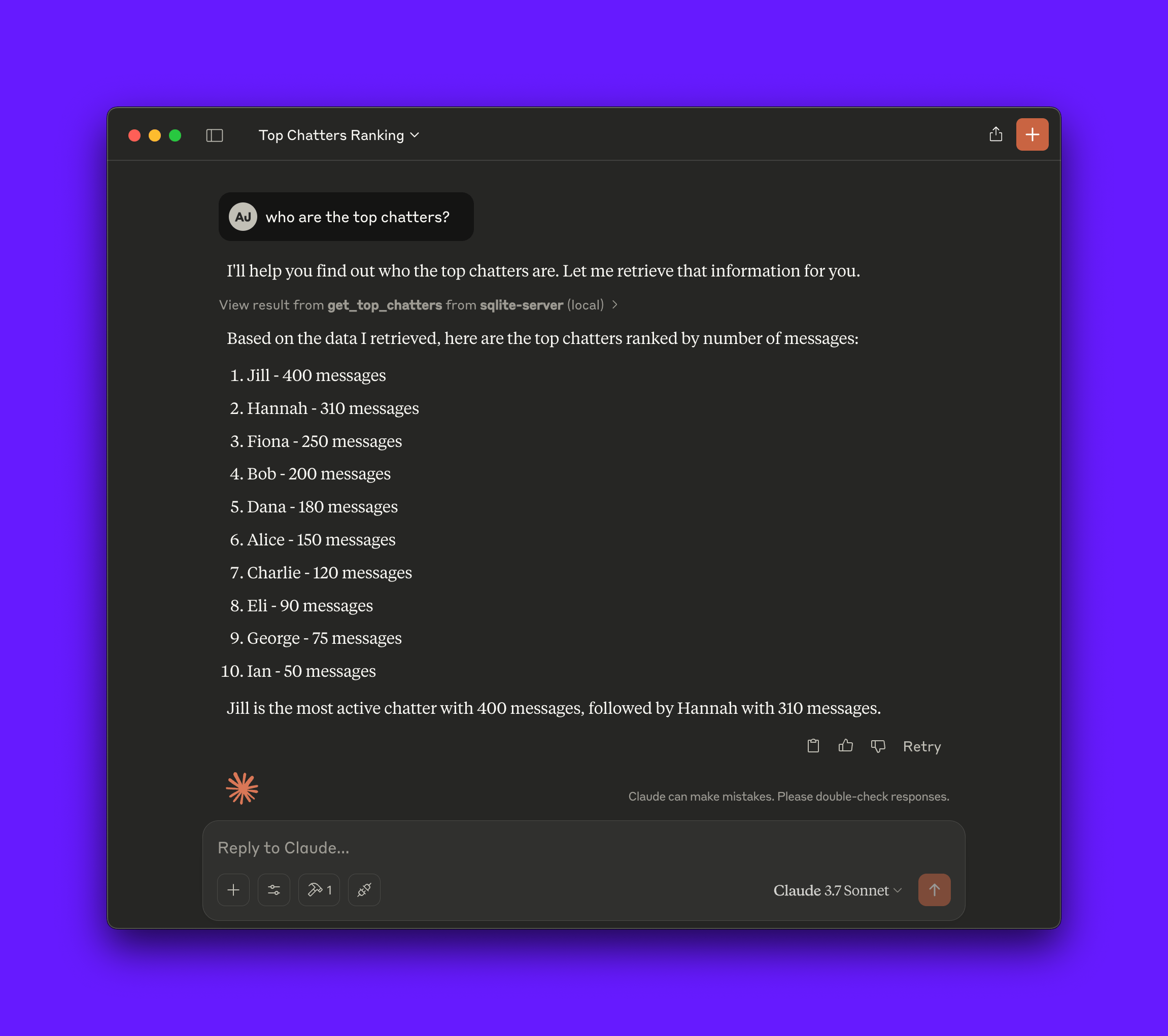
The same Python server now works from two hosts. The model brand changes. The MCP contract stays the same.
Troubleshooting
| Symptom | Fix |
|---|---|
| Red or missing status in Cursor | Check absolute paths, confirm pip show mcp inside the venv, run the server manually with the same command and args |
| Tool never offered | Improve the tool docstring, restart the host, verify the green dot or tools icon |
ModuleNotFoundError: mcp |
Activate the venv whose Python path you put in mcp.json |
| Empty or error results | Confirm community.db sits beside sqlite-server.py |
| Claude Desktop shows no tools | Use mcpServers, not a top-level servers array. Restart the app after edits |
Claude Desktop writes MCP logs to ~/Library/Logs/Claude/mcp*.log on macOS. See
Connect to local MCP servers
for log locations on other platforms.
FAQs
1. What is MCP in Python?
MCP in Python means you implement a Model Context Protocol server with the
mcp package (FastMCP on top). The server
exposes tools the host forwards to the model. Python is one supported language.
The TypeScript SDK
serves the same role for Node hosts.
2. What is the best Python MCP library for building a server?
You can use the official mcp package with
FastMCP from mcp.server.fastmcp. Install with
pip install "mcp>=1.27,<2". The standalone
fastmcp project targets the same
ergonomic API for HTTP-first deployments. Start with the official SDK so your
code matches modelcontextprotocol.io
docs.
3. How do you create an MCP server in Python?
- Create a virtualenv and
pip install "mcp>=1.27,<2". - Instantiate
FastMCP("ServerName"). - Register functions with
@mcp.tool(). - Call
mcp.run()underif __name__ == "__main__":. - Point Cursor or Claude Desktop at the venv Python and your script path in
mcpServers.
The create-python-server scaffold generates a starter repo if you prefer a template.
4. What is the difference between an MCP SDK and MCP?
MCP is the protocol specification (messages, transports, capability types). An MCP SDK is a language library that implements the spec. The Python SDK handles JSON-RPC framing, schema generation, and stdio or HTTP transports so you focus on tool logic.
5. Is MCP just a REST API?
No. MCP uses JSON-RPC messages and a defined capability model (tools, resources, prompts). Hosts spawn stdio servers or connect over Streamable HTTP. REST endpoints are optional. You wrap existing REST APIs inside tool functions, but the wire format is not plain HTTP CRUD.
Conclusion
You built an MCP server in Python with FastMCP, wired SQLite data into Cursor and Claude Desktop, and validated tool calls end to end. The same pattern extends to email gateways, cloud APIs, and deployment workflows.
What’s next
Grow from this local stdio server into production-oriented patterns:
- From Prompt to App in Minutes with the DigitalOcean MCP Server for App Platform actions from Claude or Cursor
- How to Use MCP with OpenAI Agents for agent frameworks beyond desktop hosts
- Claude Code MCP Server for terminal-based agent workflows
- MongoDB and DigitalOcean MCP Server Tutorial for database-backed MCP at scale
- MCP Python SDK on GitHub for resources, prompts, and Streamable HTTP examples
Run experiments on a DigitalOcean Droplet or ship apps with App Platform. For managed models and knowledge bases, explore the DigitalOcean AI Platform.
Thanks for learning with the DigitalOcean Community. Check out our offerings for compute, storage, networking, and managed databases.
About the author(s)
Amit is a Developer Advocate at DigitalOcean 🐳, where he helps developers build and ship better apps on the cloud. Compulsive Seinfeld quoter. LEGO nerd. 🧱 AMA.
Anish is a Sr Technical Content Strategist and Team Lead at DigitalOcean with 7+ years of experience as an DevOps SRE at Nutanix and Cloud consultant at AMEX, and technical writing at DOCN, and shipping deep infra and AI inference tutorials that help developers deploy production‑ready applications on DigitalOcean.
Still looking for an answer?
 This work is licensed under a Creative Commons Attribution-NonCommercial- ShareAlike 4.0 International License.
Become a contributor for community
Get paid to write technical tutorials and select a tech-focused charity to receive a matching donation.

DigitalOcean Documentation
Full documentation for every DigitalOcean product.

Resources for startups and AI-native businesses
The Wave has everything you need to know about building a business, from raising funding to marketing your product.
The developer cloud
Scale up as you grow — whether you're running one virtual machine or ten thousand.

Start building today
From GPU-powered inference and Kubernetes to managed databases and storage, get everything you need to build, scale, and deploy intelligent applications.



