
Nearly three-quarters of enterprises watched their AI costs blow past budget last year, according to the 2026 State of FinOps Report. Much of that gap can be traced back to a missing step: accurate LLM cost calculation before the workload went into production.
Token pricing looks simple on a rate card with a few dollars per million tokens, but the real bill depends on how the workload actually behaves once real users are running it. Input and output length rarely match what testing predicted, since real questions and real answers run longer or shorter than a handful of sample prompts. Caching and batch discounts only apply if the request is structured to earn them, so the same workload can land at a very different price depending on whether that happened. And a single user question doesn’t always mean a single model call: agents checking tools and retries firing silently can turn a request into several, each billed separately.
Understanding LLM cost calculation matters whether you’re pricing out a new feature before it ships or explaining why last month’s bill doubled. The difference between a rough guess and a reasonable estimate comes down to comprehending how each variable affects your bill. Let’s explore the factors that influence LLM costs, learn how to estimate expenses for different workloads, and discover practical ways to reduce your AI bill.
Key takeaways:
-
LLM costs depend on more than token pricing. Input and output tokens, context windows, caching, batch processing, and tool usage all contribute to your final inference bill.
-
Estimating request costs before deployment, plus optimizing prompts, batching, model routing, and response length, can help reduce AI spending without affecting output quality.
-
Monitor request-level metrics, attribute costs to applications and teams, and track efficiency metrics such as cost per request and cost per successful task to keep production AI workloads within budget.
-
DigitalOcean Serverless Inference, batch inference, prompt caching, and Inference Router help you optimize LLM costs through intelligent model routing, discounted batch processing, caching, and built-in production analytics.
How LLM pricing works
Before attempting to calculate anything, you need to understand what you’re actually paying for. An LLM bill is not one flat rate. It’s a stack of separate charges: some obvious and some that are easy to miss until they show up on the invoice, because a quick test prompt does not hit caching or tool calls, the way real production traffic does. They combine into the number that lands on your invoice.
The major factors driving LLM pricing include:
-
How your input and the model’s output text translate to billable tokens
-
Why a reply costs more per token than the question that triggered it
-
Whether repeated content results in a caching discount
-
How extras like tool calls or image inputs add to the base cost
Let’s break down each of these four factors in more detail and how they show up on an actual bill:
| Pricing factor | Description | How it affects the cost | Example |
|---|---|---|---|
| Tokens and tokenizers | Before a model fully parses inputs, it breaks the text into tokens, using a tokenizer built for that specific model. Tokens are small chunks of words or characters. | Users are billed by token count, not by word count or character count. | A cloud support assistant analyzes a long Kubernetes error log. |
| Input vs. output tokens | The input prompt (what you send) and the model’s reply output (what it generates) are counted and billed as two separate token counts at different rates. | A short question can still cost more if the model returns a long answer, making input length alone a poor predictor of a request’s actual cost. Models with higher output token prices might increase the total cost quickly. | You consume 100 tokens asking an AI model to write a Terraform configuration. The generated configuration and explanation use 1,500 output tokens, so output accounts for most of the request cost. |
| Context windows and caching | The context window is the maximum text the model can hold in one request. Every token in is counted as input, which includes any unchanged text repeated in your next request, like the same system prompt or reference document. | Large context windows can increase input token usage. Prompt caching reduces the cost of repeated requests by reusing the same system prompt, tool definitions, or reference data. | An AI support agent sends the same 10,000 token product guide with every customer question. |
| Additional costs | Tool calls, images (upload and generation), and web search add tokens, and sometimes flat fees, on top of your standard input and output count. | A cost formula built only around input and output tokens will undercount the actual cost, since these extras are billed on their own separate meters rather than folded into the base chat rate. | A multimodal cloud monitoring app sends logs to an LLM, generates a chart image, and uses web search to check for a current outage. Token usage, image generation, and web search may each incur separate charges. |
67% lower inference costs, 67% higher throughput, and 2–3× faster AI deployment. Learn how Workato scaled enterprise AI with DigitalOcean’s optimized NVIDIA H200 infrastructure.
How to calculate LLM cost
Understanding what drives your bill and knowing what your bill will be are two different things. A single request might cost a fraction of a cent. That number only becomes real once you multiply it and adjust it for how you actually use the API.
One request: baseline formula
Say you’ve built an AI assistant inside a cloud dashboard. A developer pastes in an error log and asks what went wrong, and the assistant explains it in plain language. That’s your basic unit: one request in, one reply out.
The formula: cost = (input tokens ÷ 1,000,000 × input price) + (output tokens ÷ 1,000,000 × output price).
For example, the error log and the question come to 600 input tokens. The explanation the assistant generates comes to 300 output tokens. Using example rates of $2 per million input tokens and $10 per million output tokens:
(600 ÷ 1,000,000 × $2) + (300 ÷ 1,000,000 × $10) = $0.0012 + $0.003 = $0.0042
That single request costs less than half a cent. On its own, that looks negligible. It stops looking negligible at enterprise scale once that same request runs thousands of times a day.
Scaling the formula to daily and monthly spend
That dashboard assistant doesn’t run just once. It might handle close to 20,000 requests a day. At $0.0042 each, that’s $84 a day, or about $2,520 a month at a flat 30-day pace.
That being said, $2,520 is the baseline—not the number to focus your budget around. Add margin for retries, replies that run longer than the example above, and system prompt overhead. Forecast with a range, not a single confident number, because there’s no fixed number that will work reliably month over month
Adjusting for batch APIs and streaming
Consider that not all daily requests need to happen in real time. Say 5,000 of the 20,000 in our example come from an overnight job that pre-generates explanations for the most common error codes. These requests don’t need to run live. Route just that overnight batch of 5,000 requests through a batch endpoint, and that slice of the bill drops from about $21 a day to roughly $10.50 a day.
Batch processing costs half the real-time price, though the exact discount varies by provider and is subject to change. Streaming changes how the reply arrives: word by word as it’s generated, rather than all at once at the end. This helps a developer see progress on a long explanation. The model still generates the same 300 output tokens either way, so you’re billed for tokens generated, not for how they reach the screen.
Some providers even meter streamed calls through a slightly different logging path. For example, a streamed response may appear as multiple output chunks while a standard response appears as a single completed request. So if a streamed response appears less expensive on an invoice, check how usage is being recorded before crediting streaming itself. In other words, don’t expect a streamed response to cost less than the same response delivered all at once.
Calculating costs in Python or JavaScript
You can automate the calculation instead of estimating every request manually. Pass the token counts and model prices to a small function and return the cost in dollars. The functions are only as accurate as the token counts you feed them, and guessing from word count is where the estimates might go wrong.
Python example:
def request_cost(input_tokens, output_tokens, input_price_per_million, output_price_per_million):
    input_cost = (input_tokens / 1_000_000) * input_price_per_million
    output_cost = (output_tokens / 1_000_000) * output_price_per_million
    return input_cost + output_cost

# the dashboard assistant example above
cost = request_cost(600, 300, 2, 10)
print(round(cost, 4))  # 0.0042
JavaScript example:
function requestCost(
  inputTokens,
  outputTokens,
  inputPricePerMillion,
  outputPricePerMillion
) {
  const inputCost =
    (inputTokens / 1_000_000) * inputPricePerMillion;

  const outputCost =
    (outputTokens / 1_000_000) * outputPricePerMillion;

  return inputCost + outputCost;
}

// The dashboard assistant example above
const cost = requestCost(600, 300, 2, 10);

console.log(Number(cost.toFixed(4))); // 0.0042
There’s no need to estimate token counts by manually counting words. Model providers provide token-counting tools and APIs that show how your input is split into billable tokens. For example, use OpenAI’s Tokenizer, Anthropic’s Token Counting API, or Gemini’s count_tokens method to inspect a prompt before calculating its cost. Because models employ different tokenizers, count tokens with the tool for the model you plan to use, rather than applying one token count across every model.
Comparing costs across LLM providers
Every LLM provider follows the same core pricing model: input tokens and output tokens are billed separately, with output tokens tending to cost more than input tokens. What changes are the token rates, available discounts, and pricing for additional capabilities.
On top of the base input/output split, a few broad pricing modes tend to show up across providers:
-
Standard pricing: A synchronous, real-time request.
-
Batch or asynchronous pricing: A discounted rate for work that doesn’t need an immediate reply.
-
Cached-input pricing: A reduced rate for the portion of a prompt that’s already been sent and hasn’t changed.
-
Long-context pricing: Some providers charge more once a single request’s input grows past a certain size; others use one flat rate regardless of length.
-
Metered extras: Tool calls, image or audio input, and embeddings are priced separately from the base chat rate, on their own units. Specifically, a web search is billed by search, and an image upload or generation is billed by image, rather than folded into the token count.
Which of these apply, and how much each one actually saves or adds, differs by provider and shifts with every model release. If you access these models through an inference platform like DigitalOcean Serverless Inference, you’ll still pay for model inference. The cost includes the actual cost of running a request through a model, its input and output tokens billed at whatever rate that model charges, separate from anything a platform adds on top. Some platforms, like DigitalOcean, offer additional capabilities, such as intelligent model routing, batch processing, observability, and deployment features, which impact overall production costs.
When comparing providers, compare models with similar capabilities. Which of these apply, and how much each one actually saves or adds, differs by provider and shifts with every model release.
-
Every model tier across OpenAI, Anthropic, and Google, with embedding and reranking models, is available through DigitalOcean’s Model Catalog via a single API key.
-
Compare more than token prices with DigitalOcean Inference pricing to know how discounts, caching, batch processing, and routing capabilities with per-token rates impact your total production inference costs.
What different LLM workloads cost
Formulas are great for estimates, but will fail to forecast exact production usage. “Send a prompt, get a reply” involves different pricing components depending on the shape of the request. These five patterns cover most of the ways an application calls an LLM in production, with examples:
A short question and answer
Recalling the example of an AI assistant built into a cloud dashboard, let’s say one of your users asks a specific question: “Why is my Droplet showing 100% CPU?”
The question, plus the addition of relevant system context, such as a short instruction telling the model to answer as a cloud support assistant, is ~150 input tokens, and the answer is ~100 output tokens.
(150 ÷ 1,000,000 × $2) + (100 ÷ 1,000,000 × $10) = $0.0003 + $0.001 = $0.0013
This is the lowest cost pattern on the list. It’s also the most common one: support and Q&A features are built around this shape: a short question in, a short answer out.
A long-form response
Now the same assistant is asked to generate a full root cause analysis after an outage. The input (raw logs, a timeline, the request itself) runs ~3,000 tokens. The generated report comes back at ~1,500 tokens, which is half the length of the input, but not half the cost.
(3,000 ÷ 1,000,000 × $2) + (1,500 ÷ 1,000,000 × $10) = $0.006 + $0.015 = $0.021
The output alone accounts for $0.015 of the $0.021 total, even though the input has twice as many tokens.
A retrieval-augmented generation (RAG) query
Give that assistant access to your documentation, and a question like “how do I set up a load balancer with health checks” turns into a Retrieval Augmented Generation (RAG) query. The assistant retrieves the three most relevant sections from your docs, 800 tokens worth, and adds them to the original question before it answers. That pushes input to ~820 tokens, with a 250-token answer.
(820 ÷ 1,000,000 × $2) + (250 ÷ 1,000,000 × $10) = $0.00164 + $0.0025 = $0.00414, for the model call alone.
That’s already more than three times the plain short-answer example, mostly from the retrieved context added to the input. There’s also a second, separate charge: embedding the incoming question so the system can search for matches. At an example rate of $0.02 per million tokens, embedding a 20-token question costs a fraction of a cent. It’s billed separately from the chat completion tokens, as its own line item for embedding usage.
Your bill ends up with two entries instead of one: the chat model’s input and output tokens, and the embedding model’s tokens, each priced and metered on their own. Re-embedding your documentation whenever it updates shows up on that same embedding line item, not the chat model one. For documentation that changes frequently, the ongoing re-embedding cost is worth budgeting separately from the per-query cost this section is calculating.
A multi-turn conversation
Now, one of your users is debugging an issue over several messages instead of a single chat query. Each new message is short and about the same size (~50 tokens), and each reply runs ~100 tokens.
Turn 1 costs about $0.0011: just the opening question and a short reply. By turn 5, the user’s new message is still 50 tokens, but the four previous exchanges in the conversation history get resent along with it. That turn’s input alone comes to 650 tokens, and the turn costs about $0.0023, roughly double turn 1, even though the message length itself hasn’t changed at all.
Unless the chat history is summarized, every turn resends everything that came before. As a result, a five-message debugging session costs more than five separate short questions would.
An agent or tool-calling workflow
Give the assistant tools to check server status, restart a service, or pull recent logs, and one user request can turn into several model calls behind the scenes.
Say a user asks, “My Droplet keeps crashing, can you check what’s wrong and fix it if it’s simple?” Behind that single question:
-
Call 1 (Cost: $0.00122): The model decides to check the server status. With four tool definitions attached (which collectively use ~400 tokens), plus the question, input runs to 460 tokens, and the output is just the decision to call that tool, ~30 tokens.
-
Call 2 (Cost: $0.00158): The status result comes back and gets added to the context, bringing the input to 640 tokens. The model decides to check logs next, another 30-token output.
-
Call 3 (Cost: $0.00314): The log result comes back, input reaches 970 tokens, and the model writes the actual answer, about 120 tokens: “Found it, memory limit was hit, I’ve restarted the service.”
Add up the three calls, and this one user action costs about $0.00594, more than four times the plain short-answer example, even though the user only asked one question and got one final reply. What shows up on the bill—whether or not the user ever sees it—includes every intermediate step, the tool definitions sent on every call, the results fed back in, and the model’s own decisions about what to check next.
Curious to know how output tokens, reasoning models, long-context requests, and non-production traffic quietly drive AI costs? Read about how better visibility, prompt caching, and model routing can lower your LLM bill.
How to cut LLM costs without hurting output quality
The instinct when a bill gets too high is to make cuts to the product and its functionality: use cheaper models, offer shorter replies by default, and reduce the things it can do. That instinct usually costs more in frustrated users than it saves in tokens. Most of the waste in a production AI product comes from what you’re sending the model and how you’re sending it—not from the functioning of the model itself. These things are fixable without the user ever noticing a difference.
Here are the ways you can effectively cut costs, including how to build an effective request:
Trim prompts and context
For instance, let’s say that the AI assistant’s system prompt has grown to 800 tokens over time. Half of this involves formatting instructions and edge cases that almost never come up. By trimming it down to the 200 tokens that actually matter, you cut 600 tokens off every single request before touching a line of application code. At the $2-per-million input rate used earlier, across the same 20,000 requests a day, that’s about $24 a day, or roughly $720 a month—all from editing a prompt.
The same logic applies to retrieved context: if your RAG pipeline pulls in three full documentation pages when the answer lives in two paragraphs, you’re paying extra to send text the model doesn’t need. Tightening retrieval to just the relevant chunks cuts the input side of every RAG query without changing the answer.
Turn on prompt caching
If your application sends the same instructions or reference documents with every request, prompt caching can reduce inference costs. To maximize cache hits, place the reusable content, such as your system prompt or retrieved documents, before the user’s question. This keeps the prompt’s beginning consistent across requests, allowing supported providers to reuse cached prompt prefixes instead of reprocessing them from scratch. Many managed inference like OpenAI and Anthropic model providers support prompt caching. The implementation and configuration vary. The same idea runs deeper at the infrastructure layer as KV caching: instead of recalculating the key and value data for every prior token at each generation step, the model stores and reuses it.
Read how Prompt Caching reuses repeated prompt context across requests, improving efficiency and reducing inference costs with minimal changes to your existing API calls.
Batch what doesn’t need to run in real time
Not every AI task requires an instant response. If your application can wait minutes or even hours for the result, you can move those requests from real-time inference to batch inference and lower costs. Batch inference means paying a lower per-token rate, roughly half the real-time price, in exchange for a short wait.
For example, an AI customer support platform could have these two kinds of workloads running side by side:
| Point of comparison | Real-time inference | Batch inference |
|---|---|---|
| Example workload | Live chatbot answering customer questions | Nightly summaries of daily support conversations for an analytics dashboard |
| Importance of response timeliness | A customer is expecting an answer in seconds | The dashboard just needs to be updated by morning |
| Execution timing | The moment the question comes in | Submitted as a job, processed within hours |
| Relative cost | Standard rate | Roughly half the standard rate |
Since the summaries happen on a schedule and no one is waiting for them as an instant response, submitting them as a batch job instead of processing them one at a time gets the same result at a lower cost.
Discounted tiers work on a clock instead of a queue. DigitalOcean applies a 5%-10% discount between 10 PM and 4 AM Pacific Time. This pricing works well for workloads that can run during that window, like scheduled content generation, document processing, or AI pipelines.
Batch inference is a switch, not a rebuild. With DigitalOcean Batch Inference, point existing OpenAI or Anthropic requests to the batch endpoint instead of the real-time endpoint, and receive up to a 50% discount on supported models, and get results back within 24 hours.
Route simple requests to smaller, cheaper models
Many AI applications receive a mix of simple and complex queries, and treating them all the same can drive up inference costs. For example, an AI e-commerce assistant gets questions like “Where is my order?”, “Do you ship internationally?” or “What are your return policies?” These straightforward questions can be handled by a smaller, lower-cost model. More complex requests, like “I’m looking for a laptop under $1,500 for software development, occasional gaming, and light video editing. Compare the best options and explain the trade-offs between performance, battery life, and portability.” requires deeper reasoning and is better suited to a larger reasoning model. Instead of sending every request to your most expensive model, define intelligent routing policies that match the model to the task. Routine queries can be handled by smaller, lower-cost models, while recommendation, comparison, and decision-making tasks can be routed to more capable reasoning models. DigitalOcean Inference Router automates this process by selecting the most appropriate model from a configured pool based on the defined routing policy for each task.
Comparing a direct model call with an Inference Router in the DigitalOcean Playground:
The left panel sends the prompt directly to GLM-5.2, while the right panel routes the same prompt through router09072026-1. Here, the router router09072026-1 selects the best model based on the configured routing policy.
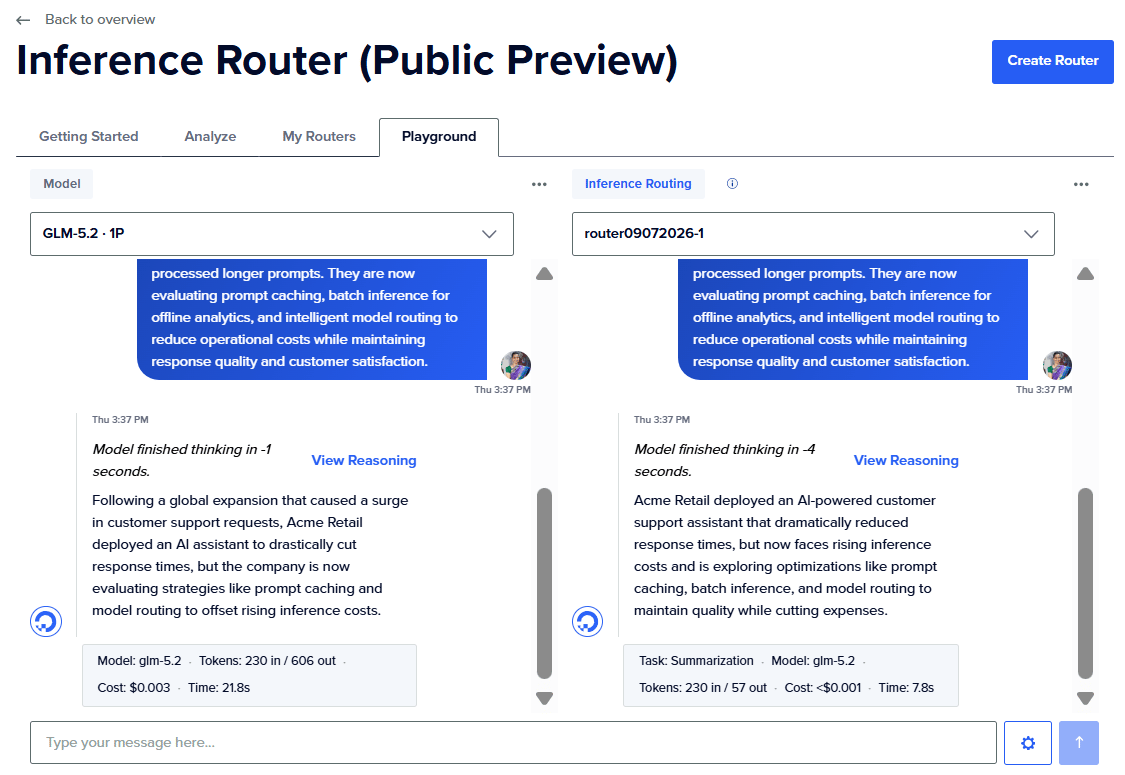
In this example, the Inference Router selected GLM-5.2 for the summarization task, reduced output tokens from 606 to 57, lowered the estimated cost from $0.003 to less than $0.001 (81% cheaper), improved Time to First Byte by 11%, and reduced the total response time from 21.8 seconds to 7.8 seconds (64% faster) for the same prompt.
Limit response length and use structured outputs
Long, unconstrained responses increase output token usage, which directly increases inference costs. If your application only needs to share specific information, instruct the model to return a concise, structured response instead of a free-form explanation. When providing reference documents to an LLM, use clean, well-structured Markdown where possible. Markdown is easier to chunk and strip down to only the relevant content, which reduces unnecessary input tokens compared to sending entire richly formatted documents.
In the DigitalOcean Serverless Inference Playground, the cloud incident report can be submitted twice to compare the difference. In the first request, the model summarized the incident report. The model returned a detailed summary with sections: What happened, Root cause, and Impact—consuming more output tokens than necessary for many applications.
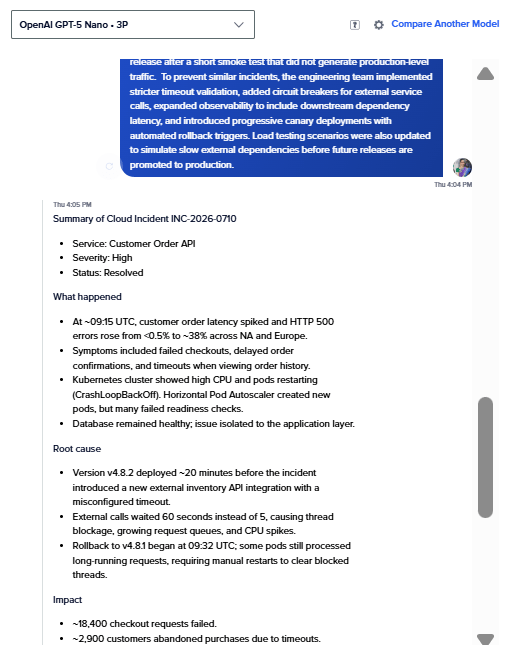
Next, the same incident report was submitted with additional instructions:
Summarize the incident report.
Return JSON only.
{
  "root_cause": "",
  "impact": "",
  "resolution": ""
}
Limit the response to 80 tokens.
This time, the model returned only the required information as a compact JSON object. The response is easier for downstream applications to parse and contains fewer output tokens, reducing inference costs without losing the key details.
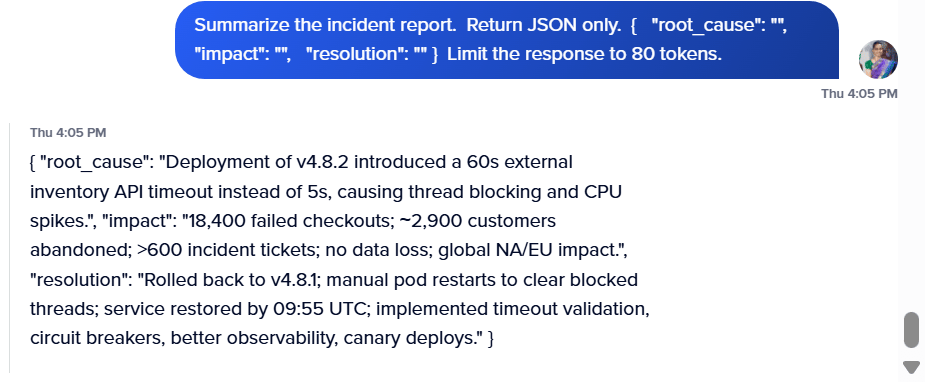
In production applications, you can reinforce these prompt instructions by setting API parameters such as max_tokens to enforce a hard limit on response length. Use a lower temperature for deterministic tasks such as summarization, classification, and information extraction. While temperature does not directly reduce costs, it helps produce more focused, consistent responses that are less likely to include unnecessary text, indirectly lowering output token usage.
Understand how to balance throughput, latency, and cost for AI inference, then learn practical techniques to optimize LLM inference for real-world production workloads:
How to track spend and set budgets in production
A formula tells you what a request should cost, yet real-life production usage is rarely predictable. A prompt that looked like 500 tokens in testing meets edge cases you didn’t account for once real users start typing, or a retry silently fires three times instead of once. Both only become visible once something in your system is actually tracking them.
Monitor request-level metrics and production analytics
Tracking the total cost of an API request is useful, but it does not fully explain why your bill changes. To truly understand your AI spend, log the information behind every request. Metrics like the model used, input and output token counts, latency, cache usage, retries, and the application feature that triggered the request help you identify expensive workloads. These data points help you compare model performance and troubleshoot unexpected cost increases.
In addition to application-level logging, managed inference platforms such as DigitalOcean Serverless Inference provide useful monitoring dashboards. Use the dashboard to monitor token consumption, request volume, latency, and usage trends over time. Regularly reviewing these metrics makes it easier to investigate unexpected changes in AI spending.
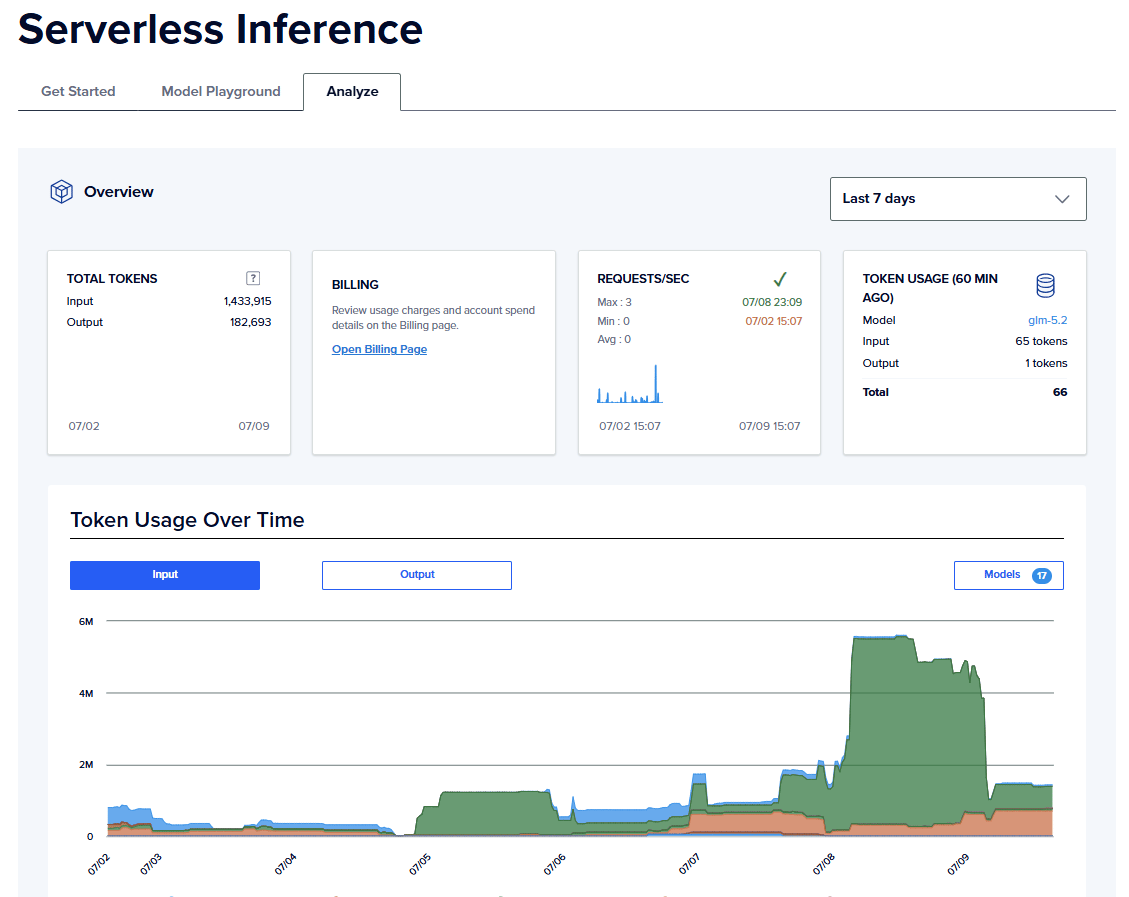
Monitoring Time to First Token (TTFT) and end-to-end latency helps identify performance regressions across models. This is because TTFT and end-to-end latency are numbers that show a regression before ever getting reported as a complaint.
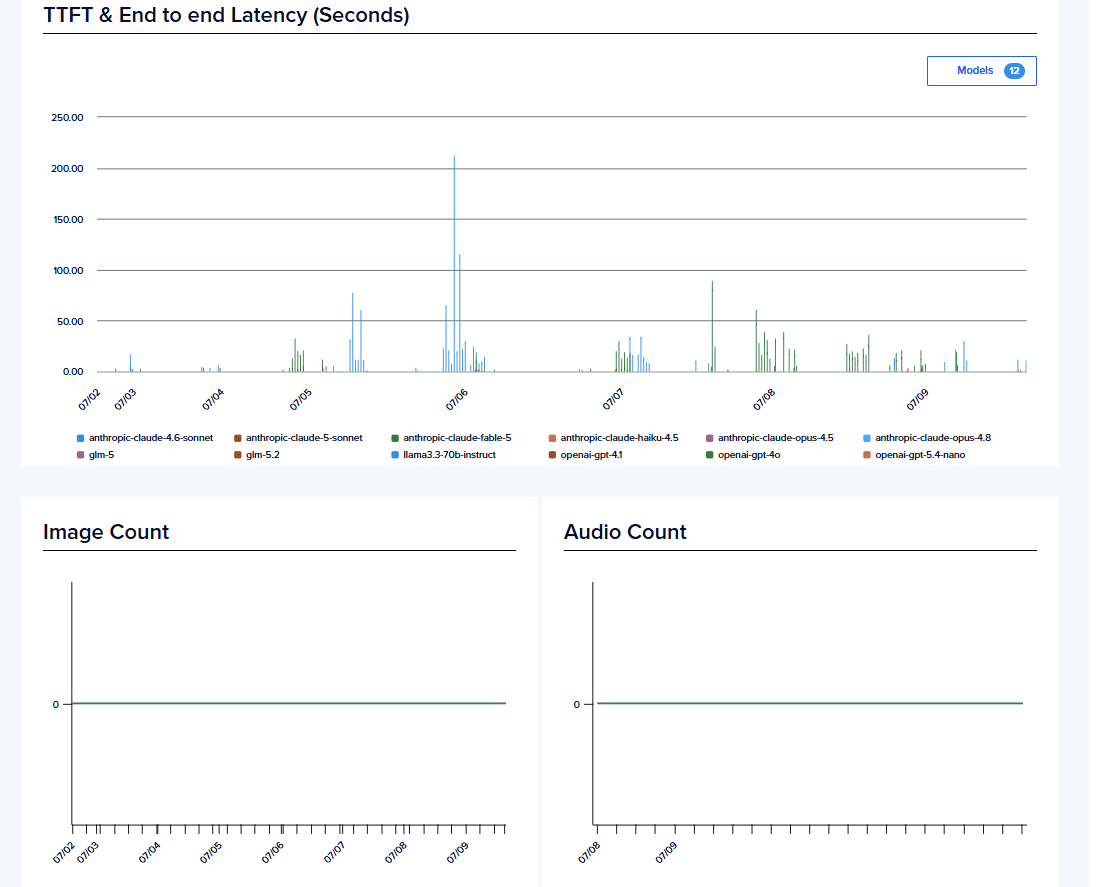
For example, if an AI chatbot suddenly costs twice as much as it did last month, the total spend alone cannot explain the increase. Request-level logs may reveal that the chatbot switched to a more expensive model after a deployment, response lengths doubled, or prompt caching stopped working for a frequently used system prompt. Having those details makes it much easier to identify and fix the issue.
Attribute AI costs to features, users, or teams
As AI adoption grows, multiple products and teams may share the same LLM infrastructure. Without cost attribution, it’s difficult to determine which application or feature is responsible for specific charges on your AI bill. A common approach is to tag every request with metadata: application name, feature, environment, customer, or team. This allows you to group and analyze spending from different perspectives.
Say an organization uses LLMs for document summarization, code generation, and customer support, and AI spending increases after a product release. Cost attribution can quickly show whether the increase came from, for example, the document summarization pipeline processing larger files or from higher customer support traffic.
Set budgets and alerts for unusual spending patterns
Alerts help prevent unexpected costs before they become a larger problem. Instead of relying only on monthly spending limits, monitor daily or hourly usage and compare it with recent trends so unusual activity quickly comes to your attention.
A bug in a document processing workflow may repeatedly retry failed requests, leading to token usage increasing several times over a few hours. A monthly budget might not detect the issue until the invoice arrives, whereas a daily spending alert or anomaly detection rule can notify the team on the same day the issue originates, and workflow updates can be made.
Track metrics that explain cost efficiency
A rising AI bill is not necessarily a sign of inefficient spending. To understand whether costs are justified, monitor metrics that relate spending to usage and business outcomes. Useful metrics include:
-
Cost per request
-
Cost per active user
-
Cost per successful task
-
Cost per generated document or conversation
-
Total token usage by application or feature
Say an AI writing assistant’s monthly spend increases from $2,000 to $3,500. If the number of generated articles also doubles, the cost per generated article has actually decreased, indicating better efficiency despite the higher overall bill. Looking at both cost and usage provides a more meaningful picture than total spending alone.
LLM cost calculation FAQs
How do I predict LLM API costs before they hit my invoice?
Estimate one request’s cost using cost = (input tokens ÷ 1,000,000 × input price) + (output tokens ÷ 1,000,000 × output price), pulling current rates from the provider’s pricing page, then multiply by expected daily volume and by 30 for a monthly figure. Treat that as a starting estimate, not a guarantee, and pad it for retries, longer outputs than testing showed, and faster-than-planned growth. Once the feature is live, providers like DigitalOcean offer inference dashboards that show actual token consumption and usage trends, so you can check them against your estimate within days of launch instead of waiting for the invoice.
What’s the difference between input and output tokens, and why does it matter?
Input tokens are what you send to the model: your prompt, system instructions, and any retrieved context. Output tokens are what the model generates in reply. Providers bill these separately, and output usually costs 3-5x more per token than input, so a short reply can end up costing more than a much longer prompt. It matters because the fix for a high bill depends on which side is driving cost: trim your prompt if input is heavy, or cap and structure responses if output is.
How many tokens are in 1,000 English words on average?
1,000 English words equals about 1,300 tokens, based on the common rule of thumb that 750 words run close to 1,000 tokens in English. That works out to roughly 1.3 tokens per word, or about 4 characters per token. The exact count shifts with content, since code, technical text, and non-English languages tokenize heavier than plain conversational English, so treat 1,300 as a starting estimate, not a fixed number.
How much can prompt caching and batching actually reduce my LLM costs?
Batch inference can reduce inference costs by up to 50% for asynchronous workloads. Prompt caching can lower the cost of repeated prompt prefixes on supported models. Combined, these techniques help reduce production LLM costs for suitable workloads. DigitalOcean Serverless Inference supports Batch Inference for eligible models and aligns pricing with model providers. This makes it easier to optimize costs without changing your application architecture. Always verify the latest discounts and pricing before estimating production budgets.
Start routing smarter with DigitalOcean’s Inference Router
DigitalOcean Inference Engine includes an intelligent Inference Router that determines which model handles each request. You point a request at a router instead of a single hardcoded model. It reads the request, matches it to the best-fit model from the pool you define, and sends the request, using a one-line change to your existing API call. A simple lookup goes to a smaller, less expensive model, while a more involved request gets routed to a more robust option.
DigitalOcean Inference Router features:
-
Automatic routing by cost or latency: Set the priority once—cost, latency, or a manual order to specify—and the router matches each request to the best model in your pool. In other words, no hardcoded model names scattered throughout your codebase.
-
Real savings on real requests: In a walkthrough of the router’s comparison view, one code generation request cost $0.0359 and took 10.5 seconds on a single flagship model. The router sent that same request to a different model instead: under a cent and 6.9 seconds, 88% cheaper and 34% faster on that one request.
-
Presets for common workloads, or build your own: Ready-made routers for software engineering, writing, and document intelligence, or define custom tasks with your own model pool and rules.
-
Automatic failover: If the selected model is down or rate-limited, the router automatically falls back to the next-best option, so one provider’s outage doesn’t take your feature down with it.
-
Protect your caching discount in agent workflows: Long agent sessions that switch models between turns can lose their prompt cache and pay full price on every subsequent turn. Pinning a session to one model keeps the cache intact, worth 45 to 80% in savings on cached input tokens.
-
One endpoint, the whole catalog, full visibility: Add or swap models without rewriting your integration, and see token usage, latency, and cost per request without separate monitoring tools.
Start building with DigitalOcean’s Inference Router.
The calculations in this article use example pricing to demonstrate how LLM costs are estimated. Actual charges vary based on the model, provider, inference mode, token usage, caching, batch processing, and current pricing. Verify the latest pricing for your chosen provider before planning production budgets.
Any references to third-party companies, trademarks, or logos in this document are for informational purposes only and do not imply any affiliation with, sponsorship by, or endorsement of those third parties.
About the author

Sujatha R is a Technical Writer at DigitalOcean. She has over 10+ years of experience creating clear and engaging technical documentation, specializing in cloud computing, artificial intelligence, and machine learning. ✍️ She combines her technical expertise with a passion for technology that helps developers and tech enthusiasts uncover the cloud’s complexity.
Start building today
From GPU-powered inference and Kubernetes to managed databases and storage, get everything you need to build, scale, and deploy intelligent applications.
