

By Sneh and Manikandan Kurup
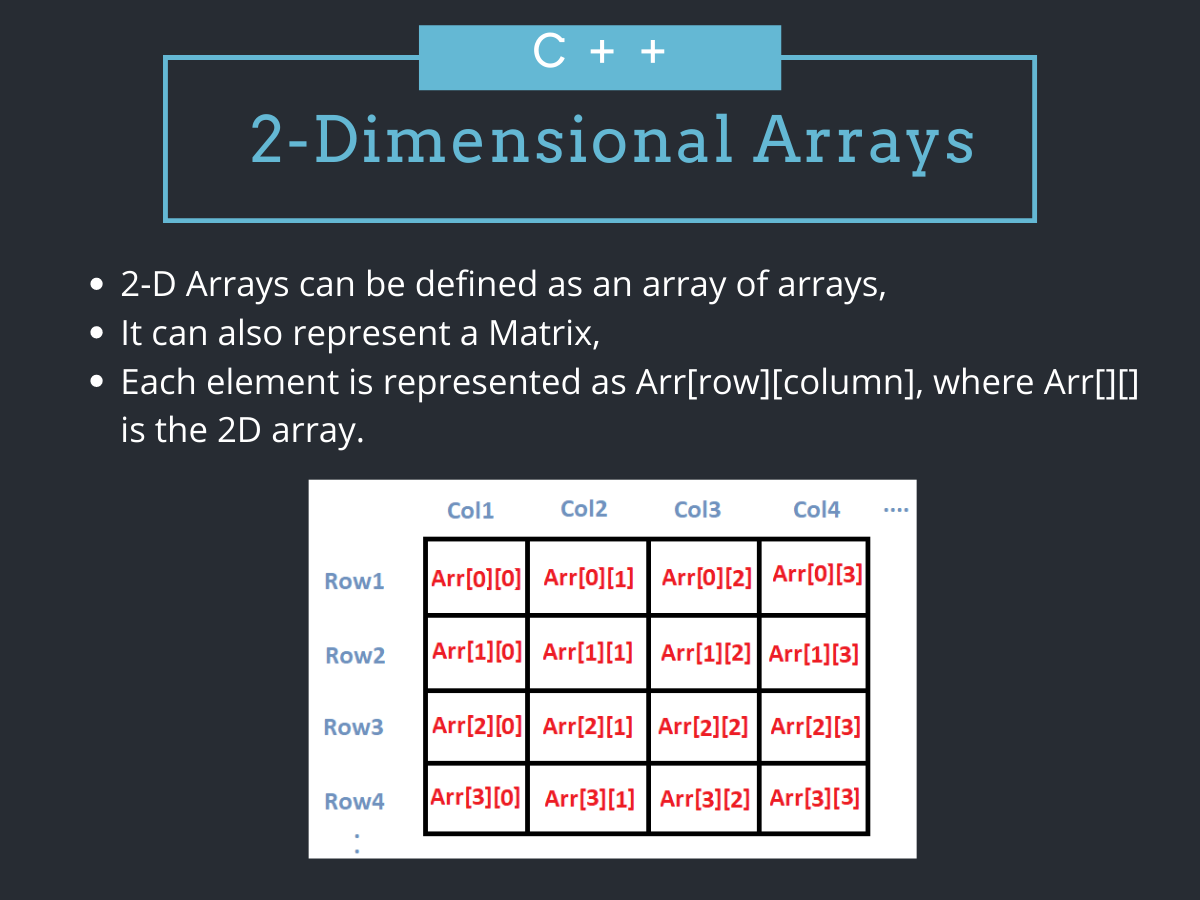
A two-dimensional array in C++ provides a powerful way to organize data into a grid-like table of rows and columns. This article will walk you through the fundamentals of declaring and initializing 2D arrays, including operations like handling user input and performing matrix addition. We will also dive into advanced topics such as dynamic arrays, pointers, the modern std::vector approach, performance optimization, and avoiding common errors. By the end, you will know how to choose between static arrays, pointer-based dynamic arrays, and vectors, and you will get a preview of std::mdspan, the C++23 way to work with multidimensional data. Let’s jump in!
Key takeaways:
- A 2D array organizes data in a grid-like structure, which you typically process using nested
forloops for rows and columns. - When passing a static 2D array to a function, you must always specify the array’s column size in the function’s parameters.
- Static arrays have dimensions fixed at compile time, while dynamic arrays are created at runtime using
new[]for variable sizing. - You must manually deallocate dynamic arrays to prevent memory leaks by deleting each row and then the main pointer.
- For modern C++,
std::vector<std::vector<int>>is the recommended alternative because it automatically manages memory and is safer to use. - C++ stores 2D arrays in row-major order, so processing data row-by-row makes the best use of the CPU cache and runs faster on large datasets.
- A comparison of static arrays, pointer-based arrays, and vectors helps you pick the right structure for compile-time versus runtime sizing.
std::vectorsupports range-basedforloops, resizing, and jagged (uneven) rows, which raw arrays cannot do.std::mdspan, introduced in C++23, gives you a lightweight, multidimensional view over an existing contiguous buffer.
Understanding a 2D array
A two-dimensional array, often called a 2D array or a matrix, is a fundamental data structure in C++. It is essentially an array of arrays: a collection of rows, where each row is itself an array of columns. The following image depicts a two-dimensional array.
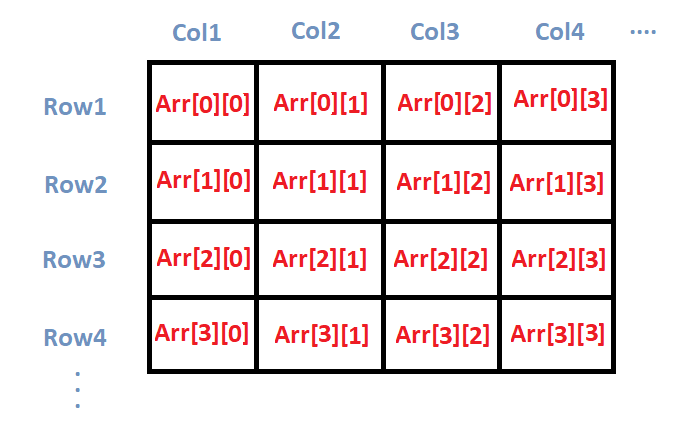
This structure allows you to store and access data in a tabular format, making it incredibly useful for a variety of programming tasks, from simple games to complex scientific computations.
While a one-dimensional array can be visualized as a single row of elements, a 2D array expands this by having multiple rows, each containing multiple columns of elements. All elements in a 2D array must be of the same data type.
C++ inherited its array model directly from the C language, where an array maps to a plain, contiguous block of memory. That low-level design is fast and predictable, but it offers no automatic resizing or bounds checking. This is exactly why std::vector<std::vector<int>> later became a popular alternative for everyday code: it keeps the familiar grid syntax while managing memory for you. We cover that approach in detail in a later section.
Where you will use 2D arrays
Before diving into syntax, it helps to see where this structure appears in real software. Some common use cases include:
- Image processing buffers: A grayscale image is a grid of pixel intensities, with rows and columns mapping directly to a 2D array.
- Game boards: Chess, tic-tac-toe, and grid-based puzzles store their state in a 2D array of cells.
- Adjacency matrices for graphs: A
[N][N]matrix records which of theNnodes in a graph are connected. - Spreadsheet-style data grids: Rows and columns of tabular data map naturally onto a 2D structure.
- Scientific and linear-algebra computations: Matrices for transformations, simulations, and numerical methods are 2D arrays at heart.
How 2D arrays are stored in memory (row-major order)
C++ stores the elements of a 2D array in row-major order, which means the entire first row is laid out in memory first, immediately followed by the entire second row, and so on. For an array declared as int arr[2][3], the elements sit in memory in this order: arr[0][0], arr[0][1], arr[0][2], arr[1][0], arr[1][1], arr[1][2].
This layout is important because it determines which access patterns are fast. As you will see in the optimization section, iterating along rows follows the memory layout and is cache-friendly, while jumping across columns works against it.
Initializing a 2D array in C++
In C++, you can initialize a two-dimensional array at the same time you declare it. The most common method is to use nested curly braces {} to specify the values for each row.
You must always specify the size of the columns, though the row size can sometimes be inferred by the compiler from the initializer list.
int arr[4][2] = {
    {1234, 56},
    {1212, 33},
    {1434, 80},
    {1312, 78}
} ;
As you can see, we initialize a 2D array arr, with 4 rows and 2 columns. It’s an array of arrays, where each element is itself an array of integers.
We can also initialize a 2D array in the following way.
int arr[4][2] = {1234, 56, 1212, 33, 1434, 80, 1312, 78};
In this case too, arr is a 2D array with 4 rows and 2 columns. While this syntax is correct, it is generally considered less readable and can be prone to errors, especially for larger arrays. For better clarity and maintainability, it is highly recommended to use nested curly braces to visually separate the rows.
One more thing worth knowing: if you provide fewer initializers than the array can hold, the remaining elements are automatically set to zero. This gives you a quick way to zero-fill an entire array. For example, int arr[4][2] = {}; sets every element to 0.
Printing a 2D array in C++
In the previous section, we initialized a 2D array. But to verify that it was initialized correctly, we must print its contents. Displaying a 2D array in a readable, grid-like format is a common task. The fundamental idea is to iterate through each row and, for each row, iterate through each of its columns. This is typically achieved using nested loops.
Here’s how we can print a 2D array:
#include <iostream>

using namespace std;

int main() {
    int arr[4][2] = {
        { 10, 11 },
        { 20, 21 },
        { 30, 31 },
        { 40, 41 }
    };

    int i, j;

    cout << "Printing a 2D Array:\n";
    for (i = 0; i < 4; i++) {
        for (j = 0; j < 2; j++) {
            cout << "\t" << arr[i][j];
        }
        cout << endl;
    }

    return 0;
}
In the above code:
- We begin by initializing a 2D array,
arr[4][2]. - Next, we print the array using a pair of nested
forloops. - The outer
forloop iterates over the rows, while the inner loop iterates over the columns of the 2D array. - For each iteration of the outer loop (indexed by
i), the inner loop (indexed byj) traverses all columns of that specific row. - This prints each element,
arr[i][j], individually.
Running this produces the following output:
Printing a 2D Array:
        10      11
        20      21
        30      31
        40      41
Taking 2D array elements as user input
Previously, we saw how to initialize a 2D array with predefined values. Now, let’s see how to populate an array using user input with the help of cin inside nested loops.
#include <iostream>

using namespace std;

int main() {
    int s[2][2];
    int i, j;

    cout << "\n2D Array Input:\n";
    for (i = 0; i < 2; i++) {
        for (j = 0; j < 2; j++) {
            cout << "\ns[" << i << "][" << j << "]=  ";
            cin >> s[i][j];
        }
    }

    cout << "\nThe 2-D Array is:\n";
    for (i = 0; i < 2; i++) {
        for (j = 0; j < 2; j++) {
            cout << "\t" << s[i][j];
        }
        cout << endl;
    }
    return 0;
}
In the code above, we declare a 2x2 2D array named s. A pair of nested for loops then traverses the array, prompting the user for input to populate each element. Finally, the completed array is printed to display the result.
Here’s the output:
2D Array Input:

s[0][0]=  1

s[0][1]=  2

s[1][0]=  3

s[1][1]=  4

The 2-D Array is:
        1       2
        3       4
Matrix addition using two-dimensional arrays in C++
Matrix addition is a fundamental operation in linear algebra where two matrices are added together to produce a third matrix. This operation is straightforward to implement in C++ using two-dimensional arrays. Let’s see an example:
#include <iostream>

using namespace std;

int main() {
    int m1[5][5], m2[5][5], m3[5][5];
    int i, j, r, c;

    cout << "Enter the no.of rows of the matrices to be added(max 5):";
    cin >> r;
    cout << "Enter the no.of columns of the matrices to be added(max 5):";
    cin >> c;

    cout << "\n1st Matrix Input:\n";
    for (i = 0; i < r; i++) {
        for (j = 0; j < c; j++) {
            cout << "\nmatrix1[" << i << "][" << j << "]=  ";
            cin >> m1[i][j];
        }
    }

    cout << "\n2nd Matrix Input:\n";
    for (i = 0; i < r; i++) {
        for (j = 0; j < c; j++) {
            cout << "\nmatrix2[" << i << "][" << j << "]=  ";
            cin >> m2[i][j];
        }
    }

    cout << "\nAdding Matrices...\n";
    for (i = 0; i < r; i++) {
        for (j = 0; j < c; j++) {
            m3[i][j] = m1[i][j] + m2[i][j];
        }
    }

    cout << "\nThe resultant Matrix is:\n";
    for (i = 0; i < r; i++) {
        for (j = 0; j < c; j++) {
            cout << "\t" << m3[i][j];
        }
        cout << endl;
    }

    return 0;
}
In the above code:
- To begin, we declare three 2D arrays:
m1andm2will hold the user’s input, whilem3will store the final result. These arrays are initialized with a maximum size, such as 5x5. - The program first prompts the user to specify the dimensions for the matrices. A key constraint for matrix addition is that both input matrices must have the same dimensions (number of rows and columns).
- Once the dimensions are set, nested
forloops will iterate through each position inm1andm2and populate them with user-provided values. - The addition is then performed with another set of nested loops. Each element in the result matrix (
m3) is calculated by summing the corresponding elements from the input matrices, as shown in this operation:m3[i][j] = m1[i][j] + m2[i][j] - Finally, the complete
m3matrix, containing the results of the addition, is printed.
The output is as follows:
Enter the no.of rows of the matrices to be added(max 5):2
Enter the no.of columns of the matrices to be added(max 5):2

1st Matrix Input:

matrix1[0][0]=  1

matrix1[0][1]=  2

matrix1[1][0]=  3

matrix1[1][1]=  4

2nd Matrix Input:

matrix2[0][0]=  1

matrix2[0][1]=  2

matrix2[1][0]=  3

matrix2[1][1]=  4

Adding Matrices...

The resultant Matrix is:
        2       4
        6       8
Matrix transposition using 2D arrays in C++
Matrix transposition is the operation of flipping a matrix over its diagonal, which turns each row into a column and each column into a row. An m x n matrix becomes an n x m matrix after transposition. The example below transposes a 2x3 matrix into a 3x2 matrix.
#include <iostream>

using namespace std;

int main() {
    int matrix[2][3] = {
        {1, 2, 3},
        {4, 5, 6}
    };

    int transpose[3][2];

    // Swap rows and columns
    for (int i = 0; i < 2; i++) {
        for (int j = 0; j < 3; j++) {
            transpose[j][i] = matrix[i][j];
        }
    }

    cout << "Transposed matrix:\n";
    for (int i = 0; i < 3; i++) {
        for (int j = 0; j < 2; j++) {
            cout << "\t" << transpose[i][j];
        }
        cout << endl;
    }

    return 0;
}
In the code above:
- We declare the original 2x3
matrixand atransposearray with the swapped dimensions, 3x2. - A pair of nested loops copies each element to its mirrored position, where
matrix[i][j]becomestranspose[j][i]. Swapping the indices is what performs the transposition. - The result is printed with another pair of nested loops, using the transposed array’s dimensions.
Running this program logs the following output:
Transposed matrix:
        1       4
        2       5
        3       6
Note that for an in-place transpose, the matrix must be square (n x n), and you only swap the elements above the diagonal with those below it. A separate result array, as shown here, is the simplest approach for non-square matrices.
Searching for an element in a 2D array in C++
Searching means scanning a 2D array to find whether a target value exists and, if so, where it is located. For an unsorted array, the standard approach is a linear search that visits each element with nested loops until it finds a match. The example below searches a 3x3 matrix for a target value and reports its position.
#include <iostream>

using namespace std;

int main() {
    int matrix[3][3] = {
        {10, 20, 30},
        {40, 50, 60},
        {70, 80, 90}
    };

    int target = 50;
    bool found = false;

    for (int i = 0; i < 3 && !found; i++) {
        for (int j = 0; j < 3; j++) {
            if (matrix[i][j] == target) {
                cout << "Found " << target << " at position ["
                     << i << "][" << j << "]" << endl;
                found = true;
                break;
            }
        }
    }

    if (!found) {
        cout << target << " was not found in the matrix." << endl;
    }

    return 0;
}
In the code above:
- We declare a 3x3
matrixand set thetargetvalue we want to locate. - A
foundflag tracks whether the target has been located. The outer loop’s condition includes!found, and the inner loop usesbreak, so the search stops as soon as a match is found instead of scanning the rest of the array. - When a match occurs, the program prints the row and column indices of the element. If the loops finish without a match, it reports that the value was not found.
Running this program logs the following output:
Found 50 at position [1][1]
This linear search runs in O(rows x columns) time in the worst case, which is fine for unsorted data. If the matrix is sorted in a known order, more efficient search strategies are possible, but a linear scan is the most general approach.
Pointer to a 2D array in C++
Just as we can create pointers to integers, floats, and characters, we can also declare a pointer that references an entire array. The following program demonstrates how to implement and use this concept.
#include <iostream>

using namespace std;

int main() {
    int s[5][2] = {
        {1, 2},
        {1, 2},
        {1, 2},
        {1, 2},
        {1, 2}
    };

    int (*p)[2];
    int i, j;

    for (i = 0; i < 5; i++) {
        p = &s[i];
        cout << "Row" << i << ":";
        for (j = 0; j <= 1; j++) {
            cout << "\t" << *(*p + j);
        }
        cout << endl;
    }

    return 0;
}
The code above demonstrates how to traverse and print a 2D array using a pointer:
- First, we initialize a 2D array,
s[5][2], along with a pointer declared asint (*p)[2]. This specific syntax definespas a pointer capable of storing the address of an array of 2 integers. - To understand the logic, remember that a 2D array is effectively an array of arrays. In this example,
sis an array containing 5 elements, where each element is, in turn, an array of 2 integers. - The outer
forloop iterates through these 5 “rows.” In each step, we assign the address of the current rows[i]to our pointerp. - With
pnow pointing to a specific row, the innerforloop iterates through the columns of that row. The expression(*p + j)calculates the memory address of the individual elements[i][j]. By dereferencing this address with*(*p + j), we can access and print the element’s value.
Here’s the print output:
Row0:   1       2
Row1:   1       2
Row2:   1       2
Row3:   1       2
Row4:   1       2
Passing a 2D array to a function
In this section, we’ll learn how to pass a 2D array to a function and access its elements. The code below demonstrates this concept by passing an array, a, to two different functions: show() and print(). Both functions perform the same action, which is to access and display the contents of the array they receive.
#include <iostream>

using namespace std;

void show(int (*q)[4], int row, int col) {
    int i, j;
    for (i = 0; i < row; i++) {
        for (j = 0; j < col; j++) {
            cout << "\t" << *(*(q + i) + j);
        }
        cout << "\n";
    }
    cout << "\n";
}

void print(int q[][4], int row, int col) {
    int i, j;
    for (i = 0; i < row; i++) {
        for (j = 0; j < col; j++) {
            cout << "\t" << q[i][j];
        }
        cout << "\n";
    }
    cout << "\n";
}

int main() {
    int a[3][4] = { 10, 11, 12, 13, 14, 15, 16, 17, 18, 19, 20, 21 };

    show(a, 3, 4);
    print(a, 3, 4);

    return 0;
}
Here:
- In the
show()function, the parameterint (*q)[4]acts like a special pointer designed to hold the location of a single row (which is an array of 4 integers) at a time. - To find an element, this function manually calculates its memory address. The expression
*(*(q + i) + j)first points to the correct row (i) and then finds the specific element (j) within that row. - The
print()function uses a more familiar declaration,int q[][4], which allows you to access elements with the much simpler and more intuitiveq[i][j]notation. - When you pass an array to a function, the
int q[][4]syntax is just a convenient shortcut. Behind the scenes, the compiler treats it exactly the same as the pointer version,int (*q)[4]. - The
show()function’s complex syntax is useful for demonstrating how pointers work “under the hood,” whileprint()uses the simple syntax you would normally use in your code.
Notice that both function signatures require the column size (4) to be specified. This is because the compiler needs the column count to calculate where each row begins in memory. The number of rows, by contrast, can be passed as a separate argument. If you want to pass a grid whose dimensions are only known at runtime, the cleanest option is std::vector<std::vector<int>>, which we cover shortly.
The print output is as follows:
        10      11      12      13
        14      15      16      17
        18      19      20      21

        10      11      12      13
        14      15      16      17
        18      19      20      21
What is a dynamic 2D array?
A dynamic 2D array is a 2D array whose dimensions (rows, columns, or both) are set during program execution. Instead of being allocated on the stack with a fixed size, it is allocated on the heap, a pool of memory available to the program at runtime. This is achieved using pointers and dynamic memory allocation with the new operator.
Why are they needed or helpful?
- Flexibility: The primary advantage is flexibility. You can create arrays of any size, which is crucial when the data size is unknown beforehand. For example, this is useful in a program that processes images of varying resolutions, or a game where the user can select the size of the game board.
- Efficient Memory Usage: You can allocate only as much memory as you need. With a large static array, you might reserve a huge amount of memory that goes unused, whereas a dynamic array can be sized precisely.
How to use dynamic 2D arrays
The most common C-style method for creating a dynamic 2D array is to create an “array of pointers.” Here’s how:
- You first create a dynamic 1D array, where each element is a pointer (specifically, a pointer to an integer,
int*). - Then, for each of those pointers, you dynamically allocate another 1D array of integers.
This creates a 2D structure where a primary pointer (int**) points to an array of row pointers (int*), and each row pointer points to the actual row data. Let’s walk through an example where a user specifies the number of rows and columns.
#include <iostream>

using namespace std;

int main() {
    int rows, cols;
    cout << "Enter number of rows: ";
    cin >> rows;
    cout << "Enter number of columns: ";
    cin >> cols;

    int** matrix;

    matrix = new int*[rows];

    for (int i = 0; i < rows; ++i) {
        matrix[i] = new int[cols];
    }

    cout << "\nFilling the matrix with values (i + j)..." << endl;
    for (int i = 0; i < rows; ++i) {
        for (int j = 0; j < cols; ++j) {
            matrix[i][j] = i + j; // Assign a value
            cout << matrix[i][j] << "\t";
        }
        cout << endl;
    }

    cout << "\nDeallocating memory..." << endl;

    for (int i = 0; i < rows; ++i) {
        delete[] matrix[i]; // Use delete[] for arrays
    }

    delete[] matrix;

    cout << "Memory deallocated successfully." << endl;

    return 0;
}
Here:
- The program first asks the user to specify the dimensions (rows and columns) for a 2D array, allowing the size to be determined at runtime.
- It then creates a dynamic array of pointers (
int** matrix), where the number of pointers is equal to the number of rows the user requested. - Next, it loops through the array of pointers and allocates a separate, dynamic 1D array of integers for each one, creating the columns for each row.
- The code demonstrates how to use this dynamic grid by filling each cell with a value (
i + j) and printing the matrix to the console. - To prevent memory leaks, it begins the deallocation process by looping through and deleting each individual row array that was created.
- Finally, it completes the cleanup by deleting the initial array of pointers itself, ensuring all dynamically allocated memory is returned to the system.
Here’s the output:
Enter number of rows: 2
Enter number of columns: 3

Filling the matrix with values (i + j)...
0       1       2
1       2       3

Deallocating memory...
Memory deallocated successfully.
Drawbacks and dangers
While powerful, C-style dynamic arrays come with significant responsibilities and drawbacks:
- Manual memory management: You are responsible for deallocating the memory you requested. Forgetting to use
delete[]results in a memory leak, where your program holds onto memory it no longer needs, potentially causing it to crash or slow down the system. - Complex deallocation: Deallocation must happen in the reverse order of allocation. You must first delete the memory for each individual row before you delete the memory for the array of pointers. Getting this wrong can lead to crashes or memory leaks.
- No bounds checking: Just like static arrays, there is no built-in protection against accessing an element out of bounds (e.g.,
matrix[rows][cols]). This leads to undefined behavior, which is a common source of bugs. - Memory fragmentation: The rows are allocated as separate blocks in memory. They may not be contiguous (next to each other), which can be slightly less efficient for CPU caching compared to a single, flat block of memory.
Because of these drawbacks, modern C++ guidance is to reach for std::vector instead of raw new/delete[] whenever you can. The next section shows how.
Using std::vector for 2D arrays
std::vector for 2D arraysA std::vector<std::vector<int>> is the modern, recommended way to build a 2D array when the dimensions are not known until runtime. It gives you the same matrix[i][j] syntax as a raw array, but it manages its own memory, so there is no new/delete[] to get wrong, and it can grow or shrink as needed. The outer vector holds the rows, and each inner vector is one row of columns. You can learn more about this structure in the dedicated 2D Vectors in C++ guide.
The example below creates a 3x4 grid, fills it with values, and prints it using range-based for loops.
#include <iostream>
#include <vector>

using namespace std;

int main() {
    // Create a 3x4 grid, every element initialized to 0
    vector<vector<int>> matrix(3, vector<int>(4, 0));

    // Assign a value to each cell
    for (size_t i = 0; i < matrix.size(); ++i) {
        for (size_t j = 0; j < matrix[i].size(); ++j) {
            matrix[i][j] = i * matrix[i].size() + j;
        }
    }

    // Print using range-based for loops
    for (const auto& row : matrix) {
        for (int value : row) {
            cout << "\t" << value;
        }
        cout << endl;
    }

    return 0;
}
In this code:
- The declaration
vector<vector<int>> matrix(3, vector<int>(4, 0))builds 3 rows, where each row is a vector of 4 integers initialized to0. - We use
matrix.size()to get the number of rows andmatrix[i].size()to get the number of columns, so the loops adapt automatically if the dimensions change. - The range-based
forloop (for (const auto& row : matrix)) reads each row without manual index bookkeeping. You can read more about this loop style in the C++ foreach loop tutorial.
Running this program prints the following grid:
        0       1       2       3
        4       5       6       7
        8       9       10      11
A major advantage of vectors over raw arrays is that they can resize at runtime and even hold rows of different lengths (a “jagged” array), as shown below.
vector<vector<int>> grid;     // start empty
grid.push_back({1, 2, 3});    // first row has 3 columns
grid.push_back({4, 5});       // second row has 2 columns (jagged)
grid.resize(5);               // grow to 5 rows; the new rows start empty
For safer element access, prefer matrix.at(i).at(j) over matrix[i][j] when you want bounds checking: .at() throws a std::out_of_range exception on an invalid index, whereas [] causes undefined behavior. This single feature eliminates an entire class of bugs that plague raw arrays.
Static vs. dynamic vs. vector: choosing the right approach
With several ways to build a 2D array available, the natural question is which one to use. The short answer: use a static array for small, fixed-size grids; use std::vector<std::vector<int>> for almost everything else; and reach for a raw pointer-based array only when you cannot use the standard library. The table below summarizes the trade-offs.
| Approach | Memory location | Resizable at runtime | Built-in bounds checking | Best for |
|---|---|---|---|---|
Static array int arr[R][C] |
Stack | No | No | Small grids whose size is known at compile time |
Pointer-based int** (with new) |
Heap | Manual | No | Runtime sizes when the STL is unavailable |
std::vector<std::vector<int>> |
Heap | Yes | With .at() |
Most modern code that needs flexible sizing |
std::mdspan (C++23) |
Views existing memory | No (non-owning) | No | A lightweight, multidimensional view over a buffer |
As the table shows, the static array is the simplest and fastest to set up but is the least flexible. The pointer-based approach buys you runtime sizing at the cost of manual memory management. The vector approach gives you runtime sizing and automatic cleanup, which is why it is the default recommendation for modern code. We cover std::mdspan, the newest option, at the end of this guide.
Optimizing 2D array operations
When working with small 2D arrays, performance is rarely an issue. However, for large datasets, as seen in scientific computing, image processing, or data analysis, how you access and manipulate your array can have a massive impact on execution speed. Performance is often limited not by the CPU’s processing power but by the time it takes to fetch data from main memory (RAM).
The key to optimization lies in understanding and leveraging the CPU cache.
- Prioritize row-major access: C++ stores 2D arrays in row-major order, meaning elements of a row are placed next to each other in memory. When you access an element, the CPU loads a whole block of nearby memory (a “cache line,” typically 64 bytes on modern x86-64 processors) into its fast cache. By accessing elements along a row, you get frequent cache hits, because the next few values you need are already in the fast cache. Conversely, accessing elements column by column forces the CPU to jump to new memory locations for each element, causing slow cache misses. Therefore, your nested loops should always iterate through rows in the outer loop and columns in the inner loop.
- Use a single contiguous memory block: When creating dynamic 2D arrays, the common
int**method (an array of pointers) can scatter the rows across different memory locations. This can reduce cache efficiency when moving from the end of one row to the start of the next. For better performance, allocate the entire 2D array as a single, contiguous 1D block of memory of sizeROWS * COLS. This guarantees that all elements, regardless of row, are packed together, maximizing data locality and improving cache performance. You must then manually calculate the index for each element as[row * COLS + col]. - Leverage compiler optimizations: Modern compilers are excellent at optimizing code. They can automatically perform complex tasks like loop unrolling and vectorization (using special CPU instructions to process multiple data points at once). Always compile your performance-critical code with optimization flags enabled (e.g.,
-O2,-O3for GCC/Clang or/O2for Visual Studio) to get a significant, free performance boost. - Parallelize your loops: For the biggest datasets on modern multi-core processors, the ultimate optimization is to do more work at once. You can parallelize your loops using simple tools like OpenMP. By adding a single directive before your outer loop, you can instruct the compiler to split the work among multiple CPU cores, drastically reducing the total processing time.
Common errors and how to avoid them
Working with 2D arrays can lead to several common bugs. Being aware of these pitfalls can help you write more robust and correct code. The subsections below walk through each error and how to fix it.
Out-of-bounds access
This frequent error is caused by using an index outside the valid 0 to SIZE-1 range. Accessing an element like arr[ROWS] results in undefined behavior, leading to data corruption or crashes. To avoid this, always use strict less-than (<) comparisons in your loops, for example: for (int i = 0; i < ROWS; ++i). When using vectors, prefer .at() for automatic bounds checking.
Incorrectly passing to functions
A common compilation error is forgetting to specify the column size when a function accepts a 2D array. The compiler needs this to calculate memory offsets. To fix this, always define the parameter with the column size specified, such as void func(int arr[][10]). The best way to avoid this issue entirely is to use std::vector, which carries its own size information.
Memory leaks with dynamic arrays
When using new[], failing to delete[] every allocated block causes memory leaks. You must deallocate in the reverse order of allocation: first delete each row array, then delete the array of pointers. The safest way to prevent this is by using std::vector or smart pointers, which manage memory automatically.
Confusing row and column indices
Accidentally swapping indices (writing arr[j][i] instead of arr[i][j]) can cause logical bugs or out-of-bounds errors. Using clear loop variable names like row and col instead of generic i and j makes your code more readable and helps prevent this mistake.
Inefficient looping order
A major performance pitfall is iterating column-by-column instead of row-by-row. This access pattern conflicts with the array’s row-major memory layout and harms CPU cache performance. For efficient code, always structure nested loops so the outer loop iterates through rows and the inner loop handles columns.
Looking ahead: std::mdspan in C++23
std::mdspan in C++23The newest addition to C++ for multidimensional data is std::mdspan, which was voted into the C++23 standard. An mdspan is a non-owning, multidimensional view over a contiguous block of memory that already exists. In other words, it does not allocate or own any data itself; it simply lets you treat a flat 1D buffer as if it were a 2D (or higher-dimensional) array, with convenient index syntax. This combines the performance of a single contiguous block (great cache behavior) with the readability of matrix[i][j]-style access.
The example below views a flat array of 6 integers as a 2x3 matrix.
#include <mdspan>
#include <iostream>

int main() {
    int data[6] = {1, 2, 3, 4, 5, 6};

    // View the flat buffer as a 2x3 matrix
    std::mdspan<int, std::extents<size_t, 2, 3>> view(data);

    for (size_t i = 0; i < view.extent(0); ++i) {
        for (size_t j = 0; j < view.extent(1); ++j) {
            std::cout << view[i, j] << "\t";   // C++23 multidimensional subscript
        }
        std::cout << "\n";
    }

    return 0;
}
This program reinterprets the 6-element buffer as two rows of three columns and prints the following:
1       2       3
4       5       6
A few things to keep in mind about std::mdspan:
- It is a view, not a container. The underlying
dataarray still owns the memory, so themdspanis only valid while that buffer is alive. - The
view[i, j]multidimensional subscript syntax is a C++23 feature, and compiler support for it is still maturing. If your toolchain does not yet support it, you can use the header-only reference implementation from the Kokkos project, which works on older standards.
Note: std::mdspan was standardized in C++23, but compiler and standard library support is still evolving. Availability depends on your compiler and standard library version.
For most everyday code, std::vector<std::vector<int>> remains the practical default. Reach for std::mdspan when you have a performance-sensitive contiguous buffer and want safe, readable multidimensional indexing over it.
FAQs
1. How do you declare a 2D array in C++?
You declare a 2D array by specifying its data type, a name, and the number of rows and columns in separate square brackets. The dimensions must be constant values known at compile time for a static array.
Syntax:
data_type array_name[NUMBER_OF_ROWS][NUMBER_OF_COLUMNS];
For example:
int matrix[3][4];
2. How can you initialize a 2D array in C++?
You can initialize a 2D array at the time of declaration using nested curly braces {}, where each inner set of braces represents a row. If you provide fewer values than the array holds, the remaining elements are set to zero.
For example:
int matrix[3][4] = {
    {1, 2, 3, 4},
    {5, 6, 7, 8},
    {9, 10, 11, 12}
};
3. How do you access elements in a 2D array?
You access an element by using the array name followed by the row and column index in square brackets. C++ uses zero-based indexing, so the first row and first column are at index 0.
Syntax:
array_name[row_index][column_index]
For example:
int value = matrix[1][2];
4. How do you pass a 2D array to a function in C++?
When passing a static 2D array to a function, you must specify the size of the columns in the function’s parameter list, while the number of rows is often passed as a separate argument. This is because the compiler needs the column count to compute memory offsets.
Method 1: Standard syntax
The most common way is to leave the row dimension empty but specify the column dimension:
const int COLS = 4;

void displayMatrix(int arr[][COLS], int rows) {
    // function body to print the array
}
Method 2: Modern C++ (recommended)
The safest and most flexible method is to use a std::vector of vectors, which carries its own size information and can be passed by reference without these rules:
#include <vector>

void displayMatrix(const std::vector<std::vector<int>>& matrix) {
    // function body to print the vector
}
5. What is the difference between a static 2D array and a dynamic 2D array in C++?
A static 2D array is allocated on the stack with fixed dimensions that must be known at compile time. A dynamic 2D array is allocated on the heap (typically using new or a std::vector), which allows its dimensions to be set at runtime. The trade-off is that a raw dynamic array allocated with new requires you to call delete[] manually to free the memory, whereas a static array and a std::vector are cleaned up automatically.
6. What are the disadvantages of using raw arrays in C++?
Raw arrays have a fixed size, no built-in bounds checking, and they “decay” to a pointer when passed to a function, which loses their size information. When allocated dynamically with new, they also require manual memory management, making memory leaks easy to introduce. For these reasons, std::vector is preferred in most modern code because it solves all of these problems automatically.
7. How does memory layout affect performance when iterating over a 2D array?
C++ stores 2D arrays in row-major order, meaning each row’s elements sit contiguously in memory. Iterating row by row accesses these adjacent addresses, which is cache-friendly and fast. Iterating column by column forces the CPU to jump across memory, causing cache misses that are measurably slower on large arrays. The practical rule is to always loop with rows in the outer loop and columns in the inner loop.
8. When should I use std::vector<std::vector<int>> instead of a raw 2D array?
Use std::vector<std::vector<int>> when the array dimensions are not known at compile time, when you need to resize rows or columns at runtime, or when you want automatic memory management without new and delete[]. It also supports jagged rows (rows of different lengths) and bounds-checked access through .at(), which raw arrays cannot offer.
9. How do you perform matrix addition with 2D arrays in C++?
You perform matrix addition by iterating over each position [i][j] in two same-dimension arrays and storing the sum in a result array: result[i][j] = a[i][j] + b[i][j];. Both input matrices must have identical row and column counts, since matrix addition is defined element by element.
10. What is std::mdspan and how does it relate to 2D arrays in C++?
std::mdspan, introduced in C++23, is a non-owning multidimensional view over a contiguous (or strided) block of memory. It provides a flexible multidimensional indexing interface without copying or owning the underlying data.
Conclusion
In this article, we have explained two-dimensional arrays, covering static declaration, dynamic allocation, and practical operations like matrix addition. We explored the nuances of using pointers and passing arrays to functions, compared static arrays, pointer-based arrays, and std::vector, and previewed std::mdspan from C++23. Most importantly, we highlighted the common pitfalls of C-style arrays and contrasted them with the benefits of using modern C++ alternatives.
To continue expanding your knowledge of arrays and related structures in C++, here are a few useful tutorials:
Thanks for learning with the DigitalOcean Community. Check out our offerings for compute, storage, networking, and managed databases.
About the author(s)

With over 6 years of experience in tech publishing, Mani has edited and published more than 75 books covering a wide range of data science topics. Known for his strong attention to detail and technical knowledge, Mani specializes in creating clear, concise, and easy-to-understand content tailored for developers.
Still looking for an answer?


Write a C++ programme and initialize a 2d array of size [4][4] and display it. please solve it!!!
- unzillah
I did not understand the concept properly plz do say in simple way to understand for the students
- Reya
write c++ program that will ask the user to enter the array size, desired elements and output the total sum of elements stored in array ANYONE CAN ANSWER THIS PLEASE, asap. THANKYOU IN ADVANCE
- TAKOOOOHAKI
 This work is licensed under a Creative Commons Attribution-NonCommercial- ShareAlike 4.0 International License.
Become a contributor for community
Get paid to write technical tutorials and select a tech-focused charity to receive a matching donation.

DigitalOcean Documentation
Full documentation for every DigitalOcean product.

Resources for startups and AI-native businesses
The Wave has everything you need to know about building a business, from raising funding to marketing your product.
The developer cloud
Scale up as you grow — whether you're running one virtual machine or ten thousand.

Start building today
From GPU-powered inference and Kubernetes to managed databases and storage, get everything you need to build, scale, and deploy intelligent applications.
