
Today we will look into Logger in Java. Java Logger provides logging in java programming.
Logger in Java
 Java Logging API was introduced in 1.4 and you can use java logging API to log application messages. In this java logging tutorial, we will learn basic features of Java Logger. We will also look into Java Logger example of different logging levels, Logging Handlers, Formatters, Filters, Log Manager and logging configurations.
Java Logger
java.util.logging.Logger is the class used to log application messages in java logging API. We can create java Logger with very simple one line code as;
Logger logger = Logger.getLogger(MyClass.class.getName());
Java Logging Levels
java.util.logging.Level defines the different levels of java logging. There are seven levels of logging in java.
- SEVERE (highest)
- WARNING
- INFO
- CONFIG
- FINE
- FINER
- FINEST
There are two other logging levels, OFF that will turn off all logging and ALL that will log all the messages. We can set the logger level using following code:
logger.setLevel(Level.FINE);
The logs will be generated for all the levels equal to or greater than the logger level. For example if logger level is set to INFO, logs will be generated for INFO, WARNING and SEVERE logging messages.
Java Logging Handlers
We can add multiple handlers to a java logger and whenever we log any message, every handler will process it accordingly. There are two default handlers provided by Java Logging API.
- ConsoleHandler: This handler writes all the logging messages to console
- FileHandler: This handler writes all the logging messages to file in the XML format.
We can create our own custom handlers also to perform specific tasks. To create our own Handler class, we need to extend java.util.logging.Handler class or any of it’s subclasses like StreamHandler, SocketHandler etc. Here is an example of a custom java logging handler:
package com.journaldev.log;

import java.util.logging.LogRecord;
import java.util.logging.StreamHandler;

public class MyHandler extends StreamHandler {

    @Override
    public void publish(LogRecord record) {
        //add own logic to publish
        super.publish(record);
    }


    @Override
    public void flush() {
        super.flush();
    }


    @Override
    public void close() throws SecurityException {
        super.close();
    }

}
Java Logging Formatters
Formatters are used to format the log messages. There are two available formatters in java logging API.
- SimpleFormatter: This formatter generates text messages with basic information. ConsoleHandler uses this formatter class to print log messages to console.
- XMLFormatter: This formatter generates XML message for the log, FileHandler uses XMLFormatter as a default formatter.
We can create our own custom Formatter class by extending java.util.logging.Formatter class and attach it to any of the handlers. Here is an example of a simple custom formatter class.
package com.journaldev.log;

import java.util.Date;
import java.util.logging.Formatter;
import java.util.logging.LogRecord;

public class MyFormatter extends Formatter {

    @Override
    public String format(LogRecord record) {
        return record.getThreadID()+"::"+record.getSourceClassName()+"::"
                +record.getSourceMethodName()+"::"
                +new Date(record.getMillis())+"::"
                +record.getMessage()+"\n";
    }

}
Logger in Java - Java Log Manager
java.util.logging.LogManager is the class that reads the logging configuration, create and maintains the logger instances. We can use this class to set our own application specific configuration.
LogManager.getLogManager().readConfiguration(new FileInputStream("mylogging.properties"));
Here is an example of Java Logging API Configuration file. If we don’t specify any configuration, it’s read from JRE Home lib/logging.properties file. mylogging.properties
handlers= java.util.logging.ConsoleHandler

.level= FINE

# default file output is in user's home directory.
java.util.logging.FileHandler.pattern = %h/java%u.log
java.util.logging.FileHandler.limit = 50000
java.util.logging.FileHandler.count = 1
java.util.logging.FileHandler.formatter = java.util.logging.XMLFormatter

# Limit the message that are printed on the console to INFO and above.
java.util.logging.ConsoleHandler.level = INFO
java.util.logging.ConsoleHandler.formatter = java.util.logging.SimpleFormatter

com.journaldev.files = SEVERE
Here is a simple java program showing usage of Logger in Java.
package com.journaldev.log;

import java.io.FileInputStream;
import java.io.IOException;
import java.util.logging.ConsoleHandler;
import java.util.logging.FileHandler;
import java.util.logging.Handler;
import java.util.logging.Level;
import java.util.logging.LogManager;
import java.util.logging.Logger;

public class LoggingExample {

    static Logger logger = Logger.getLogger(LoggingExample.class.getName());

    public static void main(String[] args) {
        try {
            LogManager.getLogManager().readConfiguration(new FileInputStream("mylogging.properties"));
        } catch (SecurityException | IOException e1) {
            e1.printStackTrace();
        }
        logger.setLevel(Level.FINE);
        logger.addHandler(new ConsoleHandler());
        //adding custom handler
        logger.addHandler(new MyHandler());
        try {
            //FileHandler file name with max size and number of log files limit
            Handler fileHandler = new FileHandler("/Users/pankaj/tmp/logger.log", 2000, 5);
            fileHandler.setFormatter(new MyFormatter());
            //setting custom filter for FileHandler
            fileHandler.setFilter(new MyFilter());
            logger.addHandler(fileHandler);

            for(int i=0; i<1000; i++){
                //logging messages
                logger.log(Level.INFO, "Msg"+i);
            }
            logger.log(Level.CONFIG, "Config data");
        } catch (SecurityException | IOException e) {
            e.printStackTrace();
        }
    }

}
When you will run above java logger example program, you will notice that CONFIG log is not getting printed in file, that is because of MyFilter class.
package com.journaldev.log;

import java.util.logging.Filter;
import java.util.logging.Level;
import java.util.logging.LogRecord;

public class MyFilter implements Filter {

 @Override
 public boolean isLoggable(LogRecord log) {
  //don't log CONFIG logs in file
  if(log.getLevel() == Level.CONFIG) return false;
  return true;
 }

}
Also the output format will be same as defined by MyFormatter class.
1::com.journaldev.log.LoggingExample::main::Sat Dec 15 01:42:43 PST 2012::Msg977
1::com.journaldev.log.LoggingExample::main::Sat Dec 15 01:42:43 PST 2012::Msg978
1::com.journaldev.log.LoggingExample::main::Sat Dec 15 01:42:43 PST 2012::Msg979
1::com.journaldev.log.LoggingExample::main::Sat Dec 15 01:42:43 PST 2012::Msg980
If we don’t add our own Formatter class to FileHandler, the log message will be printed like this.
<record>
  <date>2012-12-14T17:03:13</date>
  <millis>1355533393319</millis>
  <sequence>996</sequence>
  <logger>com.journaldev.log.LoggingExample</logger>
  <level>INFO</level>
  <class>com.journaldev.log.LoggingExample</class>
  <method>main</method>
  <thread>1</thread>
  <message>Msg996</message>
</record>
Console log messages will be of following format:
Dec 15, 2012 1:42:43 AM com.journaldev.log.LoggingExample main
INFO: Msg997
Dec 15, 2012 1:42:43 AM com.journaldev.log.LoggingExample main
INFO: Msg998
Dec 15, 2012 1:42:43 AM com.journaldev.log.LoggingExample main
INFO: Msg998
Below image shows the final Java Logger example project. 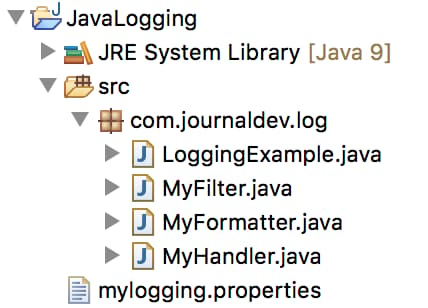 That’s all for Logger in Java and Java Logger Example. You can download the project from below link.
Download Java Logger Example Project
Reference: Java Logging API
Thanks for learning with the DigitalOcean Community. Check out our offerings for compute, storage, networking, and managed databases.
About the author

Java and Python Developer for 20+ years, Open Source Enthusiast, Founder of https://www.askpython.com/, https://www.linuxfordevices.com/, and JournalDev.com (acquired by DigitalOcean). Passionate about writing technical articles and sharing knowledge with others. Love Java, Python, Unix and related technologies. Follow my X @PankajWebDev
Still looking for an answer?
 This work is licensed under a Creative Commons Attribution-NonCommercial- ShareAlike 4.0 International License.
Become a contributor for community
Get paid to write technical tutorials and select a tech-focused charity to receive a matching donation.

DigitalOcean Documentation
Full documentation for every DigitalOcean product.

Resources for startups and AI-native businesses
The Wave has everything you need to know about building a business, from raising funding to marketing your product.
The developer cloud
Scale up as you grow — whether you're running one virtual machine or ten thousand.

Start building today
From GPU-powered inference and Kubernetes to managed databases and storage, get everything you need to build, scale, and deploy intelligent applications.


