
Today we will look into the Java file path. Java File path can be abstract, absolute or canonical.
Java File Path
java.io.File contains three methods for determining the file path, we will explore them in this tutorial.
getPath(): This file path method returns the abstract pathname as String. If String pathname is used to create File object, it simply returns the pathname argument. If URI is used as argument then it removes the protocol and returns the file name.getAbsolutePath(): This file path method returns the absolute path of the file. If File is created with absolute pathname, it simply returns the pathname. If the file object is created using a relative path, the absolute pathname is resolved in a system-dependent way. On UNIX systems, a relative pathname is made absolute by resolving it against the current user directory. On Microsoft Windows systems, a relative pathname is made absolute by resolving it against the current directory of the drive named by the pathname, if any; if not, it is resolved against the current user directory.[getCanonicalPath](https://docs.oracle.com/javase/7/docs/api/java/io/File.html#getCanonicalPath())(): This path method returns the canonical pathname that is both absolute and unique. This method first converts this pathname to absolute form if necessary, as if by invoking the getAbsolutePath method, and then maps it to its unique form in a system-dependent way. This typically involves removing redundant names such as “.” and “…” from the pathname, resolving symbolic links (on UNIX platforms), and converting drive letters to a standard case (on Microsoft Windows platforms).
Java File Path Example
Let’s see different cases of the file path in java with a simple program.
package com.journaldev.files;

import java.io.File;
import java.io.IOException;
import java.net.URI;
import java.net.URISyntaxException;

public class JavaFilePath {

	public static void main(String[] args) throws IOException, URISyntaxException {
		File file = new File("/Users/pankaj/test.txt");
		printPaths(file);
		// relative path
		file = new File("test.xsd");
		printPaths(file);
		// complex relative paths
		file = new File("/Users/pankaj/../pankaj/test.txt");
		printPaths(file);
		// URI paths
		file = new File(new URI("file:///Users/pankaj/test.txt"));
		printPaths(file);
	}

	private static void printPaths(File file) throws IOException {
		System.out.println("Absolute Path: " + file.getAbsolutePath());
		System.out.println("Canonical Path: " + file.getCanonicalPath());
		System.out.println("Path: " + file.getPath());
	}

}
Below image shows the output produced by the above java file path program. 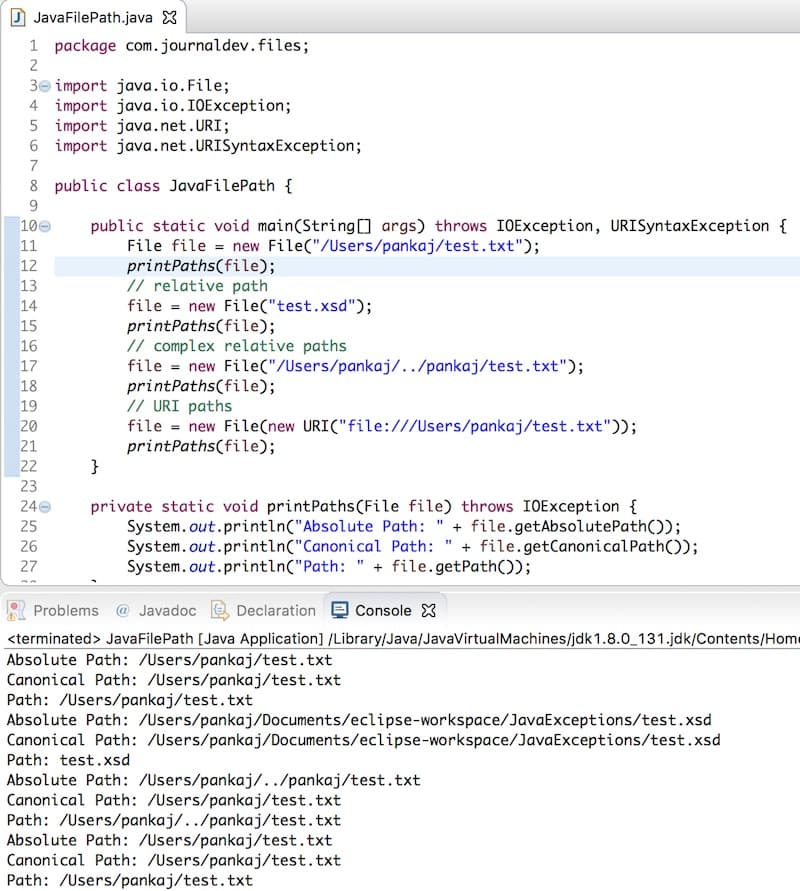 The output is self-explanatory. Based on the output, using the canonical path is best suitable to avoid any issues because of relative paths. Also, note that the java file path methods don’t check if the file exists or not. They just work on the pathname of the file used while creating the File object. That’s all for different types of the file path in java.
You can checkout more java IO examples from our GitHub Repository.
Thanks for learning with the DigitalOcean Community. Check out our offerings for compute, storage, networking, and managed databases.
About the author

Java and Python Developer for 20+ years, Open Source Enthusiast, Founder of https://www.askpython.com/, https://www.linuxfordevices.com/, and JournalDev.com (acquired by DigitalOcean). Passionate about writing technical articles and sharing knowledge with others. Love Java, Python, Unix and related technologies. Follow my X @PankajWebDev
Still looking for an answer?
 This work is licensed under a Creative Commons Attribution-NonCommercial- ShareAlike 4.0 International License.
Become a contributor for community
Get paid to write technical tutorials and select a tech-focused charity to receive a matching donation.

DigitalOcean Documentation
Full documentation for every DigitalOcean product.

Resources for startups and AI-native businesses
The Wave has everything you need to know about building a business, from raising funding to marketing your product.
The developer cloud
Scale up as you grow — whether you're running one virtual machine or ten thousand.

Start building today
From GPU-powered inference and Kubernetes to managed databases and storage, get everything you need to build, scale, and deploy intelligent applications.


