
By Pablo Carranza

Introduction
Are you a recent cloud hosting convert and find yourself struggling to figure out how to best manage the files on your first virtual private server (VPS)? Do you find yourself intimidated by the command line? If so, you will be happy to learn that FileZilla provides a user-friendly graphical interface that can securely transfer files to-and-from, as well as move files around within, your VPS.
Secure Communication
The two most common methods of securely transmitting information between two computers are the (i) Secure Shell (SSH) and (ii) Transport Layer Security (TLS), and its predecessor Secure Sockets Layer (SSL), cryptographic protocols. Both are public-key cryptography tunneling protocols that aim to create a secure, confidential exchange of data and connection across a network (particularly the internet). The encryption technologies used by both protocols are very reliable, and are (when configured correctly) nearly impossible for hackers to break into. However, while both protocols provide similar services, they are not the same. In fact, they have several significant differences that are beyond the scope of this article.
Today, OpenSSH is a default software package found on Unix-like operating systems such as Mac OS X and Linux. Thus, programs or subsystems that are based on the SSH protocol will work “out-of-the-box” without having to go through the additional steps of either purchasing or creating the requisite SSL certificate needed for certain modes of secure data transmissions via TLS/SSL.
FTP vs. SCP vs. SFTP vs. FTPS
When needing to upload or download files from your VPS in real time, you essentially have the following options:
- File Transfer Protocol (FTP);
- Secure Copy Program (SCP);
- SSH File Transfer Protocol (SFTP); or
- FTP over TLS/SSL (FTPS).
FTP *not secure
Among the various file-transfer options, one should never, ever, ever connect to a remote server via FTP; SCP and SFTP are just as easy to use, but provide much more security. In addition, while FTP requires the installation of FTP server software such as vsFTP or ProFTP, both SCP and SFTP utilize the SSH protocol and, as a result, will work “out-of-the-box” when connecting to a remote Unix-like machine, such as Mac OS X or Linux.
SCP vs. SFTP
Given that both SCP and SFTP utilize the SSH protocol in connecting to another computer, the two methods are fairly equal in regard to security. SFTP has a slight edge in regard to efficiency, because an interrupted file-transfer can resume where it left off in the event of a broken connection that is later re-established.
SFTP vs. FTPS
SFTP should not be confused with FTPS, because the two methods are incompatible with each other. While FTPS can provide equal security, it does require additional steps to deploy if one does not already have an SSL certificate.
SFTP Clients
There are several quality SFTP clients out there: Cyberduck, Filezilla or WinSCP, to name a few. This article, however, will focus on Filezilla – an open-source (i.e. free) FTP client for Windows, Mac OS X and Linux. In addition to being able to download the program, the filezilla-project.org site also contains a documentation Wiki and a Support Forum.
Key-based Authentication
With SFTP, you have two user-authentication options when connecting to a cloud server: (i) passwords or (ii) SSH keys. For a discussion on the benefits of SSH keys over passwords and/or instructions on setting up password-less logins on your server, please refer to How To Create SSH Keys with PuTTY to Connect to a VPS.
SFTP via SSH2 Key-based Authentication
FileZilla has a built-in key management page in the Settings dialog, which allows you to save your Public (SSH) Key and to (securely) automate the process of connecting to a remote server.
Prequisite
If you have yet to create an SSH key pair, you can do so by following one of two DigitalOcean tutorials:
- Windows users: How To Create SSH Keys with PuTTY to Connect to a VPS
- Mac OSX & Linux users: How To Set Up SSH Keys
Follow these steps once you have an SSH key pair that you would like to use to connect to your VPS:
- Open the FileZilla client.
- From the top of the home screen, click on Edit and select Settings.
- On the left side of the menu, expand the Connection section and highlight SFTP.
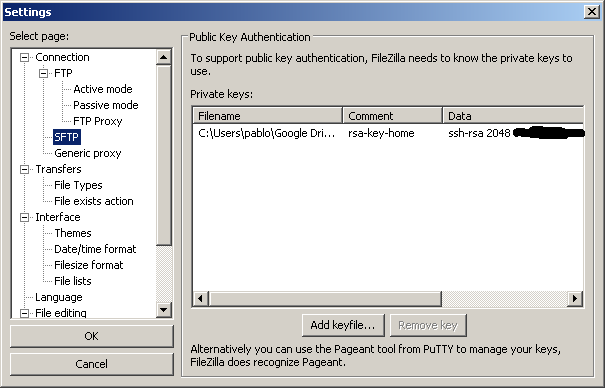
- Click on the [Add keyfile…] button and browse your local machine’s directories and select your Private Key file.
- Then, again from the top of FileZilla’s home screen, click on File and select Site Manager.
- Finally, on the left side of the Site Manager, click on the New Site button and type a unique name under My Sites that will allow you to easily identify this particular remote server in the future.
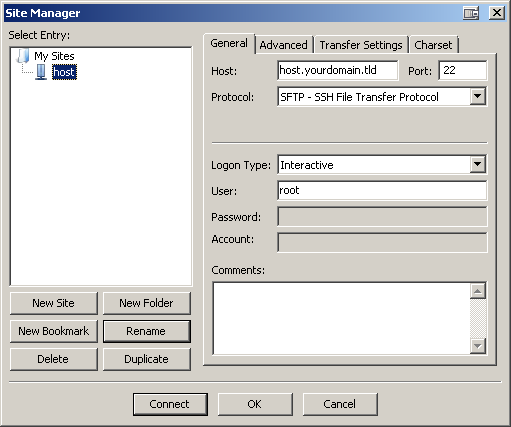
- Now, under the General tab, fill in the Host (with either an IP address or FQDN) and Port fields (default is 22).
- In the Protocol dropdown menu, select SFTP - SSH File Transfer Protocol.
- In the Logon Type dropdown menu, select Interactive.
Note for PuTTY users with passphrase-protected public keys: If your original .ppk file is password-protected, FileZilla will convert your .ppk file to an unprotected one when importing the key into FileZilla. As of version 3.0.10, a password-protected key file is not yet supported.
If a password-protected key file is desired, FileZilla is able to utilize PuTTY’s Pageant tool.
- Simply run Pageant; in your system tray, you will see the Pageant icon appear.
- Right-click on the icon and select Add Key and select your private key (.ppk) file.
- Then, follow the prompt to enter your passphrase.
- Finally, launch FileZilla and connect to your virtual private server via SFTP using SSH2 with a username and an empty password (do not forget to close pageant when you are done).
Editing Text Files
In managing your VPS, you will inevitably encounter a situation where some programming (text) files require edits. FileZilla does not carry a built-in text editor, which gives you the freedom of using any text editor of your choice. A popular editor among Windows users is Notepad++ because it is lightweight and can work with many of today’s popular programming languages.
By default, FileZilla is configured to utilize your local system’s default editor. If you do not wish to make Notepad++ your system’s default text editor, but would nevertheless like to use it to edit HTML, XML, Python, CSS, PHP & other programming files on your VPS:
- From the FileZilla home screen, click on Edit and select Settings.
- Along the left side of the Settings window, highlight File editing.
- Then, select the radio button associated with Use custom editor and click on the Browse button.
- Find your desired editor’s executable (.exe on Windows machines), double-click on it, and click the OK button to save your changes & close the Settings window.
<p><div class=“author”>Article submitted by: <a href=“https://plus.google.com/107285164064863645881?rel=author” target=“_blank”>Pablo Carranza</a> </div></p>
Thanks for learning with the DigitalOcean Community. Check out our offerings for compute, storage, networking, and managed databases.
About the author

Still looking for an answer?
 This work is licensed under a Creative Commons Attribution-NonCommercial- ShareAlike 4.0 International License.
Become a contributor for community
Get paid to write technical tutorials and select a tech-focused charity to receive a matching donation.

DigitalOcean Documentation
Full documentation for every DigitalOcean product.

Resources for startups and AI-native businesses
The Wave has everything you need to know about building a business, from raising funding to marketing your product.
The developer cloud
Scale up as you grow — whether you're running one virtual machine or ten thousand.

Start building today
From GPU-powered inference and Kubernetes to managed databases and storage, get everything you need to build, scale, and deploy intelligent applications.



