
By Erika Heidi
Developer Advocate

Introduction
As more developers work within distributed environments, tools like Kubernetes have become central to keeping application components standardized across dynamic build and production environments. With the increasing complexity of application ecosystems and the growing popularity of Kuberbetes, tools that help manage resources within Kubernetes clusters have become essential.
Helm is an open-source package manager for Kubernetes that simplifies the process of deploying and upgrading applications on a Kubernetes cluster, while also providing a way to find and share ready-to-install applications that are packaged as Kubernetes Charts.
In this tutorial, we’ll use Helm for setting up WordPress on top of a Kubernetes cluster, in order to create a highly-available website. In addition to leveraging the intrinsic scalability and high availability aspects of Kubernetes, this setup will help keeping WordPress secure by providing simplified upgrade and rollback workflows via Helm.
We’ll be using an external MySQL server in order to abstract the database component, since it can be part of a separate cluster or managed service for extended availability. After completing the steps described in this tutorial, you will have a fully functional WordPress installation within a containerized cluster environment managed by Kubernetes.
If you’re looking for a managed Kubernetes hosting service, check out our simple, managed Kubernetes service built for growth.
Prerequisites
In order to complete this guide, you will need the following available to you:
- A Kubernetes 1.10+ cluster with role-based access control (RBAC) enabled.
- The
kubectlcommand-line tool installed on your local machine or development server, configured to connect to your cluster. Please see the official Kubernetes documentation for instructions on how to set this up. - The Helm package manager installed on your local machine or development server, and Tiller installed on your cluster, as explained in this tutorial: How To Install Software on Kubernetes Clusters with the Helm Package Manager.
- An external MySQL server with SSH access, and the root MySQL password. To set this up, you can follow one of our MySQL tutorials, such as: How To Install MySQL on Ubuntu 18.04 .
Before moving on, make sure you’re able to log into your MySQL server, and that you have connectivity to your Kubernetes cluster. In case you have multiple clusters set up in your kubectl config file, you should make sure that you’re connected to the correct cluster by running the following command from your local machine or development server:
- kubectl config get-contexts
This is an example output:
Output
CURRENT   NAME                        CLUSTER                     AUTHINFO                          NAMESPACE
*         do-sfo2-wordpress-cluster   do-sfo2-wordpress-cluster   do-sfo2-wordpress-cluster-admin
          minikube                    minikube                    minikube
The asterisk sign (*) indicates which cluster is currently the default context. In case you need to change the current context, run:
- kubectl config use-context context-name
You should now be ready to follow the rest of the guide.
Step 1 — Configuring MySQL
First, we’ll create a dedicated MySQL user and a database for WordPress, allowing connections from external hosts. This is necessary because our WordPress installation will live on a separate server inside the Kubernetes cluster. In case you already have a dedicated MySQL user and database set up for WordPress, you can skip to the next step.
From the MySQL server, log into MySQL with the following command:
- mysql -u root -p
You will be prompted to provide the password you set up for the root MySQL account when you first installed the software. After logging in, MySQL will give you a command prompt you can use to create the database and user we need for WordPress.
Note: For this tutorial, we’ll be creating a database named wordpress and a user named wordpress_user, identified by the password password. Please note that these are insecure example values, and you should modify them accordingly throughout this guide.
To create the database, you can use the following statement:
- CREATE DATABASE wordpress;
Now, let’s create a dedicated MySQL user for this database:
- CREATE USER wordpress_user IDENTIFIED BY 'password';
The user wordpress_user was created, but it doesn’t have any access permissions yet. The following command will give this user admin access (all privileges) to the wordpress database from both local and external networks:
- GRANT ALL PRIVILEGES ON wordpress.* TO wordpress_user@'%';
To update the internal MySQL tables that manage access permissions, use the following statement:
- FLUSH PRIVILEGES;
Now you can exit the MySQL client with:
- exit;
To test that the changes were successful, you can log into the MySQL command-line client again, this time using the new account wordpress_user to authenticate:
- mysql -u wordpress_user -p
You should use the same password you provided when creating this MySQL user with the CREATE_USER statement. To confirm your new user has access to the wordpress database, you can use the following statement:
- show databases;
The following output is expected:
Output+--------------------+
| Database           |
+--------------------+
| information_schema |
| wordpress          |
+--------------------+
2 rows in set (0.03 sec)
After confirming the wordpress database is included in the results, you can exit the MySQL command-line client with:
- exit;
You now have a dedicated MySQL database for WordPress, and valid access credentials to use within it. Because our WordPress installation will live on a separate server, we still need to edit our MySQL configuration to allow connections coming from external hosts.
While still on your MySQL server, open the file /etc/mysql/mysql.conf.d/mysqld.cnf using your command-line editor of choice:
- sudo nano /etc/mysql/mysql.conf.d/mysqld.cnf
Locate the bind-address setting within this file. By default, MySQL listens only on 127.0.0.1 (localhost). In order to accept connections from external hosts, we need to change this value to 0.0.0.0. This is how your bind-address configuration should look:
# Instead of skip-networking the default is now to listen only on
# localhost which is more compatible and is not less secure.
bind-address            = 0.0.0.0
When you’re done making these changes, save and close the file. You’ll need to restart MySQL with the following command:
- sudo systemctl restart mysql
To test if you’re able to connect remotely, run the following command from your local machine or development server:
- mysql -h mysql_server_ip -u wordpress_user -p
Remember to change mysql_server_ip to your MySQL server IP address or hostname. If you’re able to connect without errors, you are now ready to proceed to the next step.
Step 2 — Installing WordPress
Now that we have the necessary information to connect to the MySQL database, we can go ahead and install WordPress using Helm.
By default, the WordPress chart installs MariaDB on a separate pod inside the cluster and uses it as the WordPress database. We want to disable this behavior and configure WordPress to use an external MySQL database. This and other configuration options (such as the default WordPress admin user and password) can be set at installation time, either via command-line parameters or via a separate YAML configuration file.
In order to keep things organized and easily extendable, we are going to use a configuration file.
From your local machine or development server, create a new directory for your project settings and navigate into it:
- mkdir myblog-settings
- cd myblog-settings
Next, create a file named values.yaml, using your text editor of choice:
- nano values.yaml
Within this file, we need to set up a few variables that will define how WordPress connects to the database, as well as some basic information about your site and the initial admin user for logging into WordPress when the installation is complete.
We’ll base our configuration on the default values.yaml file from the WordPress Helm chart. The Blog/Site Info section contains general options for your WordPress blog, such as the name of the blog and the initial user credentials. The Database Settings section of this file contains the settings for connecting to the remote MySQL server. MariaDB is disabled in the final section.
Copy the following contents into your values.yaml file, replacing the highlighted values with your custom values:
## Blog/Site Info
wordpressUsername: sammy
wordpressPassword: password
wordpressEmail: sammy@example.com
wordpressFirstName: Sammy
wordpressLastName: the Shark
wordpressBlogName: Sammy's Blog!

## Database Settings
externalDatabase:
  host: mysql_server_ip
  user: wordpress_user
  password: password
  database: wordpress

## Disabling MariaDB
mariadb:
  enabled: false
We have just configured the following options:
- wordpressUsername: WordPress user’s login.
- wordpressPassword: WordPress user’s password.
- wordpressEmail: WordPress user’s email.
- wordpressFirstName: Wordpress user’s first name.
- wordpressLastName: Wordpress user’s last name.
- wordpressBlogName: Name of the Site or Blog.
- host: MySQL server IP address or hostname.
- user: MySQL user.
- password: MySQL password.
- database: MySQL database name.
When you’re done editing, save the file and exit the editor.
Now that we have all settings in place, it is time to execute helm to install WordPress. The following command tells helm to install the most recent stable release of the WordPress chart under the name myblog, using values.yaml as configuration file:
- helm install --name myblog -f values.yaml stable/wordpress
You should get output similar to the following:
Output
NAME:   myblog
LAST DEPLOYED: Fri Jan 25 20:24:10 2019
NAMESPACE: default
STATUS: DEPLOYED

RESOURCES:
==> v1/Deployment
NAME              READY  UP-TO-DATE  AVAILABLE  AGE
myblog-wordpress  0/1    1           0          1s

==> v1/PersistentVolumeClaim
NAME              STATUS   VOLUME            CAPACITY  ACCESS MODES  STORAGECLASS  AGE
myblog-wordpress  Pending  do-block-storage  1s

==> v1/Pod(related)
NAME                               READY  STATUS   RESTARTS  AGE
myblog-wordpress-5965f49485-8zfl7  0/1    Pending  0         1s

==> v1/Secret
NAME               TYPE    DATA  AGE
myblog-externaldb  Opaque  1     1s
myblog-wordpress   Opaque  1     1s

==> v1/Service
NAME              TYPE          CLUSTER-IP     EXTERNAL-IP  PORT(S)                     AGE
myblog-wordpress  LoadBalancer  10.245.144.79  <pending>    80:31403/TCP,443:30879/TCP  1s

(...)
After the installation is finished, a service named myblog-wordpress is created within your Kubernetes cluster, but it may take a few minutes before the container is ready and the External-IP information is available. To check the status of this service and retrieve its external IP address, run:
- kubectl get services
You should get output similar to the following:
Output
NAME               TYPE           CLUSTER-IP      EXTERNAL-IP     PORT(S)                      AGE
kubernetes         ClusterIP      10.245.0.1      <none>          443/TCP                      20h
myblog-wordpress   LoadBalancer   10.245.144.79   203.0.113.110   80:31403/TCP,443:30879/TCP   3m40s
This command gives you detailed information about services running on your cluster, including name and type of the service, as well as IP addresses used by these services. As you can see from the output, the WordPress installation is being served as myblog-wordpress on the external IP address 203.0.113.110.
]Note: In case you are using minikube to test this setup, you’ll need to run minikube service myblog-wordpress in order to expose the container web server so that you can access it from your browser.
Your WordPress installation is now operational. To access the admin interface, use the public IP address obtained from the output of kubectl get services, followed by /wp-admin in your web browser:
http://203.0.113.110/wp-admin
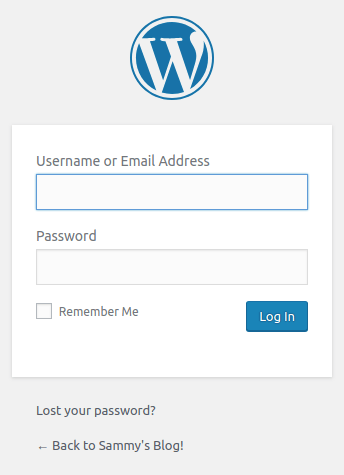
You should use the credentials defined in your values.yaml file to log in and start configuring your WordPress site.
Step 3 — Upgrading WordPress
Because of its popularity, WordPress is often a target for malicious exploitation, so it’s important to keep it updated. We can upgrade Helm releases with the command helm upgrade.
To list all of your current releases, run the following command from your local machine or development server:
- helm list
You should get output similar to this:
OutputNAME     	REVISION	UPDATED         			STATUS  	CHART  			APP VERSION NAMESPACE
myblog 		1			Fri Jan 25 20:24:10 2019	DEPLOYED	wordpress-5.1.2	5.0.3		default
As you can see from the output, our current WordPress version is 5.0.3 (app version), while the chart version is 5.1.2. If you want to upgrade a release to a newer version of a chart, first update your Helm repositories with:
- helm repo update
You can expect the following output:
OutputHang tight while we grab the latest from your chart repositories...
...Skip local chart repository
...Successfully got an update from the "stable" chart repository
Update Complete. ⎈ Happy Helming!⎈
Now you can check if there’s a newer version of the WordPress chart available with:
- helm inspect chart stable/wordpress
You should see output similar to this:
OutputapiVersion: v1
appVersion: 5.1.1
description: Web publishing platform for building blogs and websites.
engine: gotpl
home: http://www.wordpress.com/
icon: https://bitnami.com/assets/stacks/wordpress/img/wordpress-stack-220x234.png
keywords:
- wordpress
- cms
- blog
- http
- web
- application
- php
maintainers:
- email: containers@bitnami.com
  name: Bitnami
name: wordpress
sources:
- https://github.com/bitnami/bitnami-docker-wordpress
version: 5.9.0
As you can see from the output, there’s a new chart available (version 5.9.0) with WordPress 5.1.1 (app version). Whenever you want to upgrade your WordPress release to the latest WordPress chart, you should run:
- helm upgrade -f values.yaml myblog stable/wordpress
This command will produce output very similar to the output produced by helm install. It is important to provide the same configuration file we used when installing the WordPress chart for the first time, as it contains the custom database settings we defined for our setup.
Now, if you run helm list again, you should see updated information about your release:
Output
NAME  	REVISION	UPDATED                 	STATUS  	CHART          	APP VERSION		NAMESPACE
myblog	2       	Fri May  3 14:51:20 2019	DEPLOYED	wordpress-5.9.0	5.1.1      	default
You have successfully upgraded your WordPress to the latest version of the WordPress chart.
Rolling Back a Release
Each time you upgrade a release, a new revision of that release is created by Helm. A revision sets a fixed checkpoint to where you can come back if things don’t work as expected. It is similar to a commit in Git, because it creates a history of changes that can be compared and reverted. If something goes wrong during the upgrade process, you can always rollback to a previous revision of a given Helm release with the helm rollback command:
- helm rollback release-name revision-number
For instance, if we want to undo the upgrade and rollback our WordPress release to its first version, we would use:
- helm rollback myblog 1
This would rollback the WordPress installation to its first release. You should see the following output, indicating that the rollback was successful:
Output
Rollback was a success! Happy Helming!
Running helm list again should now indicate that WordPress was downgraded back to 5.0.3, chart version 5.1.2:
Output
NAME     	REVISION	UPDATED                 	STATUS  	CHART          	APP VERSION	NAMESPACE
myblog		3      	Mon Jan 28 22:02:42 2019	DEPLOYED	wordpress-5.1.2	5.0.3      	default
Notice that rolling back a release will actually create a new revision, based on the target revision of the roll-back. Our WordPress release named myblog now is at revision number three, which was based on revision number one.
Conclusion
In this guide, we installed WordPress with an external MySQL server on a Kubernetes cluster using the command-line tool Helm. We also learned how to upgrade a WordPress release to a new chart version, and how to rollback a release if something goes wrong throughout the upgrade process.
As additional steps, you might consider setting up Nginx Ingress with Cert-Manager in order to enable name-based virtual hosting and to configure an SSL certificate for your WordPress site. You should also check the recommended production settings for the WordPress chart we used in this guide.
If you want to learn more about Kubernetes and Helm, please check out the Kubernetes section of our community page.
Thanks for learning with the DigitalOcean Community. Check out our offerings for compute, storage, networking, and managed databases.
About the author
Dev/Ops passionate about open source, PHP, and Linux. Former Senior Technical Writer at DigitalOcean. Areas of expertise include LAMP Stack, Ubuntu, Debian 11, Linux, Ansible, and more.
Still looking for an answer?
 This work is licensed under a Creative Commons Attribution-NonCommercial- ShareAlike 4.0 International License.
Become a contributor for community
Get paid to write technical tutorials and select a tech-focused charity to receive a matching donation.

DigitalOcean Documentation
Full documentation for every DigitalOcean product.

Resources for startups and AI-native businesses
The Wave has everything you need to know about building a business, from raising funding to marketing your product.
The developer cloud
Scale up as you grow — whether you're running one virtual machine or ten thousand.

Start building today
From GPU-powered inference and Kubernetes to managed databases and storage, get everything you need to build, scale, and deploy intelligent applications.



