Not using Ubuntu 14.04?
Choose a different version or distribution.
Introduction
When setting up a web server, there are often sections of the site that you wish to restrict access to. Web applications often provide their own authentication and authorization methods, but the web server itself can be used to restrict access if these are inadequate or unavailable.
In this guide, we’ll demonstrate how to password protect assets on an Apache web server running on Ubuntu 14.04.
Prerequisites
To get started, you will need access to an Ubuntu 14.04 server environment. You will need a non-root user with sudo privileges in order to perform administrative tasks. To learn how to create such a user, follow our Ubuntu 14.04 initial server setup guide.
Install the Apache Utilities Package
In order to create the file that will store the passwords needed to access our restricted content, we will use a utility called htpasswd. This is found in the apache2-utils package within the Ubuntu repositories.
Update the local package cache and install the package by typing this command. We will take this opportunity to also grab the Apache2 server in case it is not yet installed on the server:
- sudo apt-get update
- sudo apt-get install apache2 apache2-utils
Create the Password File
We now have access to the htpasswd command. We can use this to create a password file that Apache can use to authenticate users. We will create a hidden file for this purpose called .htpasswd within our /etc/apache2 configuration directory.
The first time we use this utility, we need to add the -c option to create the specified file. We specify a username (sammy in this example) at the end of the command to create a new entry within the file:
- sudo htpasswd -c /etc/apache2/.htpasswd sammy
You will be asked to supply and confirm a password for the user.
Leave out the -c argument for any additional users you wish to add:
- sudo htpasswd /etc/apache2/.htpasswd another_user
If we view the contents of the file, we can see the username and the encrypted password for each record:
- cat /etc/apache2/.htpasswd
Outputsammy:$apr1$lzxsIfXG$tmCvCfb49vpPFwKGVsuYz.
another_user:$apr1$p1E9MeAf$kiAhneUwr.MhAE2kKGYHK.
Configure Apache Password Authentication
Now that we have a file with our users and passwords in a format that Apache can read, we need to configure Apache to check this file before serving our protected content. We can do this in two different ways.
The first option is to edit the Apache configuration and add our password protection to the virtual host file. This will generally give better performance because it avoids the expense of reading distributed configuration files. If you have this option, this method is recommended.
If you do not have the ability to modify the virtual host file (or if you are already using .htaccess files for other purposes), you can restrict access using an .htaccessfile. Apache uses.htaccess` files in order to allow certain configuration items to be set within a file in a content directory. The disadvantage is that Apache has to re-read these files on every request that involves the directory, which can impact performance.
Choose the option that best suits your needs below.
Configuring Access Control within the Virtual Host Definition
Begin by opening up the virtual host file that you wish to add a restriction to. For our example, we’ll be using the 000-default.conf file that holds the default virtual host installed through Ubuntu’s apache package:
- sudo nano /etc/apache2/sites-enabled/000-default.conf
Inside, with the comments stripped, the file should look similar to this:
<VirtualHost *:80>
    ServerAdmin webmaster@localhost
    DocumentRoot /var/www/html
    ErrorLog ${APACHE_LOG_DIR}/error.log
    CustomLog ${APACHE_LOG_DIR}/access.log combined
</VirtualHost>
Authentication is done on a per-directory basis. To set up authentication, you will need to target the directory you wish to restrict with a <Directory ___> block. In our example, we’ll restrict the entire document root, but you can modify this listing to only target a specific directory within the web space:
<VirtualHost *:80>
    ServerAdmin webmaster@localhost
    DocumentRoot /var/www/html
    ErrorLog ${APACHE_LOG_DIR}/error.log
    CustomLog ${APACHE_LOG_DIR}/access.log combined

    <Directory "/var/www/html">
    </Directory>
</VirtualHost>
Within this directory block, specify that we wish to set up Basic authentication. For the AuthName, choose a realm name that will be displayed to the user when prompting for credentials. Use the AuthUserFile directive to point Apache to the password file we created. Finally, we will require a valid-user to access this resource, which means anyone who can verify their identity with a password will be allowed in:
<VirtualHost *:80>
    ServerAdmin webmaster@localhost
    DocumentRoot /var/www/html
    ErrorLog ${APACHE_LOG_DIR}/error.log
    CustomLog ${APACHE_LOG_DIR}/access.log combined

    <Directory "/var/www/html">
        AuthType Basic
        AuthName "Restricted Content"
        AuthUserFile /etc/apache2/.htpasswd
        Require valid-user
    </Directory>
</VirtualHost>
Save and close the file when you are finished. Restart Apache to implement your password policy:
- sudo service apache2 restart
The directory you specified should now be password protected.
Configuring Access Control with .htaccess Files
If you wish to set up password protection using .htaccess files instead, you should begin by editing the main Apache configuration file to allow .htaccess files:
- sudo nano /etc/apache2/apache2.conf
Find the <Directory> block for the /var/www directory that holds the document root. Turn on .htaccess processing by changing the AllowOverride directive within that block from “None” to “All”:
. . .

<Directory /var/www/>
    Options Indexes FollowSymLinks
    AllowOverride All
    Require all granted
</Directory>

. . .
Save and close the file when you are finished.
Next, we need to add an .htaccess file to the directory we wish to restrict. In our demonstration, we’ll restrict the entire document root (the entire website) which is based at /var/www/html, but you can place this file in any directory you wish to restrict access to:
- sudo nano /var/www/html/.htaccess
Within this file, specify that we wish to set up Basic authentication. For the AuthName, choose a realm name that will be displayed to the user when prompting for credentials. Use the AuthUserFile directive to point Apache to the password file we created. Finally, we will require a valid-user to access this resource, which means anyone who can verify their identity with a password will be allowed in:
AuthType Basic
AuthName "Restricted Content"
AuthUserFile /etc/apache2/.htpasswd
Require valid-user
Save and close the file. Restart the web server to password protect all content in or below the directory with the .htaccess file:
- sudo service apache2 restart
Confirm the Password Authentication
To confirm that your content is protected, try to access your restricted content in a web browser. You should be presented with a username and password prompt that looks like this:
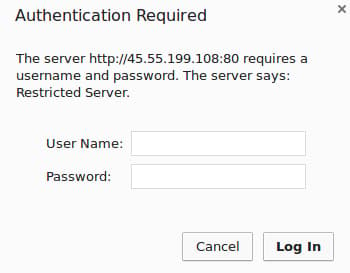
If you enter the correct credentials, you will be allowed to access the content. If you enter the wrong credentials or hit “Cancel”, you will see the “Unauthorized” error page:

Conclusion
You should now have everything you need to set up basic authentication for your site. Keep in mind that password protection should be combined with SSL encryption so that your credentials are not sent to the server in plain text. To learn how to create a self-signed SSL certificate to use with Apache, follow this guide. To learn how to install a commercial certificate, follow this guide.
Thanks for learning with the DigitalOcean Community. Check out our offerings for compute, storage, networking, and managed databases.
About the author

Former Senior Technical Writer at DigitalOcean, specializing in DevOps topics across multiple Linux distributions, including Ubuntu 18.04, 20.04, 22.04, as well as Debian 10 and 11.
Still looking for an answer?
 This work is licensed under a Creative Commons Attribution-NonCommercial- ShareAlike 4.0 International License.
Become a contributor for community
Get paid to write technical tutorials and select a tech-focused charity to receive a matching donation.

DigitalOcean Documentation
Full documentation for every DigitalOcean product.

Resources for startups and AI-native businesses
The Wave has everything you need to know about building a business, from raising funding to marketing your product.
The developer cloud
Scale up as you grow — whether you're running one virtual machine or ten thousand.

Start building today
From GPU-powered inference and Kubernetes to managed databases and storage, get everything you need to build, scale, and deploy intelligent applications.



