Not using Ubuntu 16.04?
Choose a different version or distribution.
Introduction
The Apache HTTP server is the most widely-used web server in the world. It provides many powerful features including dynamically loadable modules, robust media support, and extensive integration with other popular software.
In this guide, we’ll discuss how to install an Apache web server on your Ubuntu 16.04 server.
Prerequisites
Before you begin this guide, you should have a regular, non-root user with sudo privileges configured on your server. Additionally, you will need to configure a basic firewall to block non-essential ports. You can learn how to configure a regular user account and set up a firewall for your server by following our initial server setup guide for Ubuntu 16.04.
When you have an account available, log in as your non-root user to begin.
Step 1: Install Apache
Apache is available within Ubuntu’s default software repositories, so we will install it using conventional package management tools.
We will begin by updating the local package index to reflect the latest upstream changes. Afterwards, we can install the apache2 package:
- sudo apt-get update
- sudo apt-get install apache2
After confirming the installation, apt-get will install Apache and all required dependencies.
Step 2: Adjust the Firewall
Before we can test Apache, we need to modify our firewall to allow outside access to the default web ports. Assuming that you followed the instructions in the prerequisites, you should have a UFW firewall configured to restrict access to your server.
During installation, Apache registers itself with UFW to provide a few application profiles. We can use these profiles to simplify the process of enabling or disabling access to Apache through our firewall.
We can list the ufw application profiles by typing:
- sudo ufw app list
You should get a listing of the application profiles:
OutputAvailable applications:
  Apache
  Apache Full
  Apache Secure
  OpenSSH
As you can see, there are three profiles available for Apache:
- Apache: This profile opens only port 80 (normal, unencrypted web traffic)
- Apache Full: This profile opens both port 80 (normal, unencrypted web traffic) and port 443 (TLS/SSL encrypted traffic)
- Apache Secure: This profile opens only port 443 (TLS/SSL encrypted traffic)
For our purposes, we will allow incoming traffic for the Apache Full profile by typing:
- sudo ufw allow 'Apache Full'
You can verify the change by typing:
- sudo ufw status
You should see HTTP traffic allowed in the displayed output:
OutputStatus: active

To                         Action      From
--                         ------      ----
OpenSSH                    ALLOW       Anywhere
Apache Full                ALLOW       Anywhere
OpenSSH (v6)               ALLOW       Anywhere (v6)
Apache Full (v6)           ALLOW       Anywhere (v6)
As you can see, the profile has been activated to allow access to the web server.
Step 3: Check your Web Server
At the end of the installation process, Ubuntu 16.04 starts Apache. The web server should already be up and running.
We can check with the systemd init system to make sure the service is running by typing:
- sudo systemctl status apache2
Output● apache2.service - LSB: Apache2 web server
   Loaded: loaded (/etc/init.d/apache2; bad; vendor preset: enabled)
  Drop-In: /lib/systemd/system/apache2.service.d
           └─apache2-systemd.conf
   Active: active (running) since Fri 2017-05-19 18:30:10 UTC; 1h 5min ago
     Docs: man:systemd-sysv-generator(8)
  Process: 4336 ExecStop=/etc/init.d/apache2 stop (code=exited, status=0/SUCCESS)
  Process: 4359 ExecStart=/etc/init.d/apache2 start (code=exited, status=0/SUCCESS)
    Tasks: 55
   Memory: 2.3M
      CPU: 4.094s
   CGroup: /system.slice/apache2.service
           ├─4374 /usr/sbin/apache2 -k start
           ├─4377 /usr/sbin/apache2 -k start
           └─4378 /usr/sbin/apache2 -k start

May 19 18:30:09 ubuntu-512mb-nyc3-01 systemd[1]: Stopped LSB: Apache2 web server.
May 19 18:30:09 ubuntu-512mb-nyc3-01 systemd[1]: Starting LSB: Apache2 web server...
May 19 18:30:09 ubuntu-512mb-nyc3-01 apache2[4359]:  * Starting Apache httpd web server apache2
May 19 18:30:09 ubuntu-512mb-nyc3-01 apache2[4359]: AH00558: apache2: Could not reliably determine the server's fully qualified domain name, using 127.0.1.1. Set the 'ServerName' directive globally to suppress this message
May 19 18:30:10 ubuntu-512mb-nyc3-01 apache2[4359]:  *
May 19 18:30:10 ubuntu-512mb-nyc3-01 systemd[1]: Started LSB: Apache2 web server.
As you can see above, the service appears to have started successfully. However, the best way to test this is to actually request a page from Apache.
You can access the default Apache landing page to confirm that the software is running properly. You can access this through your server’s domain name or IP address.
If you are using DigitalOcean and do not have a domain name set up for your server, you can follow our guide how to set up a domain with DigitalOcean to set one up.
If you do not want to set up a domain name for your server, you can use your server’s public IP address. If you do not know your server’s IP address, you can get it a few different ways from the command line.
Try typing this at your server’s command prompt:
- hostname -I
You will get back a few addresses separated by spaces. You can try each in your web browser to see if they work.
An alternative is typing this, which should give you your public IP address as seen from another location on the internet:
- sudo apt-get install curl
- curl -4 icanhazip.com
When you have your server’s IP address or domain, enter it into your browser’s address bar:
http://server_domain_or_IP
You should see the default Ubuntu 16.04 Apache web page, which should look something like this:
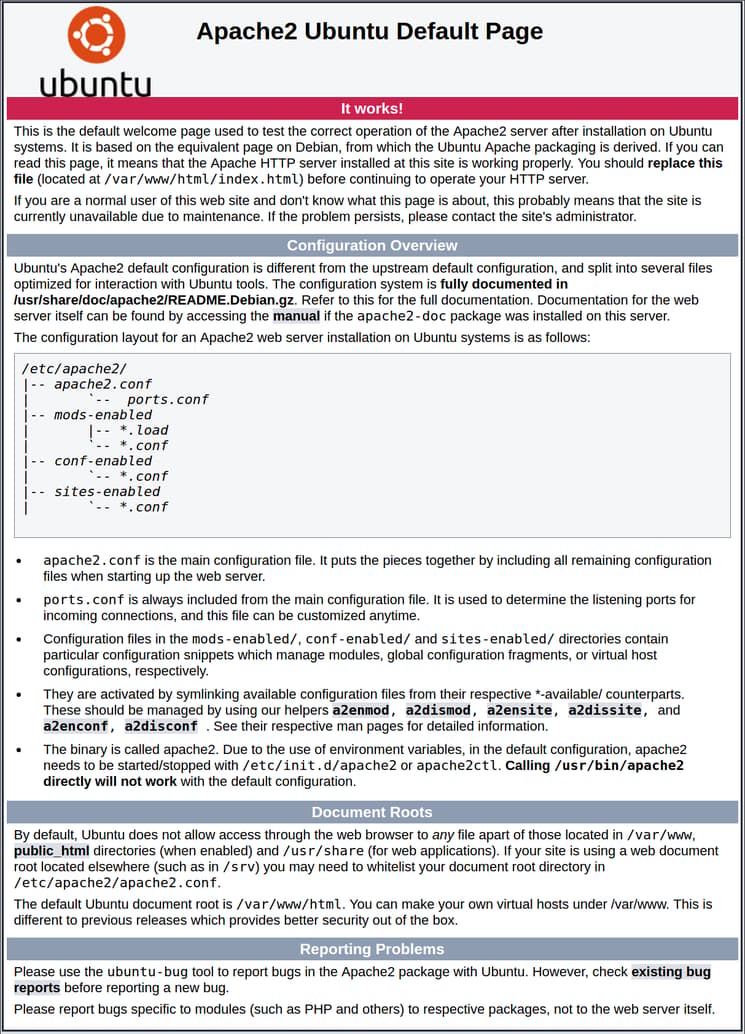
This page is simply included to show that Apache is working correctly. It also includes some basic information about important Apache files and directory locations.
Step 4: Manage the Apache Process
Now that you have your web server up and running, we can go over some basic management commands.
To stop your web server, you can type:
- sudo systemctl stop apache2
To start the web server when it is stopped, type:
- sudo systemctl start apache2
To stop and then start the service again, type:
- sudo systemctl restart apache2
If you are simply making configuration changes, Apache can often reload without dropping connections. To do this, you can use this command:
- sudo systemctl reload apache2
By default, Apache is configured to start automatically when the server boots. If this is not what you want, you can disable this behavior by typing:
- sudo systemctl disable apache2
To re-enable the service to start up at boot, you can type:
- sudo systemctl enable apache2
Apache should now start automatically when the server boots again.
Step 5: Get Familiar with Important Apache Files and Directories
Now that you know how to manage the service itself, you should take a few minutes to familiarize yourself with a few important directories and files.
Content
/var/www/html: The actual web content, which by default only consists of the default Apache page you saw earlier, is served out of the/var/www/htmldirectory. This can be changed by altering Apache configuration files.
Server Configuration
/etc/apache2: The Apache configuration directory. All of the Apache configuration files reside here./etc/apache2/apache2.conf: The main Apache configuration file. This can be modified to make changes to the Apache global configuration. This file is responsible for loading many of the other files in the configuration directory./etc/apache2/ports.conf: This file specifies the ports that Apache will listen on. By default, Apache listens on port 80 and additionally listens on port 443 when a module providing SSL capabilities is enabled./etc/apache2/sites-available/: The directory where per-site “Virtual Hosts” can be stored. Apache will not use the configuration files found in this directory unless they are linked to thesites-enableddirectory (see below). Typically, all server block configuration is done in this directory, and then enabled by linking to the other directory with thea2ensitecommand./etc/apache2/sites-enabled/: The directory where enabled per-site “Virtual Hosts” are stored. Typically, these are created by linking to configuration files found in thesites-availabledirectory with thea2ensite. Apache reads the configuration files and links found in this directory when it starts or reloads to compile a complete configuration./etc/apache2/conf-available/,/etc/apache2/conf-enabled/: These directories have the same relationship as thesites-availableandsites-enableddirectories, but are used to store configuration fragments that do not belong in a Virtual Host. Files in theconf-availabledirectory can be enabled with thea2enconfcommand and disabled with thea2disconfcommand./etc/apache2/mods-available/,/etc/apache2/mods-enabled/: These directories contain the available and enabled modules, respectively. Files in ending in.loadcontain fragments to load specific modules, while files ending in.confcontain the configuration for those modules. Modules can be enabled and disabled using thea2enmodanda2dismodcommand.
Server Logs
/var/log/apache2/access.log: By default, every request to your web server is recorded in this log file unless Apache is configured to do otherwise./var/log/apache2/error.log: By default, all errors are recorded in this file. TheLogLeveldirective in the Apache configuration specifies how much detail the error logs will contain.
Conclusion
Now that you have your web server installed, you have many options for the type of content to serve and the technologies you want to use to create a richer experience.
Learn how to use Apache Virtual Hosts here. If you’d like to build out a more complete application stack, check out this article on how to configure a LAMP stack on Ubuntu 16.04.
Thanks for learning with the DigitalOcean Community. Check out our offerings for compute, storage, networking, and managed databases.
About the author

Former Senior Technical Writer at DigitalOcean, specializing in DevOps topics across multiple Linux distributions, including Ubuntu 18.04, 20.04, 22.04, as well as Debian 10 and 11.
Still looking for an answer?
 This work is licensed under a Creative Commons Attribution-NonCommercial- ShareAlike 4.0 International License.
Become a contributor for community
Get paid to write technical tutorials and select a tech-focused charity to receive a matching donation.

DigitalOcean Documentation
Full documentation for every DigitalOcean product.

Resources for startups and AI-native businesses
The Wave has everything you need to know about building a business, from raising funding to marketing your product.
The developer cloud
Scale up as you grow — whether you're running one virtual machine or ten thousand.

Start building today
From GPU-powered inference and Kubernetes to managed databases and storage, get everything you need to build, scale, and deploy intelligent applications.



