
Introduction
In this tutorial, we will cover the installation of Graylog2 (v0.20.2), and configure it to gather the syslogs of our systems in a centralized location. Graylog2 is a powerful log management and analysis tool that has many use cases, from monitoring SSH logins and unusual activity to debugging applications. It is based on Elasticsearch, Java, MongoDB, and Scala.
Note: This tutorial is for an outdated version of Graylog2. A new version is available here: How To Install Graylog 1.x on Ubuntu 14.04.
It is possible to use Graylog2 to gather and monitor a large variety of logs, but we will limit the scope of this tutorial to syslog gathering. Also, because we are demonstrating the basics of Graylog2, we will be installing all of the components on a single server.
About Graylog2 Components
Graylog2 has four main components:
- Graylog2 Server nodes: Serves as a worker that receives and processes messages, and communicates with all other non-server components. Its performance is CPU dependent
- Elasticsearch nodes: Stores all of the logs/messages. Its performance is RAM and disk I/O dependent
- MongoDB: Stores metadata and does not experience much load
- Web Interface: The user interface
Here is a diagram of the Graylog2 components (note that the messages are sent from your other servers):
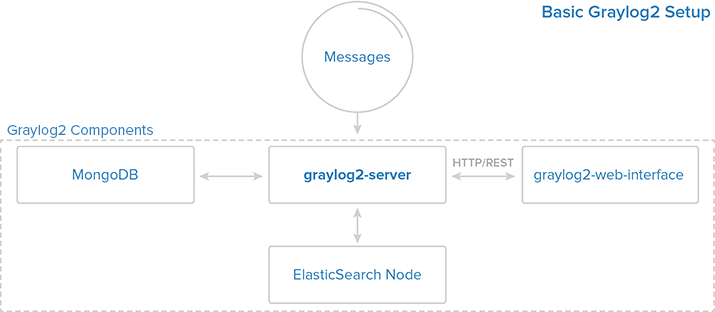
For a very basic setup, all of the components can be installed on the same server. For a larger, production setup, it would be wise to set up some high-availability features because if the server, Elasticsearch, or MongoDB components experiences an outage, Graylog2 will not gather the messages generated during the outage.
Prerequisites
The setup described in this tutorial requires an Ubuntu 14.04 VPS with at least 2GB of RAM. You also need root access (Steps 1-4 of Initial Server Setup with Ubuntu 14.04).
If you use a VPS with less than 2GB of RAM you will not be able to start all of the Graylog2 components.
Let’s start installing software!
Install MongoDB
The MongoDB installation is simple and quick. Run the following command to import the MongoDB public GPG key into apt:
sudo apt-key adv --keyserver keyserver.ubuntu.com --recv 7F0CEB10
Create the MongoDB source list:
echo 'deb http://downloads-distro.mongodb.org/repo/debian-sysvinit dist 10gen' | sudo tee /etc/apt/sources.list.d/mongodb.list
Update your apt package database:
sudo apt-get update
Install the latest stable version of MongoDB with this command:
sudo apt-get install mongodb-org
MongoDB should be up and running now. Let’s move on to installing Java 7.
Install Java 7
Elasticsearch requires Java 7, so we will install that now. We will install Oracle Java 7 because that is what is recommended on elasticsearch.org. It should, however, work fine with OpenJDK, if you decide to go that route.
Add the Oracle Java PPA to apt:
sudo add-apt-repository ppa:webupd8team/java
Update your apt package database:
sudo apt-get update
Install the latest stable version of Oracle Java 7 with this command (and accept the license agreement that pops up):
sudo apt-get install oracle-java7-installer
Now that Java 7 is installed, let’s install Elasticsearch.
Install Elasticsearch
Graylog2 v0.20.2 requires Elasticsearch v.0.90.10. Download and install it with these commands:
cd ~; wget https://download.elasticsearch.org/elasticsearch/elasticsearch/elasticsearch-0.90.10.deb
sudo dpkg -i elasticsearch-0.90.10.deb
We need to change the Elasticsearch cluster.name setting. Open the Elasticsearch configuration file:
sudo vi /etc/elasticsearch/elasticsearch.yml
Find the section that specifies cluster.name. Uncomment it, and replace the default value with “graylog2”, so it looks like the following:
cluster.name: graylog2
You will also want to restrict outside access to your Elasticsearch instance (port 9200), so outsiders can’t read your data or shutdown your Elasticseach cluster through the HTTP API. Find the line that specifies network.bind_host and uncomment it so it looks like this:
network.bind_host: localhost
Then add the following line somewhere in the file, to disable dynamic scripts:
script.disable_dynamic: true
Save and quit. Next, restart Elasticsearch to put our changes into effect:
sudo service elasticsearch restart
After a few seconds, run the following to test that Elasticsearch is running properly:
curl -XGET 'http://localhost:9200/_cluster/health?pretty=true'
Now that Elasticsearch is up and running, let’s install the Graylog2 server.
Install Graylog2 server
Now that we have installed the other required software, let’s install the Graylog2 server. We will install Graylog2 Server v0.20.2 in /opt. First, download the Graylog2 archive to /opt with this command:
cd /opt; sudo wget https://github.com/Graylog2/graylog2-server/releases/download/0.20.2/graylog2-server-0.20.2.tgz
Then extract the archive:
sudo tar xvf graylog2-server-0.20.2.tgz
Let’s create a symbolic link to the newly created directory, to simplify the directory name:
sudo ln -s graylog2-server-0.20.2 graylog2-server
Copy the example configuration file to the proper location, in /etc:
sudo cp /opt/graylog2-server/graylog2.conf.example /etc/graylog2.conf
Install pwgen, which we will use to generate password secret keys:
sudo apt-get install pwgen
Now we must configure the admin password and secret key. The password secret key is configured in graylog2.conf, by the password_secret parameter. We can generate a random key and insert it into the Graylog2 configuration with the following two commands:
SECRET=$(pwgen -s 96 1)
sudo -E sed -i -e 's/password_secret =.*/password_secret = '$SECRET'/' /etc/graylog2.conf
The admin password is assigned by creating an shasum of the desired password, and assigning it to the root_password_sha2 parameter in the Graylog2 configuration file. Create shasum of your desired password with the following command, substituting the highlighted “password” with your own. The sed command inserts it into the Graylog2 configuration for you:
<pre> PASSWORD=$(echo -n <span class=“highlight”>password</span> | shasum -a 256 | awk ‘{print $1}’) sudo -E sed -i -e ‘s/root_password_sha2 =.*/root_password_sha2 = ‘$PASSWORD’/’ /etc/graylog2.conf </pre>
Now that the admin password is setup, let’s open the Graylog2 configuration to make a few changes:
sudo vi /etc/graylog2.conf
You should see that password_secret and root_password_sha2 have random strings to them, because of the commands that you ran in the steps above. Now we will configure the rest_transport_uri, which is how the Graylog2 web interface will communicate with the server. Because we are installing all of the components on a single server, let’s set the value to 127.0.0.1, or localhost. Find and uncomment rest_transport_uri, and change it’s value so it looks like the following:
<pre> rest_transport_uri = http://<span class=“highlight”>127.0.0.1</span>:12900/ </pre>
Next, because we only have one Elasticsearch shard (which is running on this server), we will change the value of elasticsearch_shards to 1:
<pre> elasticsearch_shards = <span class=“highlight”>1</span> </pre>
Save and quit. Now our Graylog2 server is configured and ready to be started.
Optional: If you want to test it out, run the following command:
sudo java -jar /opt/graylog2-server/graylog2-server.jar --debug
You should see a lot of output. Once you see output similar to the following lines, you will know that your Graylog2 server was configured correctly:
2014-06-06 14:16:13,420 INFO : org.graylog2.Core - Started REST API at <http://127.0.0.1:12900/>
2014-06-06 14:16:13,421 INFO : org.graylog2.Main - Graylog2 up and running.
Press CTRL-C to kill the test and return to the shell.
Now let’s install the Graylog2 init script. Copy graylog2ctl to /etc/init.d:
sudo cp /opt/graylog2-server/bin/graylog2ctl /etc/init.d/graylog2
Update the startup script to put the Graylog2 logs in /var/log and to look for the Graylog2 server JAR file in /opt/graylog2-server by running the two following sed commands:
<pre> sudo sed -i -e ‘s/GRAYLOG2_SERVER_JAR=${GRAYLOG2_SERVER_JAR:=graylog2-server.jar}/GRAYLOG2_SERVER_JAR=${GRAYLOG2_SERVER_JAR:=<span class=“highlight”>/opt/graylog2-server/</span>graylog2-server.jar}/’ /etc/init.d/graylog2 sudo sed -i -e ‘s/LOG_FILE=${LOG_FILE:=log/graylog2-server.log}/LOG_FILE=${LOG_FILE:=<span class=“highlight”>/var/log/</span>graylog2-server.log}/’ /etc/init.d/graylog2 </pre>
Next, install the startup script:
sudo update-rc.d graylog2 defaults
Now we can start the Graylog2 server with the service command:
sudo service graylog2 start
The next step is to install the Graylog2 web interface. Let’s do that now!
Install Graylog2 Web Interface
We will download and install the Graylog2 v.0.20.2 web interface in /opt with the following commands:
cd /opt; sudo wget https://github.com/Graylog2/graylog2-web-interface/releases/download/0.20.2/graylog2-web-interface-0.20.2.tgz
sudo tar xvf graylog2-web-interface-0.20.2.tgz
Let’s create a symbolic link to the newly created directory, to simplify the directory name:
sudo ln -s graylog2-web-interface-0.20.2 graylog2-web-interface
Next, we want to configure the web interface’s secret key, the application.secret parameter in graylog2-web-interface.conf. We will generate another key, as we did with the Graylog2 server configuration, and insert it with sed, like so:
SECRET=$(pwgen -s 96 1)
sudo -E sed -i -e 's/application\.secret=""/application\.secret="'$SECRET'"/' /opt/graylog2-web-interface/conf/graylog2-web-interface.conf
Now open the web interface configuration file, with this command:
sudo vi /opt/graylog2-web-interface/conf/graylog2-web-interface.conf
Now we need to update the web interface’s configuration to specify the graylog2-server.uris parameter. This is a comma delimited list of the server REST URIs. Since we only have one Graylog2 server node, the value should match that of rest_listen_uri in the Graylog2 server configuration (i.e. “http://127.0.0.1:12900/”).
<pre> graylog2-server.uris=“<span class=“highlight”>http://127.0.0.1:12900/</span>” </pre>
The Graylog2 web interface is now configured. Let’s start it up to test it out:
sudo /opt/graylog2-web-interface-0.20.2/bin/graylog2-web-interface
You will know it started properly when you see the following two lines:
[info] play - Application started (Prod)
[info] play - Listening for HTTP on /0:0:0:0:0:0:0:0:9000
Hit CTRL-C to kill the web interface. Now let’s install a startup script. You can either create your own, or download one that I created for this tutorial. To download the script to your home directory, use this command:
cd ~; wget https://assets.digitalocean.com/articles/graylog2/graylog2-web
Next, you will want to copy it to /etc/init.d, and change its ownership to root and its permissions to 755:
sudo cp ~/graylog2-web /etc/init.d/
sudo chown root:root /etc/init.d/graylog2-web
sudo chmod 755 /etc/init.d/graylog2-web
Now you can install the web interface init script with this command:
sudo update-rc.d graylog2-web defaults
Start the Graylog2 web interface:
sudo service graylog2-web start
Now we can use the Graylog2 web interface. Let’s do that now.
Configure Graylog2 to Receive syslog messages
Log into Graylog2 Web Interface
In your favorite browser, go to the port 9000 of your VPS’s public IP address:
<pre> http://<span class=“highlight”>gl2_public_IP</span>:9000/ </pre>
You should see a login screen. Enter “admin” as your username and the password the admin password that you set earlier.
Once logged in, you will see something like the following:
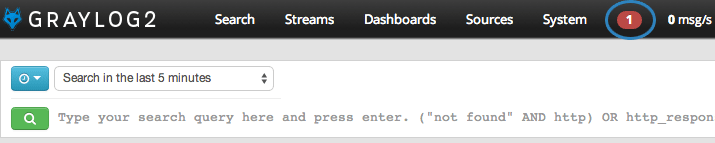
The flashing red “1” is a notification. If you click on it, you will see a message that says you have a node without any running inputs. Let’s add an input to receive syslog messages over UDP now.
Create Syslog UDP Input
To add an input to receive syslog messages, click on Inputs in the System menu on the right side.
Now, from the drop-down menu, select Syslog UDP and click Launch new input.
A “Launch a new input Syslog UDP” window will pop up. Enter the following information:
- Title: syslog
- Port: 514
- Bind address:
gl2_private_IP
Then click Launch.
You should now see an input named “syslog” in Running local inputs section (and it should have a green box that says “running” in it), like so:
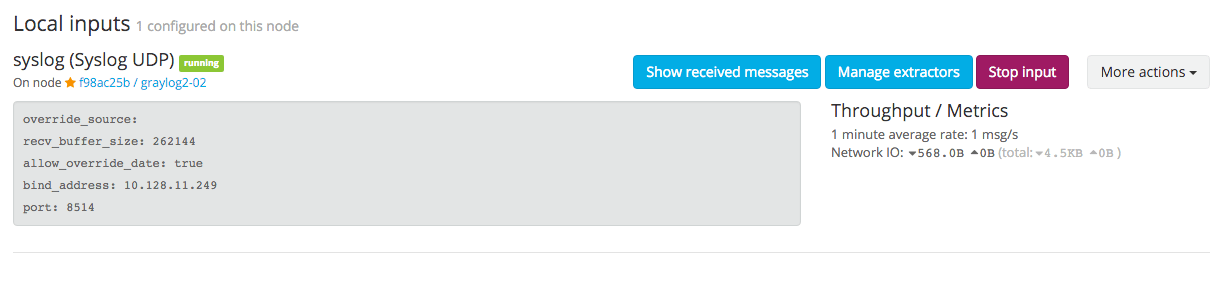
Now our Graylog2 server is ready to receive syslog messages from your servers. Let’s configure our servers to send their syslog messages to Graylog2 now.
Configure rsyslog to Send to Your Graylog2 server
On all of the servers that you want to send syslog messages to Graylog2, do the following steps.
Create an rsyslog configuration file in /etc/rsyslog.d. We will call ours 90-graylog2.conf:
sudo vi /etc/rsyslog.d/90-graylog2.conf
In this file, add the following lines to configure rsyslog to send syslog messages to your Graylog2 server (replace gl2_private_IP with your Graylog2 server’s private IP address):
<pre> $template GRAYLOGRFC5424,“<%pri%>%protocol-version% %timestamp:::date-rfc3339% %HOSTNAME% %app-name% %procid% %msg%\n” . @<span class=“highlight”>gl2_private_IP</span>:514;GRAYLOGRFC5424 </pre>
Save and quit. This file will be loaded as part of your rsyslog configuration from now on. Now you need to restart rsyslog to put your change into effect.
sudo service rsyslog restart
After you are finished configuring rsyslog on all of the servers you want to monitor, let’s go back to the Graylog2 web interface.
Viewing Your Graylog2 Sources
In your favorite browser, go to the port 9000 of your VPS’s public IP address:
<pre> http://<span class=“highlight”>gl2_public_IP</span>:9000/ </pre>
Click on Sources in the top bar. You will see a list of all of the servers that you configured rsyslog on. Here is an example of what it might look like:
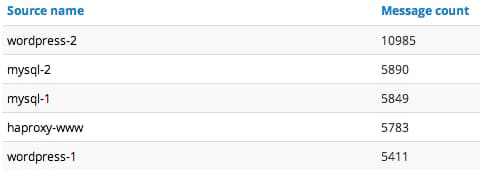
The hostname of the sources is on the left, with the number of messages received by Graylog2 on the right.
Searching Your Graylog2 Data
After letting your Graylog2 collect messages for some time, you will be able to search through the messages. As an example, let’s search for “sshd” to see what kind of SSH activity is happening on our servers. Here is a snippet of our results:
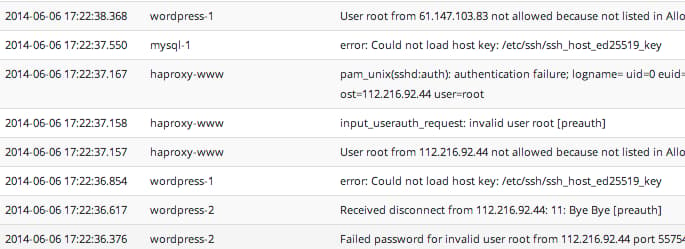
As you can see, our example search results revealed sshd logs for various servers, and a lot of failed root login attempts. Your results may vary, but it can help you to identify many issues, including how unauthorized users are attempting to access your servers.
In addition to the basic search functionality on all of your sources, you can search the logs of a specific host, or in a specific time frame.
Searching through data in Graylog2 is useful, for example, if you would like to review the logs of a server or several servers after an incident has occurred. Centralized logging makes it easier to correlate related incidents because you do not need to log into multiple servers to see all the events that have happened.
For more information on how the search bar works, check out the official documentation: The Search Bar Explained
Conclusion
Now that you have Graylog2 set up, feel free to explore the other functionality that it offers. You can send other types of logs into Graylog2, and set up extractors (or reformat logs with software like logstash) to make the logs more structured and searchable. You can also look into expanding your Graylog2 environment by separating the components and adding redundancy to increase performance and availability.
Good luck!
<div class=“author”>By Mitchell Anicas</div>
Thanks for learning with the DigitalOcean Community. Check out our offerings for compute, storage, networking, and managed databases.
About the author

Software Engineer @ DigitalOcean. Former Señor Technical Writer (I no longer update articles or respond to comments). Expertise in areas including Ubuntu, PostgreSQL, MySQL, and more.
Still looking for an answer?
 This work is licensed under a Creative Commons Attribution-NonCommercial- ShareAlike 4.0 International License.
Become a contributor for community
Get paid to write technical tutorials and select a tech-focused charity to receive a matching donation.

DigitalOcean Documentation
Full documentation for every DigitalOcean product.

Resources for startups and AI-native businesses
The Wave has everything you need to know about building a business, from raising funding to marketing your product.
The developer cloud
Scale up as you grow — whether you're running one virtual machine or ten thousand.

Start building today
From GPU-powered inference and Kubernetes to managed databases and storage, get everything you need to build, scale, and deploy intelligent applications.



