
By Popute Sebastian Armin

Introduction
The frustration of getting falsely flagged as a spammer is not strange to most of the mail server admins. By excluding the possibility of a compromised server, a false flag is usually caused by one of the following:
- the server is an open mail relay
- the sender’s or server’s IP address is blacklisted
- the server does not have a Fully Qualified Domain Name (FQDN) and a PTR record
- the Sender Policy Framework (SPF) DNS record is missing or it is misconfigured
- the DomainKeys Identified Mail (DKIM) implementation is missing or it’s not properly set up
These are some of the basic properties that are being checked by the majority of proprietary and open source spam filters (including SpamAssassin). Passing these tests is extremely important for a well configured mail server.
This tutorial will focus on installing and configuring OpenDKIM]: an open source implementation of the DKIM sender authentication system.
It is assumed that the reader knows how to access the server over SSH, Postfix and Dovecot is already installed and configured (tutorial), the host name and the FQDN are set up (tutorial, tutorial) and the SPF record is in place (tutorial).
About DKIM
DKIM is an Internet Standard that enables a person or organisation to associate a domain name with an email message. This, in effect, serves as a method of claiming responsibility for a message. At its core, DKIM is powered by asymmetric cryptography. The sender’s Mail Transfer Agent (MTA) signs every outgoing message with a private key. The recipient retrieves the public key from the sender’s DNS records and verifies if the message body and some of the header fields were not altered since the message signing took place.
Install OpenDKIM
Before starting the installation, a system update is recommended:
sudo apt-get update
sudo apt-get dist-upgrade
Install OpenDKIM and it’s dependencies:
sudo apt-get install opendkim opendkim-tools
Additional packages will be listed as dependencies, type yes and press Enter to continue.
Configure OpenDKIM
A couple of files must be created and edited in order to configure OpenDKIM.
Nano will be used as an editor because it’s installed by default on DigitalOcean droplets and it’s simple to operate:
- navigate with the arrow keys
- exit without saving changes: press
CTRL + Xand thenN - exit and save changes: press
CTRL + Xand thenY, and finally pressEnter
Important: replace every instance of example.com with your own domain in all commands and configuration files. Don’t forget to save your files after editing.
Let’s start with the main configuration file:
sudo nano /etc/opendkim.conf
Append the following lines to the end of the conf file (each parameter is explained below). Optionally, you can choose a custom port number for the Socket. Make sure that it’s not used by a different application.
AutoRestart             Yes
AutoRestartRate         10/1h
UMask                   002
Syslog                  yes
SyslogSuccess           Yes
LogWhy                  Yes

Canonicalization        relaxed/simple

ExternalIgnoreList      refile:/etc/opendkim/TrustedHosts
InternalHosts           refile:/etc/opendkim/TrustedHosts
KeyTable                refile:/etc/opendkim/KeyTable
SigningTable            refile:/etc/opendkim/SigningTable

Mode                    sv
PidFile                 /var/run/opendkim/opendkim.pid
SignatureAlgorithm      rsa-sha256

UserID                  opendkim:opendkim

Socket                  inet:12301@localhost
-
AutoRestart: auto restart the filter on failures
-
AutoRestartRate: specifies the filter’s maximum restart rate, if restarts begin to happen faster than this rate, the filter will terminate;
10/1h- 10 restarts/hour are allowed at most -
UMask: gives all access permissions to the user group defined by
UserIDand allows other users to read and execute files, in this case it will allow the creation and modification of a Pid file. -
Syslog, SyslogSuccess, *LogWhy: these parameters enable detailed logging via calls to syslog
-
Canonicalization: defines the canonicalization methods used at message signing, the
simplemethod allows almost no modification while therelaxedone tolerates minor changes such as whitespace replacement;relaxed/simple- the message header will be processed with therelaxedalgorithm and the body with thesimpleone -
ExternalIgnoreList: specifies the external hosts that can send mail through the server as one of the signing domains without credentials
-
InternalHosts: defines a list of internal hosts whose mail should not be verified but signed instead
-
KeyTable: maps key names to signing keys
-
SigningTable: lists the signatures to apply to a message based on the address found in the
From:header field -
Mode: declares operating modes; in this case the milter acts as a signer (
s) and a verifier (v) -
PidFile: the path to the Pid file which contains the process identification number
-
SignatureAlgorithm: selects the signing algorithm to use when creating signatures
-
UserID: the opendkim process runs under this user and group
-
Socket: the milter will listen on the socket specified here, Posfix will send messages to opendkim for signing and verification through this socket;
12301@localhostdefines a TCP socket that listens onlocalhost, port12301
This simple configuration is meant to allow message signing for one or more domains, to learn about other options please go here.
Connect the milter to Postfix:
sudo nano /etc/default/opendkim
Add the following line, edit the port number only if a custom one is used:
SOCKET="inet:12301@localhost"
Configure postfix to use this milter:
sudo nano /etc/postfix/main.cf
Make sure that these two lines are present in the Postfix config file and are not commented out:
milter_protocol = 2
milter_default_action = accept
It is likely that a filter (SpamAssasin, Clamav etc.) is already used by Postfix; if the following parameters are present, just append the opendkim milter to them (milters are separated by a comma), the port number should be the same as in opendkim.conf:
smtpd_milters = unix:/spamass/spamass.sock, inet:localhost:12301
non_smtpd_milters = unix:/spamass/spamass.sock, inet:localhost:12301
If the parameters are missing, define them as follows:
smtpd_milters = inet:localhost:12301
non_smtpd_milters = inet:localhost:12301
Create a directory structure that will hold the trusted hosts, key tables, signing tables and crypto keys:
sudo mkdir /etc/opendkim
sudo mkdir /etc/opendkim/keys
Specify trusted hosts:
sudo nano /etc/opendkim/TrustedHosts
We will use this file to define both ExternalIgnoreList and InternalHosts, messages originating from these hosts, domains and IP addresses will be trusted and signed.
Because our main configuration file declares TrustedHosts as a regular expression file (refile), we can use wildcard patters, *.example.com means that messages coming from example.com’s subdomains will be trusted too, not just the ones sent from the root domain.
Customize and add the following lines to the newly created file. Multiple domains can be specified, do not edit the first three lines:
127.0.0.1
localhost
192.168.0.1/24

*.example.com

#*.example.net
#*.example.org
Create a key table:
sudo nano /etc/opendkim/KeyTable
A key table contains each selector/domain pair and the path to their private key. Any alphanumeric string can be used as a selector, in this example mail is used and it’s not necessary to change it.
mail._domainkey.example.com example.com:mail:/etc/opendkim/keys/example.com/mail.private

#mail._domainkey.example.net example.net:mail:/etc/opendkim/keys/example.net/mail.private
#mail._domainkey.example.org example.org:mail:/etc/opendkim/keys/example.org/mail.private
Create a signing table:
sudo nano /etc/opendkim/SigningTable
This file is used for declaring the domains/email addresses and their selectors.
*@example.com mail._domainkey.example.com

#*@example.net mail._domainkey.example.net
#*@example.org mail._domainkey.example.org
Generate the public and private keys
Change to the keys directory:
cd /etc/opendkim/keys
Create a separate folder for the domain to hold the keys:
sudo mkdir example.com
cd example.com
Generate the keys:
sudo opendkim-genkey -s mail -d example.com
-s specifies the selector and -d the domain, this command will create two files, mail.private is our private key and mail.txt contains the public key.
Change the owner of the private key to opendkim:
sudo chown opendkim:opendkim mail.private
Add the public key to the domain’s DNS records
Open mail.txt:
sudo nano -$ mail.txt
The public key is defined under the p parameter. Do not use the example key below, it’s only an illustration and will not work on your server.
mail._domainkey IN TXT "v=DKIM1; k=rsa; p=MIGfMA0GCSqGSIb3DQEBAQUAA4GNADCBiQKBgQC5N3lnvvrYgPCRSoqn+awTpE+iGYcKBPpo8HHbcFfCIIV10Hwo4PhCoGZSaKVHOjDm4yefKXhQjM7iKzEPuBatE7O47hAx1CJpNuIdLxhILSbEmbMxJrJAG0HZVn8z6EAoOHZNaPHmK2h4UUrjOG8zA5BHfzJf7tGwI+K619fFUwIDAQAB" ; ----- DKIM key mail for example.com
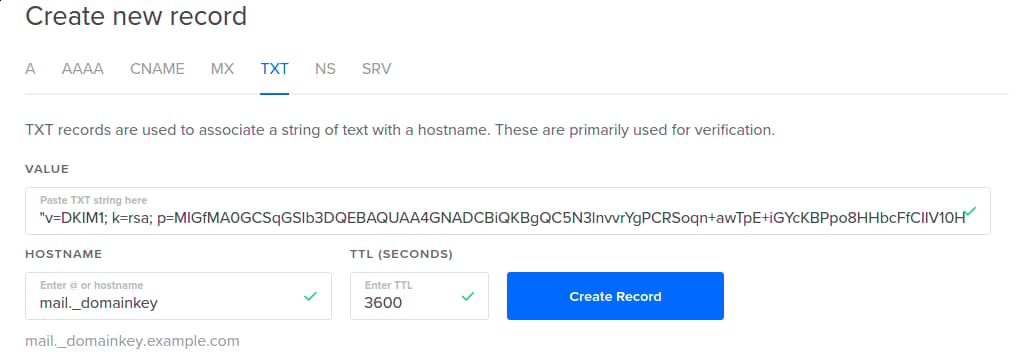
Copy that key and add a TXT record to your domain’s DNS entries:
Name: mail._domainkey.example.com.

Text: "v=DKIM1; k=rsa; p=MIGfMA0GCSqGSIb3DQEBAQUAA4GNADCBiQKBgQC5N3lnvvrYgPCRSoqn+awTpE+iGYcKBPpo8HHbcFfCIIV10Hwo4PhCoGZSaKVHOjDm4yefKXhQjM7iKzEPuBatE7O47hAx1CJpNuIdLxhILSbEmbMxJrJAG0HZVn8z6EAoOHZNaPHmK2h4UUrjOG8zA5BHfzJf7tGwI+K619fFUwIDAQAB"
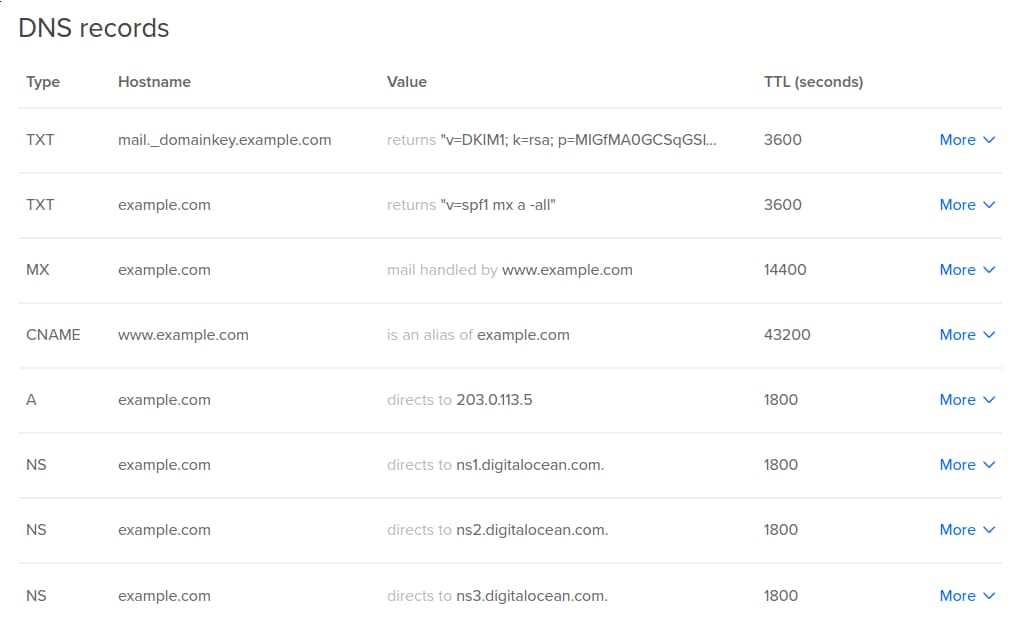
Please note that the DNS changes may take a couple of hours to propagate.
Restart Postfix and OpenDKIM:
sudo service postfix restart
sudo service opendkim restart
Congratulations! You have successfully configured DKIM for your mail server!
The configuration can be tested by sending an empty email to check-auth@verifier.port25.com and a reply will be received. If everything works correctly you should see DKIM check: pass under Summary of Results.
==========================================================
Summary of Results
==========================================================
SPF check:          pass
DomainKeys check:   neutral
DKIM check:         pass
Sender-ID check:    pass
SpamAssassin check: ham
Alternatively, you can send a message to a Gmail address that you control, view the received email’s headers in your Gmail inbox, dkim=pass should be present in the Authentication-Results header field.
Authentication-Results: mx.google.com;
       spf=pass (google.com: domain of contact@example.com designates --- as permitted sender) smtp.mail=contact@example.com;
       dkim=pass header.i=@example.com;
<div class=“author”>Submitted by: P. Sebastian</a></div>
Thanks for learning with the DigitalOcean Community. Check out our offerings for compute, storage, networking, and managed databases.
About the author

Still looking for an answer?
 This work is licensed under a Creative Commons Attribution-NonCommercial- ShareAlike 4.0 International License.
Become a contributor for community
Get paid to write technical tutorials and select a tech-focused charity to receive a matching donation.

DigitalOcean Documentation
Full documentation for every DigitalOcean product.

Resources for startups and AI-native businesses
The Wave has everything you need to know about building a business, from raising funding to marketing your product.
The developer cloud
Scale up as you grow — whether you're running one virtual machine or ten thousand.

Start building today
From GPU-powered inference and Kubernetes to managed databases and storage, get everything you need to build, scale, and deploy intelligent applications.



