Not using Ubuntu 16.04?
Choose a different version or distribution.
Introduction
TLS, or transport layer security, and its predecessor SSL, which stands for secure sockets layer, are web protocols used to wrap normal traffic in a protected, encrypted wrapper.
Using this technology, servers can send traffic safely between the server and clients without the possibility of the messages being intercepted by outside parties. The certificate system also assists users in verifying the identity of the sites that they are connecting with.
In this guide, we will show you how to set up a self-signed SSL certificate for use with an Nginx web server on an Ubuntu 16.04 server.
Note: A self-signed certificate will encrypt communication between your server and any clients. However, because it is not signed by any of the trusted certificate authorities included with web browsers, users cannot use the certificate to validate the identity of your server automatically.
A self-signed certificate may be appropriate if you do not have a domain name associated with your server and for instances where the encrypted web interface is not user-facing. If you do have a domain name, in many cases it is better to use a CA-signed certificate. You can find out how to set up a free trusted certificate with the Let’s Encrypt project.
Note: This tutorial was written for Ubuntu 16.04, which may no longer be actively supported. As time passes, some commands, package names, and configuration steps can change or stop working as expected. If you run into issues, we recommend checking How To Create a Self-Signed SSL Certificate for Nginx in Ubuntu for the latest version of the tutorial or using instructions written for a currently supported Ubuntu release.
If you are setting up a new environment, following documentation that targets a supported Ubuntu version will generally provide the most reliable results.
Prerequisites
Before you begin, you should have a non-root user configured with sudo privileges. You can learn how to set up such a user account by following our initial server setup for Ubuntu 16.04.
You will also need to have the Nginx web server installed. If you would like to install an entire LEMP (Linux, Nginx, MySQL, PHP) stack on your server, you can follow our guide on setting up LEMP on Ubuntu 16.04.
If you just want the Nginx web server, you can instead follow our guide on installing Nginx on Ubuntu 16.04.
When you have completed the prerequisites, continue below.
Step 1: Create the SSL Certificate
TLS/SSL works by using a combination of a public certificate and a private key. The SSL key is kept secret on the server. It is used to encrypt content sent to clients. The SSL certificate is publicly shared with anyone requesting the content. It can be used to decrypt the content signed by the associated SSL key.
We can create a self-signed key and certificate pair with OpenSSL in a single command:
- sudo openssl req -x509 -nodes -days 365 -newkey rsa:2048 -keyout /etc/ssl/private/nginx-selfsigned.key -out /etc/ssl/certs/nginx-selfsigned.crt
You will be asked a series of questions. Before we go over that, let’s take a look at what is happening in the command we are issuing:
- openssl: This is the basic command line tool for creating and managing OpenSSL certificates, keys, and other files.
- req: This subcommand specifies that we want to use X.509 certificate signing request (CSR) management. The “X.509” is a public key infrastructure standard that SSL and TLS adheres to for its key and certificate management. We want to create a new X.509 cert, so we are using this subcommand.
- -x509: This further modifies the previous subcommand by telling the utility that we want to make a self-signed certificate instead of generating a certificate signing request, as would normally happen.
- -nodes: This tells OpenSSL to skip the option to secure our certificate with a passphrase. We need Nginx to be able to read the file, without user intervention, when the server starts up. A passphrase would prevent this from happening because we would have to enter it after every restart.
- -days 365: This option sets the length of time that the certificate will be considered valid. We set it for one year here.
- -newkey rsa:2048: This specifies that we want to generate a new certificate and a new key at the same time. We did not create the key that is required to sign the certificate in a previous step, so we need to create it along with the certificate. The
rsa:2048portion tells it to make an RSA key that is 2048 bits long. - -keyout: This line tells OpenSSL where to place the generated private key file that we are creating.
- -out: This tells OpenSSL where to place the certificate that we are creating.
As we stated above, these options will create both a key file and a certificate. We will be asked a few questions about our server in order to embed the information correctly in the certificate.
Fill out the prompts appropriately. The most important line is the one that requests the Common Name (e.g. server FQDN or YOUR name). You need to enter the domain name associated with your server or, more likely, your server’s public IP address.
The entirety of the prompts will look something like this:
OutputCountry Name (2 letter code) [AU]:US
State or Province Name (full name) [Some-State]:New York
Locality Name (eg, city) []:New York City
Organization Name (eg, company) [Internet Widgits Pty Ltd]:Bouncy Castles, Inc.
Organizational Unit Name (eg, section) []:Ministry of Water Slides
Common Name (e.g. server FQDN or YOUR name) []:server_IP_address
Email Address []:admin@your_domain.com
Both of the files you created will be placed in the appropriate subdirectories of the /etc/ssl directory.
While we are using OpenSSL, we should also create a strong Diffie-Hellman group, which is used in negotiating Perfect Forward Secrecy with clients.
We can do this by typing:
- sudo openssl dhparam -out /etc/ssl/certs/dhparam.pem 2048
This may take a few minutes, but when it’s done you will have a strong DH group at /etc/ssl/certs/dhparam.pem that we can use in our configuration.
Step 2: Configure Nginx to Use SSL
We have created our key and certificate files under the /etc/ssl directory. Now we just need to modify our Nginx configuration to take advantage of these.
We will make a few adjustments to our configuration.
- We will create a configuration snippet containing our SSL key and certificate file locations.
- We will create a configuration snippet containing strong SSL settings that can be used with any certificates in the future.
- We will adjust our Nginx server blocks to handle SSL requests and use the two snippets above.
This method of configuring Nginx will allow us to keep clean server blocks and put common configuration segments into reusable modules.
Create a Configuration Snippet Pointing to the SSL Key and Certificate
First, let’s create a new Nginx configuration snippet in the /etc/nginx/snippets directory.
To properly distinguish the purpose of this file, let’s call it self-signed.conf:
- sudo nano /etc/nginx/snippets/self-signed.conf
Within this file, we just need to set the ssl_certificate directive to our certificate file and the ssl_certificate_key to the associated key. In our case, this will look like this:
ssl_certificate /etc/ssl/certs/nginx-selfsigned.crt;
ssl_certificate_key /etc/ssl/private/nginx-selfsigned.key;
When you’ve added those lines, save and close the file.
Create a Configuration Snippet with Strong Encryption Settings
Next, we will create another snippet that will define some SSL settings. This will set Nginx up with a strong SSL cipher suite and enable some advanced features that will help keep our server secure.
The parameters we will set can be reused in future Nginx configurations, so we will give the file a generic name:
- sudo nano /etc/nginx/snippets/ssl-params.conf
To set up Nginx SSL securely, we will be using the recommendations by Remy van Elst on the Cipherli.st site. This site is designed to provide easy-to-consume encryption settings for popular software. You can read more about his decisions regarding the Nginx choices in Strong SSL Security on nginx.
Note: The suggested settings on the site linked to above offer strong security. Sometimes, this comes at the cost of greater client compatibility. If you need to support older clients, there is an alternative list that can be accessed by clicking the link on the page labelled “Yes, give me a ciphersuite that works with legacy / old software.” That list can be substituted for the items copied below. The choice of which config you use will depend largely on what you need to support. They both will provide great security.
For our purposes, we can copy the provided settings in their entirety. We just need to make a few small modifications.
First, we will add our preferred DNS resolver for upstream requests. We will use Google’s for this guide. We will also go ahead and set the ssl_dhparam setting to point to the Diffie-Hellman file we generated earlier.
Finally, you should take take a moment to read up on HTTP Strict Transport Security, or HSTS, and specifically about the “preload” functionality. Preloading HSTS provides increased security, but can have far reaching consequences if accidentally enabled or enabled incorrectly. In this guide, we will not preload the settings, but you can modify that if you are sure you understand the implications:
# from https://cipherli.st/
# and https://raymii.org/s/tutorials/Strong_SSL_Security_On_nginx.html

ssl_protocols TLSv1 TLSv1.1 TLSv1.2;
ssl_prefer_server_ciphers on;
ssl_ciphers "EECDH+AESGCM:EDH+AESGCM:AES256+EECDH:AES256+EDH";
ssl_ecdh_curve secp384r1;
ssl_session_cache shared:SSL:10m;
ssl_session_tickets off;
ssl_stapling on;
ssl_stapling_verify on;
resolver 8.8.8.8 8.8.4.4 valid=300s;
resolver_timeout 5s;
# Disable preloading HSTS for now. You can use the commented out header line that includes
# the "preload" directive if you understand the implications.
# add_header Strict-Transport-Security "max-age=63072000; includeSubdomains; preload";
add_header Strict-Transport-Security "max-age=63072000; includeSubdomains";
add_header X-Frame-Options DENY;
add_header X-Content-Type-Options nosniff;

ssl_dhparam /etc/ssl/certs/dhparam.pem;
Because we are using a self-signed certificate, the SSL stapling will not be used. Nginx will simply output a warning, disable stapling for our self-signed cert, and continue to operate correctly.
Save and close the file when you are finished.
Adjust the Nginx Configuration to Use SSL
Now that we have our snippets, we can adjust our Nginx configuration to enable SSL.
We will assume in this guide that you are using the default server block file in the /etc/nginx/sites-available directory. If you are using a different server block file, substitute it’s name in the below commands.
Before we go any further, let’s back up our current server block file:
- sudo cp /etc/nginx/sites-available/default /etc/nginx/sites-available/default.bak
Now, open the server block file to make adjustments:
- sudo nano /etc/nginx/sites-available/default
Inside, your server block probably begins like this:
server {
    listen 80 default_server;
    listen [::]:80 default_server;

    # SSL configuration

    # listen 443 ssl default_server;
    # listen [::]:443 ssl default_server;

    . . .
We will be modifying this configuration so that unencrypted HTTP requests are automatically redirected to encrypted HTTPS. This offers the best security for our sites. If you want to allow both HTTP and HTTPS traffic, use the alternative configuration that follows.
We will be splitting the configuration into two separate blocks. After the two first listen directives, we will add a server_name directive, set to your server’s domain name or, more likely, IP address. We will then set up a redirect to the second server block we will be creating. Afterwards, we will close this short block:
Note: We will use a 302 redirect until we have verified that everything is working properly. Afterwards, we can change this to a permanent 301 redirect.
server {
    listen 80 default_server;
    listen [::]:80 default_server;
    server_name server_domain_or_IP;
    return 302 https://$server_name$request_uri;
}

    # SSL configuration

    # listen 443 ssl default_server;
    # listen [::]:443 ssl default_server;

    . . .
Next, we need to start a new server block directly below to contain the remaining configuration. We can uncomment the two listen directives that use port 443. We can add http2 to these lines in order to enable HTTP/2 within this block. Afterwards, we just need to include the two snippet files we set up:
Note: You may only have one
listendirective that includes thedefault_servermodifier for each IP version and port combination. If you have other server blocks enabled for these ports that havedefault_serverset, you must remove the modifier from one of the blocks.
server {
    listen 80 default_server;
    listen [::]:80 default_server;
    server_name server_domain_or_IP;
    return 302 https://$server_name$request_uri;
}

server {

    # SSL configuration

    listen 443 ssl http2 default_server;
    listen [::]:443 ssl http2 default_server;
    include snippets/self-signed.conf;
    include snippets/ssl-params.conf;

    . . .
Save and close the file when you are finished.
(Alternative Configuration) Allow Both HTTP and HTTPS Traffic
If you want or need to allow both encrypted and unencrypted content, you will have to configure Nginx a bit differently. This is generally not recommended if it can be avoided, but in some situations it may be necessary. Basically, we just compress the two separate server blocks into one block and remove the redirect:
server {
    listen 80 default_server;
    listen [::]:80 default_server;
    listen 443 ssl http2 default_server;
    listen [::]:443 ssl http2 default_server;

    server_name server_domain_or_IP;
    include snippets/self-signed.conf;
    include snippets/ssl-params.conf;

    . . .
Save and close the file when you are finished.
Step 3: Adjust the Firewall
If you have the ufw firewall enabled, as recommended by the prerequisite guides, you’ll need to adjust the settings to allow for SSL traffic. Luckily, Nginx registers a few profiles with ufw upon installation.
We can see the available profiles by typing:
- sudo ufw app list
You should see a list like this:
OutputAvailable applications:
  Nginx Full
  Nginx HTTP
  Nginx HTTPS
  OpenSSH
You can see the current setting by typing:
- sudo ufw status
It will probably look like this, meaning that only HTTP traffic is allowed to the web server:
OutputStatus: active

To                         Action      From
--                         ------      ----
OpenSSH                    ALLOW       Anywhere
Nginx HTTP                 ALLOW       Anywhere
OpenSSH (v6)               ALLOW       Anywhere (v6)
Nginx HTTP (v6)            ALLOW       Anywhere (v6)
To additionally let in HTTPS traffic, we can allow the “Nginx Full” profile and then delete the redundant “Nginx HTTP” profile allowance:
- sudo ufw allow 'Nginx Full'
- sudo ufw delete allow 'Nginx HTTP'
Your status should look like this now:
- sudo ufw status
OutputStatus: active

To                         Action      From
--                         ------      ----
OpenSSH                    ALLOW       Anywhere
Nginx Full                 ALLOW       Anywhere
OpenSSH (v6)               ALLOW       Anywhere (v6)
Nginx Full (v6)            ALLOW       Anywhere (v6)
Step 4: Enable the Changes in Nginx
Now that we’ve made our changes and adjusted our firewall, we can restart Nginx to implement our new changes.
First, we should check to make sure that there are no syntax errors in our files. We can do this by typing:
- sudo nginx -t
If everything is successful, you will get a result that looks like this:
Outputnginx: [warn] "ssl_stapling" ignored, issuer certificate not found
nginx: the configuration file /etc/nginx/nginx.conf syntax is ok
nginx: configuration file /etc/nginx/nginx.conf test is successful
Notice the warning in the beginning. As noted earlier, this particular setting throws a warning since our self-signed certificate can’t use SSL stapling. This is expected and our server can still encrypt connections correctly.
If your output matches the above, your configuration file has no syntax errors. We can safely restart Nginx to implement our changes:
- sudo systemctl restart nginx
Step 5: Test Encryption
Now, we’re ready to test our SSL server.
Open your web browser and type https:// followed by your server’s domain name or IP into the address bar:
- https://server_domain_or_IP
Because the certificate we created isn’t signed by one of your browser’s trusted certificate authorities, you will likely see a scary looking warning like the one below:
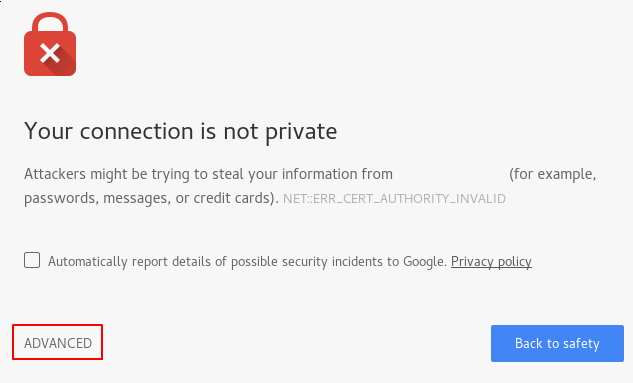
This is expected and normal. We are only interested in the encryption aspect of our certificate, not the third party validation of our host’s authenticity. Click “ADVANCED” and then the link provided to proceed to your host anyways:
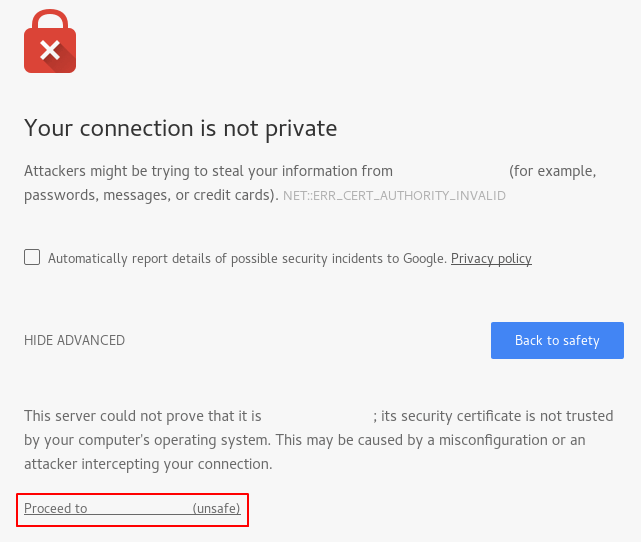
You should be taken to your site. If you look in the browser address bar, you will see a lock with an “x” over it. In this case, this just means that the certificate cannot be validated. It is still encrypting your connection.
If you configured Nginx with two server blocks, automatically redirecting HTTP content to HTTPS, you can also check whether the redirect functions correctly:
- http://server_domain_or_IP
If this results in the same icon, this means that your redirect worked correctly.
Step 6: Change to a Permanent Redirect
If your redirect worked correctly and you are sure you want to allow only encrypted traffic, you should modify the Nginx configuration to make the redirect permanent.
Open your server block configuration file again:
- sudo nano /etc/nginx/sites-available/default
Find the return 302 and change it to return 301:
server {
    listen 80 default_server;
    listen [::]:80 default_server;
    server_name server_domain_or_IP;
    return 301 https://$server_name$request_uri;
}

. . .
Save and close the file.
Check your configuration for syntax errors:
- sudo nginx -t
When you’re ready, restart Nginx to make the redirect permanent:
- sudo systemctl restart nginx
Conclusion
You have configured your Nginx server to use strong encryption for client connections. This will allow you serve requests securely, and will prevent outside parties from reading your traffic.
Thanks for learning with the DigitalOcean Community. Check out our offerings for compute, storage, networking, and managed databases.
About the author

Former Senior Technical Writer at DigitalOcean, specializing in DevOps topics across multiple Linux distributions, including Ubuntu 18.04, 20.04, 22.04, as well as Debian 10 and 11.
Still looking for an answer?
 This work is licensed under a Creative Commons Attribution-NonCommercial- ShareAlike 4.0 International License.
Become a contributor for community
Get paid to write technical tutorials and select a tech-focused charity to receive a matching donation.

DigitalOcean Documentation
Full documentation for every DigitalOcean product.

Resources for startups and AI-native businesses
The Wave has everything you need to know about building a business, from raising funding to marketing your product.
The developer cloud
Scale up as you grow — whether you're running one virtual machine or ten thousand.

Start building today
From GPU-powered inference and Kubernetes to managed databases and storage, get everything you need to build, scale, and deploy intelligent applications.



