
Status: Deprecated
This article covers a version of Ubuntu that is no longer supported. If you are currently operate a server running Ubuntu 12.04, we highly recommend upgrading or migrating to a supported version of Ubuntu:
- Upgrade to Ubuntu 14.04.
- Upgrade from Ubuntu 14.04 to Ubuntu 16.04
- Migrate the server data to a supported version
Reason: Ubuntu 12.04 reached end of life (EOL) on April 28, 2017 and no longer receives security patches or updates. This guide is no longer maintained.
See Instead: This guide might still be useful as a reference, but may not work on other Ubuntu releases. If available, we strongly recommend using a guide written for the version of Ubuntu you are using. You can use the search functionality at the top of the page to find a more recent version.
Introduction
WordPress is the most popular CMS (content management system) used on the internet today. While many people use it because it is powerful and simple, sometimes people make a trade-off for convenience at the expense of security.
This is the case in how you choose to assign directory ownership and permissions, and how you choose to perform upgrades. There are a variety of different methods to do this. We will choose what we consider a relatively secure way of upgrading and installing themes and plugins.
In this guide, we assume that you have gone through your initial server setup. You will also need to install a LAMP stack on your VPS.
We will also assume that you have installed WordPress on Ubuntu 12.04. You can follow our guide on how to install WordPress on Ubuntu 12.04 here.
Once you have the user and required software, you can start following this guide.
Set Up Secure Updates with SSH
If you do not have key-based updates and installations configured, you will get a prompt for connection information whenever you attempt to do either of these tasks.
It will ask you to provide FTP credentials, such as a hostname, FTP username, and FTP password:
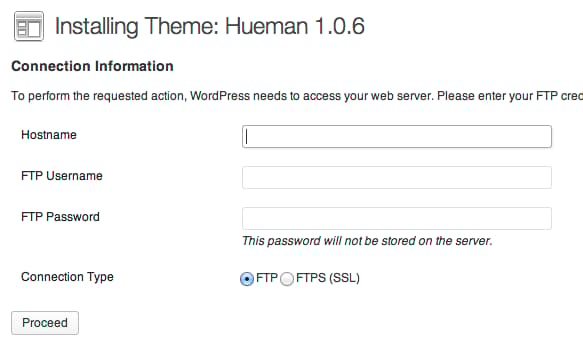
FTP is an inherently insecure protocol, so we do not recommend you using it in most cases. We will be configuring our installation to use a secure alternative.
Changing Permissions
If you followed the guide on installing WordPress above, you will notice that you gave permission of the web directory to the Apache web user. This is a very quick way to get started, but can potentially be a security risk. In an ideal situation, you would separate the content owner from the web process. We will do this as part of our preparation for allowing SSH updates.
We will create a user called wp-user to own our WordPress installation.
sudo adduser wp-user
You will be asked a lot of question, including the password you want to set. We do not want to set a password, so press “ENTER” through all of the prompts, including the repeated password questions.
Next, change to the /var/www/html directory, where our WordPress files are being served.
cd /var/www/html
We will give our new user ownership over everything under this directory, changing it from the www-data Apache web user that we configured during installation.
sudo chown -R wp-user:wp-user /var/www/html
Create SSH Keys for WordPress
We now need to create an SSH key pair for our WordPress user. Log into the WordPress user by issuing the following command:
sudo su - wp-user
We will create a key pair with the ssh-keygen command:
ssh-keygen -t rsa -b 4096
You will be asked where to store your keys and what to call them. Choose /home/wp-user/wp_rsa. You will also be asked to choose a passphrase. Press “ENTER” through the prompt to create a key without password authentication.
Exit out into your normal user account:
exit
We need to do some maintenance to get the permissions secure. We want to give the WordPress user ownership, but set the www-data group as the group owner. We then want to lock down the other access:
sudo chown wp-user:www-data /home/wp-user/wp_rsa*
sudo chmod 0640 /home/wp-user/wp_rsa*
You need to create the ~/.ssh directory and give it appropriate permissions and ownership so that the web process can log in.
sudo mkdir /home/wp-user/.ssh
sudo chown wp-user:wp-user /home/wp-user/.ssh/
sudo chmod 0700 /home/wp-user/.ssh/
Now, we can input the public key into our authorized keys file so that the user can log in using those credentials. Since we do not have this file already, we can simply copy the public key.
sudo cp /home/wp-user/wp_rsa.pub /home/wp-user/.ssh/authorized_keys
Again, we need to adjust the permissions and ownership of these files to ensure that they can be accessed, while remaining secure:
sudo chown wp-user:wp-user /home/wp-user/.ssh/authorized_keys
sudo chmod 0644 /home/wp-user/.ssh/authorized_keys
Since these keys will only be used for logging in from within the WordPress site, which is on the same computer, we can restrict the login to this server:
sudo nano /home/wp-user/.ssh/authorized_keys
At the very beginning of the file, before any of the other text, add the portion in red to restrict the key usage to the local computer:
<pre> <span class=“highlight”>from=“127.0.0.1”</span> ssh-rsa… </pre>
Save and close the file.
Adjust WordPress Configuration to Use Keys
Now, we can install the packages necessary for WordPress to authenticate SSH logins:
sudo apt-get update
sudo apt-get install php5-dev libssh2-1-dev libssh2-php
Now that we have the utilities, we can edit the configuration file and set the values that we configured.
sudo nano /var/www/html/wp-config.php
Towards the end of the file, add these lines:
define('FTP_PUBKEY','/home/wp-user/wp_rsa.pub');
define('FTP_PRIKEY','/home/wp-user/wp_rsa');
define('FTP_USER','wp-user');
define('FTP_PASS','');
define('FTP_HOST','127.0.0.1:22');
Save and close the file.
Now, we should restart Apache to take advantage of our new update procedures:
sudo service apache2 restart
Test the Results
Now, we can test to see if our configuration is correct. Log into your WordPress site as an administrator by visiting your site in a browser at the following URL:
<pre> <span class=“highlight”>your_domain.com</span>/wp-admin </pre>
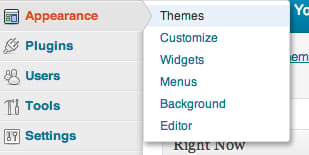
We can check that our settings are configured correctly by attempting to install a new theme. Click on “Appearance” and then “Themes”.
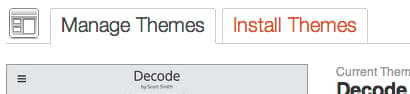
At the top, click on “Install Themes”:
Search for a theme or click on the “Featured” themes. Click “Install” to install the theme on your site. It should successfully log in, download, and install your package using the key files you specified:
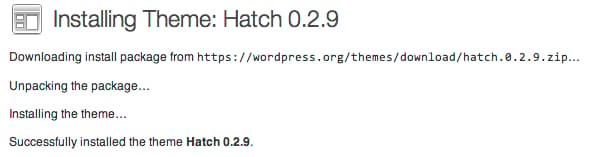
You can click on “Activate” to switch to the new theme and then click “visit site” to see the results.
Common Issues
There are some issues that you may run into if you’ve configured your SSH keys incorrectly.
One common error that you may see when trying to push a change through the web interface is:
<pre> Public and Private keys incorrect for <span class=“highlight”>user</span> </pre>
This error is frustratingly unspecific. It can be caused for a variety of reasons, some of which are:
-
Improper permissions on the public key, private key, and the directories that contain them.
The web process needs to be able to read each of these files, so if the web-server group is the owner, then each file needs to have at least 640 permissions.
On the other hand, the
~.sshdirectory only needs to be accessible to the user that will be logging in. This means thewp-useruser in our example. The contents of the directory should be similarly owned by this user and not writable by anyone else. -
Improper file ownership. These same keys need to be owned by the correct parties. Between owner and group-owner, this is often a mixture of the user being logged in and the web process user.
In our example, the
wp-userowns both the private and public keys, while the www-data group is the group-owner. This allows us to associate them with the correct user while allowing the server to read the files. -
Improper file formatting. If your public or private key has formatting issues, WordPress will reject the key and refuse to use it. The same goes for the
~/.ssh/authorized_keysfile.The portion that you added to the authorized_keys file,
from="127.0.0.1" ...should not exist in the public key. Even though SSH will consider it a valid file, WordPress will reject it as invalid before even sending the attempt to the SSH daemon.
Another common error during the process of updating or installing themes and plugins is:
Could not create directory...
This is usually an issue with incorrect web-directory ownership. If you are going to be updating the files with the wp-user account, the upload directories also need to be owned and accessible by this user.
This means that you need to give the files and folders within the /var/www/html directory to the wp-user account. If you followed the instructions above and are still having problems, make sure you passed the -R option to the chown command.
Another thing to check is that the upload directories have write permissions for the WordPress user. Change to the document root:
cd /var/www/html
If we check the permissions of the files in this folder, we should see write permissions for the owner (first column), but not for the second or third columns:
ls -l
total 180
-rw-r--r--  1 wp-user wp-user   177 Nov 18 15:21 index.html
-rw-r--r--  1 wp-user wp-user   418 Sep 24 20:18 index.php
-rw-r--r--  1 wp-user wp-user    20 Nov 18 15:24 info.php
-rw-r--r--  1 wp-user wp-user 19929 Jan 18  2013 license.txt
-rw-r--r--  1 wp-user wp-user  7128 Oct 23 16:08 readme.html
-rw-r--r--  1 wp-user wp-user  4892 Oct  4 10:12 wp-activate.php
drwxr-xr-x  9 wp-user wp-user  4096 Oct 29 16:08 wp-admin/
-rw-r--r--  1 wp-user wp-user   271 Jan  8  2012 wp-blog-header.php
-rw-r--r--  1 wp-user wp-user  4795 Sep  5 21:38 wp-comments-post.php
-rw-r--r--  1 wp-user wp-user  3350 Nov 19 12:23 wp-config.php
-rw-r--r--  1 wp-user wp-user  3177 Nov  1  2010 wp-config-sample.php
drwxr-xr-x  5 wp-user wp-user  4096 Nov 19 12:25 wp-content/
. . .
As you can see, the file permissions that read -rw-r--r-- and the directory permissions that read drwxr-xr-x indicate that the wp-user, who owns the files and directories, has write permissions and others do not.
A similar check within the wp-content directory, which contains themes, plugins, etc, will show us whether these directories are owned by and writeable by the wp-user user.
cd /var/www/html/wp-content
ls -l
total 16
-rw-r--r-- 1 wp-user wp-user   28 Jan  8  2012 index.php
drwxr-xr-x 3 wp-user wp-user 4096 Oct 29 16:08 plugins
drwxr-xr-x 6 wp-user wp-user 4096 Nov 19 13:10 themes
drwxr-xr-x 2 wp-user wp-user 4096 Nov 19 13:10 upgrade
These directories are correctly configured.
Conclusion
While WordPress is convenient and can be configured and managed relatively easily, it does not mean that security should not be a primary concern for your site.
Something as simple as updating your installation, which should be done immediately upon any security release, should be simple. It also should not be a procedure that forces you to use insecure protocols or set insecure directory permissions.
Securing your update procedure and correct directory permissions is one easy task that can prevent a rather large security concern.
<div class=“author”>By Justin Ellingwood</div>
Thanks for learning with the DigitalOcean Community. Check out our offerings for compute, storage, networking, and managed databases.
About the author

Former Senior Technical Writer at DigitalOcean, specializing in DevOps topics across multiple Linux distributions, including Ubuntu 18.04, 20.04, 22.04, as well as Debian 10 and 11.
Still looking for an answer?
 This work is licensed under a Creative Commons Attribution-NonCommercial- ShareAlike 4.0 International License.
Become a contributor for community
Get paid to write technical tutorials and select a tech-focused charity to receive a matching donation.

DigitalOcean Documentation
Full documentation for every DigitalOcean product.

Resources for startups and AI-native businesses
The Wave has everything you need to know about building a business, from raising funding to marketing your product.
The developer cloud
Scale up as you grow — whether you're running one virtual machine or ten thousand.

Start building today
From GPU-powered inference and Kubernetes to managed databases and storage, get everything you need to build, scale, and deploy intelligent applications.



