
Technical Writer II

Introduction
An 8-digit hex color code in
CSS uses the #RRGGBBAA
format, where the final two characters set the alpha (transparency) channel as
a hexadecimal value from 00 (fully transparent) to FF (fully opaque).
This notation lets you control opacity directly inside a hex value, without
switching to rgba().
CSS supports several color formats, including hex codes, rgb(), rgba(),
hsl(), and color keywords. This article focuses on hex notation: how the
standard 3-digit and 6-digit formats work, how the 4-digit (#RGBA) and
8-digit (#RRGGBBAA) formats add transparency, how hex alpha compares to
rgba(), hsla(), and the opacity property, and which browsers support each
format.
Key Takeaways
- The 8-digit hex format
#RRGGBBAAadds an alpha channel to a standard 6-digit hex color, whereAAranges from00(transparent) toFF(opaque). - The 4-digit format
#RGBAis shorthand: each digit is doubled, so#F00Aexpands to#FF0000AA. - To convert an opacity percentage to a hex alpha value, multiply by 255 and
convert to hexadecimal. For example, 50% is
round(0.5 × 255) = 128, or80in hex. - Hex alpha,
rgba(), andhsla()apply transparency to a single color value only. Theopacityproperty fades an entire element and all of its children. #RRGGBBAAand#RGBAare supported in all current major browsers but not in Internet Explorer. Usergba()as a fallback when you must support legacy engines.
Prerequisites
If you would like to follow along with this article, you will need:
- Some familiarity with CSS is required. You may benefit from How To Build a Website With CSS tutorial series if you need a refresher.
- A modern web browser that supports
#rrggbbaahex color notation.
Understanding the CSS Hex Color Format
Before adding transparency, it helps to understand how a hex color is
constructed. A hex code is a compact way to express a red, green, and blue
combination using base-16 digits. CSS color keywords such as red or lavender
cover about 140 named colors, but hex codes let you specify any of the roughly
16.7 million RGB combinations, plus an optional alpha channel.
The 3-Digit and 6-Digit Hex Formats (#RGB and #RRGGBB)
You are probably most used to counting with decimal values (or base 10):
0, 1, 2, 3, 4, 5, 6, 7, 8, 9
In other words, a single-digit only has 10 possible values (0 to 9), and
after that, it must increase to two digits (10).
Hexadecimal values are base 16 instead of base 10:
0, 1, 2, 3, 4, 5, 6, 7, 8, 9, A, B, C, D, E, F
It uses the letters A, B, C, D, E, and F to represent the additional
values.
For example, these are all valid hexadecimal values:
00, 01, 99, 9D, 1D, CC, E4, F5
Each two-digit pair encodes a number from 0 to 255. The left digit is the 16s
place and the right digit is the 1s place, so A0 equals (10 × 16) + 0 = 160,
and FF equals (15 × 16) + 15 = 255, the largest value two hex digits can
hold. That 0-to-255 range is why each color channel has 256 possible levels.
When styling an element with CSS, you will often be changing the color values
for properties like font color, background-color, border-color, etc.
To create custom colors, you can use combinations of the hexadecimal numbers described above to create hex codes, which represent specific colors.
CSS hex codes must begin with a
“number sign” (#) (also known as a
pound sign or a hash symbol). Then, six digits of hexadecimal values. Each pair
of two digits represents red, green, and blue. The pattern looks like #RRGGBB
(where red is R, green is G, and blue is B).
Each pair sets the intensity of one channel: 00 means none of that channel and
FF means the maximum. Setting all three pairs to 00 produces black, and
setting all three to FF produces white. A single channel at FF with the
other two at 00 gives the pure, fully saturated version of that channel, such
as #FF0000 for pure red.
Setting all three pairs to the lowest value (00) will produce a solid black
color:
div {
  color: #000000;
}
Setting all three pairs to the highest value (FF) will produce a solid white
color:
div {
  color: #FFFFFF;
}
Let’s say you wanted the heading text color to be a bright red. To achieve this,
you can set the red (RR) value to the highest possible value (FF). Since you
do not want any green or blue, you can set the green (GG) and blue (BB)
values each to the lowest possible value (00).
div {
  color: #FF0000;
}
This code will render as:
By changing the amount of red, blue, and green, you can produce a variety of
colors. #DC143C has a large amount of red (DC), which produces a Crimson
color. #EE82EE has large amounts of red (EE) and blue (EE), which produces
a Violet color. #40E0D0 has large amounts of green (E0) and blue (D0),
which produces a Turquoise color.
Note: CSS hex codes are not case-sensitive. This means the alphabetic
characters can be upper or lowercase, so #ff0000 is equivalent to #FF0000.
CSS also supports shorthand values. This means that #F00 is equivalent to
#FF0000.
The approach you adopt should adhere to the coding standards used by your project.
What the Alpha Channel Controls
The alpha channel sets how opaque a color is. It does not change the color
itself, only how much of the background shows through it. An alpha of FF
renders the color at full strength. As the value decreases toward 00, the color
blends more with whatever sits behind it, until at 00 it is fully transparent
and invisible.
Alpha applies to the color value alone. Unlike the opacity property, a hex
alpha value on a background-color does not affect the element’s text or its
child elements.
How CSS Color Module Level 4 Added Alpha to Hex Notation
The original #RGB and #RRGGBB hex formats had no way to express
transparency. For years, developers reached for rgba() whenever they needed a
translucent color.
CSS Color Module Level 4 added the
4-digit (#RGBA) and 8-digit (#RRGGBBAA) hex formats so that an alpha channel
can be expressed in
hex directly. This means a team already standardized on hex codes can add
transparency without converting to a different color function.
The 4-Digit Hex Format (#RGBA)
Syntax and Structure
The 4-digit format follows the pattern #RGBA: one digit each for red, green,
blue, and alpha. It is the shorthand companion to #RRGGBBAA, the same way
#RGB is shorthand for #RRGGBB.
How 4-Digit Shorthand Maps to 8-Digit Values
Each digit in a 4-digit hex code is doubled to produce the 8-digit equivalent.
The digit F becomes FF, 0 becomes 00, and so on.
/* These pairs are equivalent   */
/* #RGBA    ->  #RRGGBBAA       */
/* #F00A    ->  #FF0000AA       */
/* #0000    ->  #00000000       */
Code Example: Applying #RGBA to a Background Color
Apply a 4-digit hex value the same way as any color value. Each digit doubles
on expansion: #00FA expands as 0→00, 0→00, F→FF, A→AA,
giving #0000FFAA, which is blue at roughly 67% opacity.
div {
  background-color: #00FA; /* expands to #0000FFAA */
}
The 8-Digit Hex Format (#RRGGBBAA)
Structure of the 8-Digit Format
The 8-digit format extends #RRGGBB with a two-digit alpha channel:
#RRGGBBAA. The first six digits are unchanged from a standard hex color; the
final pair sets transparency.
How Alpha Values Work in Hexadecimal
The AA pair runs from 00 to FF, the same range as each color pair: 00 is
fully transparent and FF is fully opaque. Intermediate values blend the color
with whatever is painted behind it. The browser computes each final pixel as
foreground × alpha + background × (1 − alpha), where alpha is the AA value
divided by 255. This is why the same alpha looks different over different
backdrops: #0000FF80 reads as a muted blue over a white background but as a
deep navy over black, because the backdrop it blends with changed, not the
color itself. Because base 16 is hard to estimate by eye, the reference table
below maps common alpha values to opacity percentages.
Code Example: Setting Partial Transparency on a UI Element
To make any solid color partially transparent, append an alpha pair to its 6-digit hex value. Start with a solid blue:
div {
  background-color: #0080FF;
}
This code will render as:
#0080FF
Next, you can change the transparency by adding two more values to the hex
code. In this example, the alpha value is set to 80:
div {
  background-color: #0080FF80;
}
This code will render as:
#0080FF80
The 80 alpha keeps the existing #0080FF color and adds transparency in
place, with no switch to a different color function.
Code Example: Fully Transparent and Fully Opaque Values
.fully-opaque {
  /* identical to #3498DB, no transparency */
  background-color: #3498DBFF;
}

.fully-transparent {
  /* invisible, background shows through completely */
  background-color: #3498DB00;
}
Hex Alpha Value to Transparency Percentage Reference Table
To find the hex alpha for a given opacity, multiply the opacity (as a decimal) by 255, round to the nearest whole number, and convert to hexadecimal. The table below lists common 10% steps.
| Opacity | Decimal (0 to 255) | Hex alpha (AA) |
|---|---|---|
| 0% | 0 | 00 |
| 10% | 26 | 1A |
| 20% | 51 | 33 |
| 30% | 77 | 4D |
| 40% | 102 | 66 |
| 50% | 128 | 80 |
| 60% | 153 | 99 |
| 70% | 179 | B3 |
| 80% | 204 | CC |
| 90% | 230 | E6 |
| 100% | 255 | FF |
Note: These percentages are rounded to the nearest 10% step. For exact
control, compute round(opacity × 255) and convert that integer to a two-digit
hexadecimal value. Fifty percent opacity maps to 80 (decimal 128), not 7F
or 88.
Comparing CSS Transparency Methods
CSS offers four common ways to apply transparency. Hex alpha, rgba(), and
hsla() all set transparency on a single color value. The opacity property is
different: it fades the whole element.
8-Digit Hex vs. rgba()
Both express the same RGB color with an alpha channel. rgba(52, 152, 219, 0.5)
and #3498DB80 render identically. rgba() reads more clearly because the
alpha is a decimal from 0 to 1, and it pairs with channel-based custom
properties (the rgb() pattern shown below).
#RRGGBBAA is the most compact form, expressing color and alpha in a single
token.
8-Digit Hex vs. hsla()
hsla() defines color by hue, saturation, and lightness plus alpha, which makes
it easier to derive tints and shades of the same hue programmatically. Hex
alpha gives no such control over the color components; it is a direct
RGB-plus-alpha value. Choose hsla() when you need to adjust lightness or
saturation alongside transparency.
8-Digit Hex vs. the CSS opacity Property
The opacity property applies to the entire element, including its text and
child elements. Hex alpha (and rgba()/hsla()) applies only to the color it is
set on. To make a card’s background translucent while keeping its text fully
readable, set a hex alpha background-color, not opacity.
Hex Alpha and CSS Custom Properties
A common real-world snag: you cannot append an alpha channel to an existing hex
custom property. If --brand: #3498DB; is defined in your design system, there
is no plain-CSS way to express that color at 50% opacity using hex notation,
because CSS does not concatenate strings. Two practical options solve this.
Store the channels instead of the hex value and use the slash-alpha rgb()
syntax:
:root {
  --brand-rgb: 52 152 219;
}

.button {
  background-color: rgb(var(--brand-rgb) / 50%);
}
Or keep the hex variable and derive a transparent variant with color-mix():
:root {
  --brand: #3498DB;
}

.button {
  background-color: color-mix(in srgb, var(--brand) 50%, transparent);
}
color-mix() is the more composable modern approach. Check
caniuse: color-mix for
your support targets before relying on it.
Comparison Table: When to Use Each Method
| Method | Scope | Children | Best for |
|---|---|---|---|
#RRGGBBAA / #RGBA |
Single color | No | Per-property hex transparency |
rgba() |
Single color | No | Readable alpha, CSS custom properties |
hsla() |
Single color | No | Transparency plus hue adjustments |
opacity |
Whole element | Yes | Fading an entire element or overlay |
Note: Beyond color-mix() shown above, CSS Color Module Level 5 also adds
relative color syntax, which lets you derive a new color (including a
translucent one) from an existing color by adjusting individual channels. Check
caniuse: css-relative-colors for
browser support before using it in production.
Browser Support for Hex Alpha Values
The 4-digit (#RGBA) and 8-digit (#RRGGBBAA) hex formats are supported in all
current major browsers. They are not supported in Internet Explorer. The minimum
versions below are drawn from caniuse; confirm against
Can I use: #rrggbbaa hex notation for your
target audience before shipping.
| Browser | Minimum version with support |
|---|---|
| Chrome | 62 |
| Firefox | 49 |
| Safari | 10 |
| Edge | 79 |
| Internet Explorer | Not supported |
Fallback strategy: When you must support engines without hex alpha, declare
an rgba() value first as the fallback, then override it with the 8-digit hex
value. Browsers that support hex alpha use the second declaration; older
browsers use the first.
.banner {
  background-color: rgba(52, 152, 219, 0.5); /* fallback for IE */
  /* 8-digit hex for modern browsers */
  background-color: #3498DB80;
}
Practical Examples
Transparent Overlay on an Image
To darken a background image for readable text, layer a semi-transparent black
overlay using a pseudo-element. The inset: 0 shorthand is equivalent to
top: 0; right: 0; bottom: 0; left: 0, which stretches the overlay to fill
the parent. Without position: relative and z-index on the content, the
overlay paints on top of your text.
.hero {
  position: relative;
  background-image: url("hero.jpg");
}

.hero::after {
  content: "";
  position: absolute;
  inset: 0;
  /* black at 50% opacity */
  background-color: #00000080;
}

.hero__content {
  position: relative;
  z-index: 1;
}
Disabled Button State Using Hex Alpha
Reducing a button’s color to 40% opacity signals that the control is inactive without removing it from the layout.
.button:disabled {
  /* brand blue at 40% opacity */
  background-color: #3498DB66;
  cursor: not-allowed;
}
Card Background with Subtle Transparency
An 80% white background lets a texture or gradient behind the card remain faintly visible while keeping the card readable.
.card {
  /* white at 80% opacity */
  background-color: #FFFFFFCC;
  -webkit-backdrop-filter: blur(6px);
  backdrop-filter: blur(6px);
}
Using Chrome DevTools to Pick and Convert Colors
One quick tip for seeing your colors in different formats is with the Chrome DevTools.
Once your DevTools panel is open, look for the color you are checking in the
styles section. Once you find it, you can click the box to the left of the color
to adjust the values directly. You can also hold SHIFT and click on the box to
toggle through your various format options with the values correctly converted.
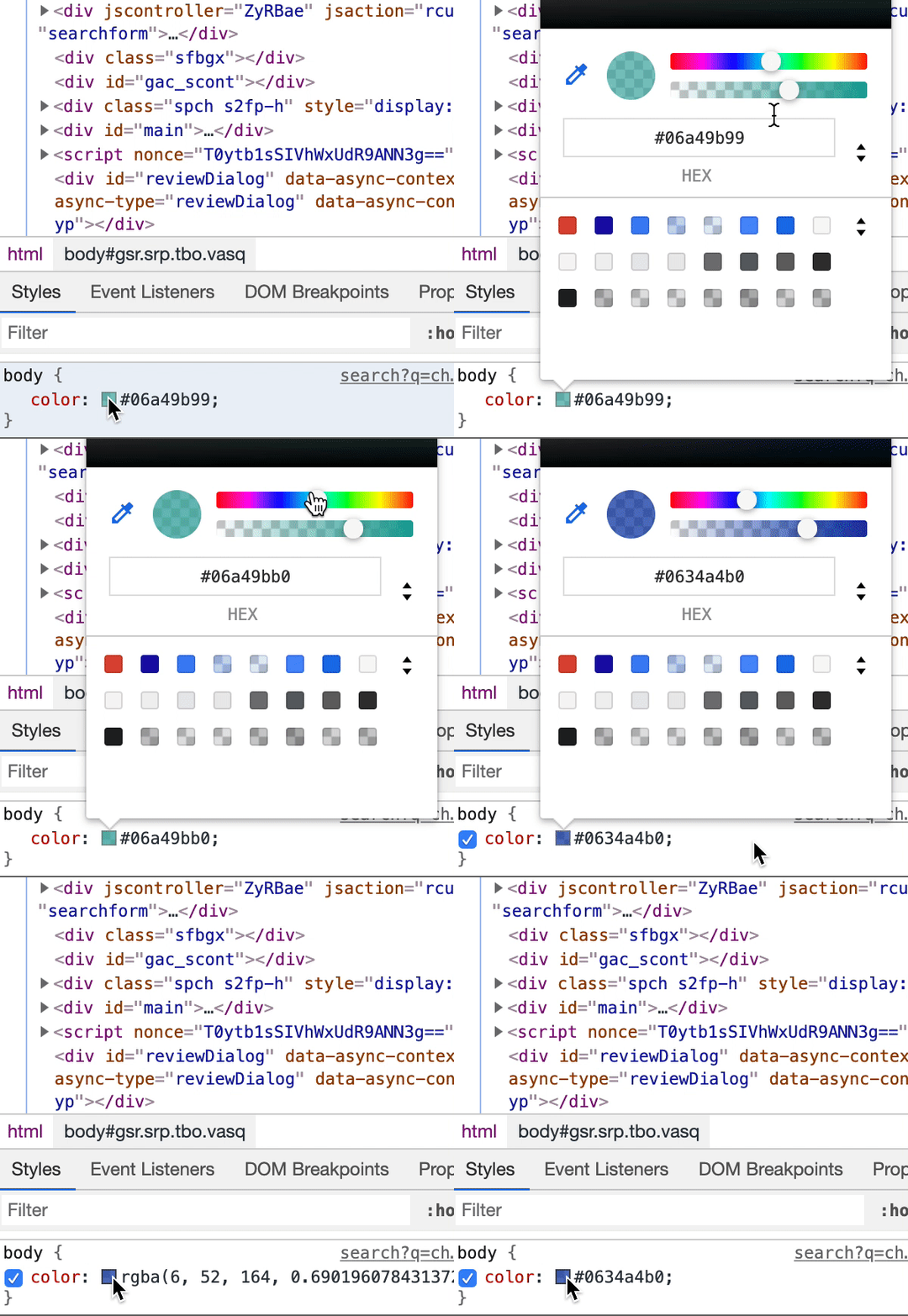
This example adjusts the alpha value and color value. Then toggles between hex code format, RGBA format, and HSLA format.
Learn more about the Chrome DevTools Color Picker.
FAQ
What is an 8-digit hex color code in CSS?
An 8-digit hex code uses the format #RRGGBBAA, where the last two digits set
the alpha (transparency) channel as a hexadecimal value from 00 (fully
transparent) to FF (fully opaque).
What is the hex code for a fully transparent color?
Any color with 00 as its alpha pair is fully transparent, for example
#FF000000 for transparent red or #00000000 for transparent black. CSS also
accepts the named value transparent.
What does #0000 mean in CSS?
#0000 is the 4-digit shorthand for #00000000, fully transparent black. In
the 4-digit format, each digit is doubled, so all four 0 digits expand to
00.
How do I convert an rgba() color to an 8-digit hex code?
Multiply the alpha decimal (0.0 to 1.0) by 255 and convert the result to
hexadecimal. For example, rgba(255, 0, 0, 0.5) has an alpha of 0.5, which is
128 in decimal and 80 in hex, producing #FF000080.
Is 8-digit hex supported in all browsers?
#RRGGBBAA is supported in all current major browsers, including Chrome 62+,
Firefox 49+, Safari 10+, and Edge 79+. It is not supported in Internet Explorer;
use rgba() as a fallback for those environments.
What is the difference between hex alpha and the CSS opacity property?
The opacity property applies transparency to an element and all of its
children. Hex alpha (like rgba()) applies transparency only to the specific
color value, leaving child elements unaffected. Use hex alpha when you need
per-property transparency without fading child content.
Can I use a 4-digit hex shorthand for colors with alpha?
Yes. The 4-digit format #RGBA doubles each digit to form the 8-digit
equivalent, so #F00A expands to #FF0000AA. Browser support for #RGBA
matches #RRGGBBAA.
How do I set 50% transparency using a hex color code?
50% opacity is round(0.5 × 255) = 128, which is 80 in hexadecimal. Append
80 to any 6-digit hex color. For example, #3498DB80 applies roughly 50%
transparency to the color #3498DB.
Conclusion
In this article, you reviewed the CSS hex color format and learned how the
4-digit (#RGBA) and 8-digit (#RRGGBBAA) notations add an alpha channel for
transparency. You also saw how to map hex alpha values to opacity percentages
using the reference table, and how to fall back to rgba() for browsers that do
not support hex alpha.
You compared hex alpha against rgba(), hsla(), and the opacity property.
The key distinction is scope: hex alpha and the color functions affect a single
color value, while opacity fades an entire element and its children. Choose
the method that matches the effect you need and the conventions your codebase
already follows.
To continue learning, see the How To Build a Website With CSS series and the CSS topic page for more exercises and projects.
Thanks for learning with the DigitalOcean Community. Check out our offerings for compute, storage, networking, and managed databases.
About the author
Building future-ready infrastructure with Linux, Cloud, and DevOps. Full Stack Developer & System Administrator. Technical Writer @ DigitalOcean | GitHub Contributor | Passionate about Docker, PostgreSQL, and Open Source | Exploring NLP & AI-TensorFlow | Nailed over 50+ deployments across production environments.
Still looking for an answer?
This textbox defaults to using Markdown to format your answer.
You can type !ref in this text area to quickly search our full set of tutorials, documentation & marketplace offerings and insert the link!

Using an alpha value to update a color’s transparency will change the hex code format from #RRGGBB to #RRGGBBAA (where alpha is A ). The first six values (the red, green, and blue ones) remain the same. The AA value in #RRGGBBAA can range from the lowest value possible ( 00 ) to the highest value possible ( FF ).
Using an alpha value to update a color’s transparency will change the hex code format from #RRGGBB to #RRGGBBAA (where alpha is A ). The first six values (the red, green, and blue ones) remain the same. The AA value in #RRGGBBAA can range from the lowest value possible ( 00 ) to the highest value possible ( FF ).
 This work is licensed under a Creative Commons Attribution-NonCommercial- ShareAlike 4.0 International License.
Become a contributor for community
Get paid to write technical tutorials and select a tech-focused charity to receive a matching donation.

DigitalOcean Documentation
Full documentation for every DigitalOcean product.

Resources for startups and AI-native businesses
The Wave has everything you need to know about building a business, from raising funding to marketing your product.
The developer cloud
Scale up as you grow — whether you're running one virtual machine or ten thousand.

Start building today
From GPU-powered inference and Kubernetes to managed databases and storage, get everything you need to build, scale, and deploy intelligent applications.
