

By Sadequl Hussain and Sharon Campbell

Introduction
Security Enhanced Linux or SELinux is an advanced access control mechanism built into most modern Linux distributions. It was initially developed by the US National Security Agency to protect computer systems from malicious intrusion and tampering. Over time, SELinux was released in the public domain and various distributions have since incorporated it in their code.
Many system administrators find SELinux a somewhat uncharted territory. The topic can seem daunting and at times quite confusing. However, a properly configured SELinux system can greatly reduce security risks, and knowing a bit about it can help you troubleshoot access-related error messages. In this tutorial we will learn about the concepts behind SELinux – its packages, commands, and configuration files – and the error messages it logs when access is denied. We will also see a few practical instances of putting SELinux in action.
Note The commands, packages, and files shown in this tutorial were tested on CentOS 7. The concepts remain the same for other distributions.
In this tutorial, we will be running the commands as the root user unless otherwise stated. If you don’t have access to the root account and use another account with sudo privileges, you need to precede the commands with the sudo keyword.
Why SELinux
Before we begin, let’s understand a few concepts.
SELinux implements what’s known as MAC (Mandatory Access Control). This is implemented on top of what’s already present in every Linux distribution, the DAC (Discretionary Access Control).
To understand DAC, let’s first consider how traditional Linux file security works.
In a traditional security model, we have three entities: User, Group, and Other (u,g,o) who can have a combination of Read, Write, and Execute (r,w,x) permissions on a file or directory. If a user jo creates a file in their home directory, that user will have read/write access to it, and so will the jo group. The “other” entity will possibly have no access to it. In the following code block, we can consider the hypothetical contents of jo’s home directory.
You don’t need to set up this jo user - we’ll be setting up plenty of users later in the tutorial.
Running a command like this:
ls -l /home/jo/
can show output like the following:
total 4
-rwxrw-r--. 1 jo jo 41 Aug  6 22:45 myscript.sh
Now jo can change this access. jo can grant (and restrict) access to this file to other users and groups or change the owner of the file. These actions can leave critical files exposed to accounts who don’t need this access. jo can also restrict to be more secure, but that’s discretionary: there’s no way for the system administrator to enforce it for every single file in the system.
Consider another case: when a Linux process runs, it may run as the root user or another account with superuser privileges. That means if a black-hat hacker takes control of the application, they can use that application to get access to whatever resource the user account has access to. For processes running as the root user, basically this means everything in the Linux server.
Think about a scenario where you want to restrict users from executing shell scripts from their home directories. This can happen when you have developers working on a production system. You would like them to view log files, but you don’t want them to use su or sudo commands, and you don’t want them to run any scripts from their home directories. How do you do that?
SELinux is a way to fine-tune such access control requirements. With SELinux, you can define what a user or process can do. It confines every process to its own domain so the process can interact with only certain types of files and other processes from allowed domains. This prevents a hacker from hijacking any process to gain system-wide access.
Setting Up a Test System
To help us learn the concepts, we will build a test server running both a web and an SFTP server. We will start with a bare installation of CentOS 7 with minimal packages installed and install the Apache and vsftp daemons on that server. However, we will not configure either of these applications.
We will also create a few test user accounts in our cloud server. We will use these accounts in different places throughout the lesson.
Finally, we will install needed SELinux-related packages. This is to ensure we can work with the latest SELinux commands.
Installing Apache and SFTP Services
First, let’s log in to the server as the root user and run the following command to install Apache:
yum install httpd
The output will show the package being downloaded and ask you for permission to install:
Loaded plugins: fastestmirror, langpacks
...
...
================================================================================
 Package       Arch           Version                     Repository       Size
================================================================================
Installing:
 httpd         x86_64         2.4.6-18.el7.centos         updates         2.7 M

Transaction Summary
================================================================================
Install  1 Package

Total download size: 2.7 M
Installed size: 9.3 M
Is this ok [y/d/N]:
Pressing y will install the Apache web server daemon.
Downloading packages:
httpd-2.4.6-18.el7.centos.x86_64.rpm                       | 2.7 MB   00:01
Running transaction check
Running transaction test
Transaction test succeeded
Running transaction
  Installing : httpd-2.4.6-18.el7.centos.x86_64                             1/1
  Verifying  : httpd-2.4.6-18.el7.centos.x86_64                             1/1

Installed:
  httpd.x86_64 0:2.4.6-18.el7.centos

Complete!
Start the daemon manually:
service httpd start
Running the service httpd status command will show the service is now running:
Redirecting to /bin/systemctl status  httpd.service
httpd.service - The Apache HTTP Server
   Loaded: loaded (/usr/lib/systemd/system/httpd.service; disabled)
   Active: active (running) since Tue 2014-08-19 13:39:48 EST; 1min 40s ago
 Main PID: 339 (httpd)
...
...
Next we will install vsftp:
yum install vsftpd
The output should look similar to the following:
Loaded plugins: fastestmirror, langpacks
...
...
==============================================================================================================
 Package                  Arch                     Version                       Repository              Size
==============================================================================================================
Installing:
 vsftpd                   x86_64                   3.0.2-9.el7                   base                   165 k

Transaction Summary
==============================================================================================================
Install  1 Package

Total download size: 165 k
Installed size: 343 k
Is this ok [y/d/N]:
Press y to install the package.
Next, we will use the service vsftpd start command to start the vsftpd daemon. The output should show something like the following:
Redirecting to /bin/systemctl status  vsftpd.service
vsftpd.service - Vsftpd ftp daemon
   Loaded: loaded (/usr/lib/systemd/system/vsftpd.service; disabled)
   Active: active (running) since Tue 2014-08-19 13:48:57 EST; 4s ago
  Process: 599 ExecStart=/usr/sbin/vsftpd /etc/vsftpd/vsftpd.conf (code=exited, status=0/SUCCESS)
 Main PID: 600 (vsftpd)
...
...
Installing SELinux Packages
A number of packages are used in SELinux. Some are installed by default. Here is a list for Red Hat-based distributions:
- policycoreutils (provides utilities for managing SELinux)
- policycoreutils-python (provides utilities for managing SELinux)
- selinux-policy (provides SELinux reference policy)
- selinux-policy-targeted (provides SELinux targeted policy)
- libselinux-utils (provides some tools for managing SELinux)
- setroubleshoot-server (provides tools for deciphering audit log messages)
- setools (provides tools for audit log monitoring, querying policy, and file context management)
- setools-console (provides tools for audit log monitoring, querying policy, and file context management)
- mcstrans (tools to translate different levels to easy-to-understand format)
Some of these are installed already. To check what SELinux packages are installed on your CentOS 7 system, you can run a few commands like the one below (with different search terms after grep) as the root user:
rpm -qa | grep selinux
The output should look something like this:
libselinux-utils-2.2.2-6.el7.x86_64
libselinux-2.2.2-6.el7.x86_64
selinux-policy-targeted-3.12.1-153.el7.noarch
selinux-policy-3.12.1-153.el7.noarch
libselinux-python-2.2.2-6.el7.x86_64
You can go ahead and install all the packages with the command below (yum will just update any you already have), or just the ones that you find missing from your system:
yum install policycoreutils policycoreutils-python selinux-policy selinux-policy-targeted libselinux-utils setroubleshoot-server setools setools-console mcstrans
Now we should have a system that’s loaded with all the SELinux packages. We also have Apache and SFTP servers running with their default configurations. We also have four regular user accounts ready for testing in addition to the root account.
SELinux Modes
It’s time to start playing around with SELinux, so let’s begin with SELinux modes. At any one time, SELinux can be in any of three possible modes:
- Enforcing
- Permissive
- Disabled
In enforcing mode SELinux will enforce its policy on the Linux system and make sure any unauthorized access attempts by users and processes are denied. The access denials are also written to relevant log files. We will talk about SELinux policies and audit logs later.
Permissive mode is like a semi-enabled state. SELinux doesn’t apply its policy in permissive mode, so no access is denied. However any policy violation is still logged in the audit logs. It’s a great way to test SELinux before enforcing it.
The disabled mode is self-explanatory – the system won’t be running with enhanced security.
Checking SELinux Modes and Status
We can run the getenforce command to check the current SELinux mode.
getenforce
SELinux should currently be disabled, so the output will look like this:
Disabled
We can also run the sestatus command:
sestatus
When SELinux is disabled the output will show:
SELinux status: disabled
SELinux Configuration File
The main configuration file for SELinux is /etc/selinux/config. We can run the following command to view its contents:
cat /etc/selinux/config
The output will look something like this:
# This file controls the state of SELinux on the system.
# SELINUX= can take one of these three values:
#     enforcing - SELinux security policy is enforced.
#     permissive - SELinux prints warnings instead of enforcing.
#     disabled - No SELinux policy is loaded.
SELINUX=disabled
# SELINUXTYPE= can take one of these two values:
#     targeted - Targeted processes are protected,
#     minimum - Modification of targeted policy. Only selected processes are protected.
#     mls - Multi Level Security protection.
SELINUXTYPE=targeted
There are two directives in this file. The SELINUX directive dictates the SELinux mode and it can have three possible values as we discussed before.
The SELINUXTYPE directive determines the policy that will be used. The default value is targeted. With a targeted policy, SELinux allows you to customize and fine tune access control permissions. The other possible value is “MLS” (multilevel security), an advanced mode of protection. Also with MLS, you need to install an additional package.
Enabling and Disabling SELinux
Enabling SELinux is fairly simple; but unlike disabling it, should be done in a two-step process. We assume that SELinux is currently disabled, and that you’ve installed all of the SELinux packages from the earlier section.
As a first step, we need to edit the /etc/selinux/config file to change the SELINUX directive to permissive mode.
vi /etc/sysconfig/selinux
...
SELINUX=permissive
...
Setting the status to permissive first is necessary because every file in the system needs to have its context labelled before SELinux can be enforced. Unless all files are properly labelled, processes running in confined domains may fail because they can’t access files with the correct contexts. This can cause the boot process to fail or start with errors. We will introduce contexts and domains later in the tutorial.
Now issue a system reboot:
reboot
The reboot process will see all the files in the server labelled with an SELinux context. Since the system is running in permissive mode, SELinux errors and access denials will be reported but it won’t stop anything.
Log in to your server again as root. Next, search for the string “SELinux is preventing” from the contents of the /var/log/messages file.
cat /var/log/messages | grep "SELinux is preventing"
If there are no errors reported, we can safely move to the next step. However, it would still be a good idea to search for text containing “SELinux” in /var/log/messages file. In our system, we ran the following command:
cat /var/log/messages | grep "SELinux"
This showed some error messages related to the GNOME Desktop that was running. This was happening when SELInux was either disabled or in permissive mode:
Aug 20 11:31:14 localhost kernel: SELinux:  Initializing.
Aug 20 11:31:16 localhost kernel: SELinux:  Disabled at runtime.
Aug 20 11:31:21 localhost journal: Unable to lookup SELinux process context: Invalid argument
Aug 20 11:33:20 localhost gnome-session: SELinux Troubleshooter: Applet requires SELinux be enabled to run.

Aug 20 11:37:15 localhost kernel: SELinux:  Initializing.
Aug 20 11:37:17 localhost kernel: SELinux:  Disabled at runtime.
Aug 20 11:37:23 localhost journal: Unable to lookup SELinux process context: Invalid argument
Aug 20 11:37:44 localhost gnome-session: SELinux Troubleshooter: Applet requires SELinux be enabled to run.

Aug 20 11:39:42 localhost kernel: SELinux:  Initializing.
Aug 20 11:39:44 localhost kernel: SELinux:  Disabled at runtime.
Aug 20 11:39:50 localhost journal: Unable to lookup SELinux process context: Invalid argument
These types of errors are fine.
In the second phase, we need to edit the config file to change the SELINUX directive from permissive to enforcing in the /etc/sysconfig/selinux file:
...
SELINUX=enforcing
...
Next, reboot the server again.
reboot
Once the server is back online, we can run the sestatus command to check the SELinux status. It should now show more details about the server:
SELinux status:                 enabled
SELinuxfs mount:                /sys/fs/selinux
SELinux root directory:         /etc/selinux
Loaded policy name:             targeted
Current mode:                   permissive
Mode from config file:          error (Success)
Policy MLS status:              enabled
Policy deny_unknown status:     allowed
Max kernel policy version:      28
Check the /var/log/messages file:
cat /var/log/messages | grep "SELinux"
There should be no errors. The output should look something like this:
Aug 20 11:42:06 localhost kernel: SELinux:  Initializing.
Aug 20 11:42:09 localhost systemd[1]: Successfully loaded SELinux policy in 183.302ms.

Aug 20 11:44:25 localhost kernel: SELinux:  Initializing.
Aug 20 11:44:28 localhost systemd[1]: Successfully loaded SELinux policy in 169.039ms.
Checking SELinux Modes and Status (Again)
We can run the getenforce command to check the current SELinux mode.
getenforce
If our system is running in enforcing mode the output will look like this:
Enforcing
The output will be different if SELinux is disabled:
Disabled
We can alo run the sestatus command to get a better picture.
sestatus
If SELinux isn’t disabled, the output will show its current status, its current mode, the mode defined in the configuration file, and the policy type.
SELinux status:                 enabled
SELinuxfs mount:                /sys/fs/selinux
SELinux root directory:         /etc/selinux
Loaded policy name:             targeted
Current mode:                   enforcing
Mode from config file:          enforcing
Policy MLS status:              enabled
Policy deny_unknown status:     allowed
Max kernel policy version:      28
When SELinux is disabled the output will show:
SELinux status: disabled
We can also temporarily switch between enforcing and permissive modes using the setenforce command. (Note that we can’t run setenforce when SELinux is disabled.)
First change the SELinux mode from enforcing to permissive in our CentOS 7 system:
setenforce permissive
Running the sestatus command now shows the current mode is different from the mode defined in config file:
SELinux status:                 enabled
SELinuxfs mount:                /sys/fs/selinux
SELinux root directory:         /etc/selinux
Loaded policy name:             targeted
Current mode:                   permissive
Mode from config file:          enforcing
Policy MLS status:              enabled
Policy deny_unknown status:     allowed
Max kernel policy version:      28
Switch back to enforcing:
setenforce enforcing
SELinux Policy
At the heart of SELinux’ security engine is its policy. A policy is what the name implies: a set of rules that define the security and access rights for everything in the system. And when we say everything, we mean users, roles, processes, and files. The policy defines how each of these entities are related to one another.
Some Basic Terminology
To understand policy, we have to learn some basic terminology. We will go into the details later, but here is a brief introduction. An SELinux policy defines user access to roles, role access to domains, and domain access to types.
Users
SELinux has a set of pre-built users. Every regular Linux user account is mapped to one or more SELinux users.
In Linux, a user runs a process. This can be as simple as the user jo opening a document in the vi editor (it will be jo’s account running the vi process) or a service account running the httpd daemon. In the SELinux world, a process (a daemon or a running program) is called a subject.
Roles
A role is like a gateway that sits between a user and a process. A role defines which users can access that process. Roles are not like groups, but more like filters: a user may enter or assume a role at any time provided the role grants it. The definition of a role in SELinux policy defines which users have access to that role. It also defines what process domains the role itself has access to. Roles come into play because part of SELinux implements what’s known as Role Based Access Control (RBAC).
Subjects and Objects
A subject is a process and can potentially affect an object.
An object in SELinux is anything that can be acted upon. This can be a file, a directory, a port, a tcp socket, the cursor, or perhaps an X server. The actions that a subject can perform on an object are the subject’s permissions.
Domains are for Subjects
A domain is the context within which an SELinux subject (process) can run. That context is like a wrapper around the subject. It tells the process what it can and can’t do. For example, the domain will define what files, directories, links, devices, or ports are accessible to the subject.
Types are for Objects
A type is the context for a file’s context that stipulates the file’s purpose. For example, the context of a file may dictate that it’s a web page, or that the file belongs to the /etc directory, or that the file’s owner is a specific SELinux user. A file’s context is called its type in SELinux lingo.
So what is SELinux policy?
SELinux policy defines user access to roles, role access to domains, and domain access to types. First the user has to be authorized to enter a role, and then the role has to be authorized to access the domain. The domain in turn is restricted to access only certain types of files.
The policy itself is a bunch of rules that say that so-and-so users can assume only so-and-so roles, and those roles will be authorized to access only so-and-so domains. The domains in turn can access only so-and-so file types. The following image shows the concept:
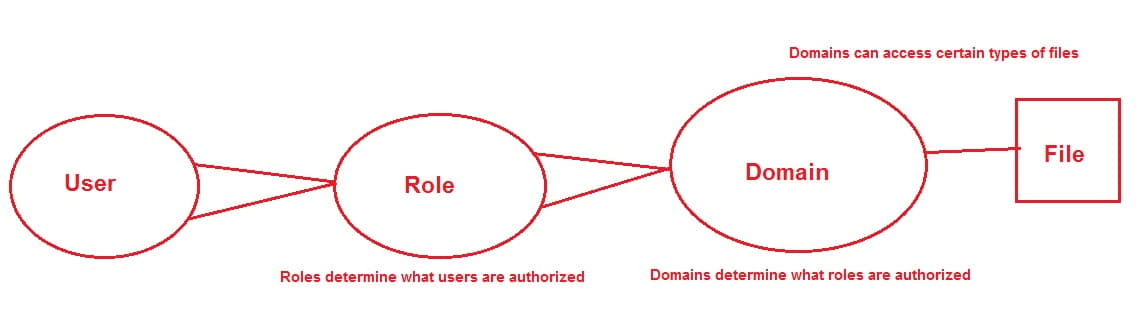
Terminology tip: The last bit, where a process running within a particular domain can perform only certain operations on certain types of objects, is called Type Enforcement (TE).
Coming back to the topic of policies, SELinux policy implementations are also typically targeted by default. If you remember the SELinux config file that we saw before, the SELINUXTYPE directive is set to be targeted. What this means is that, by default, SELinux will restrict only certain processes in the system (i.e. only certain processes are targeted). The ones that are not targeted will run in unconfined domains.
The alternative is a deny-by-default model where every access is denied unless approved by the policy. It would be a very secure implementation, but this also means that developers have to anticipate every single possible permission every single process may need on every single possible object. The default behaviour sees SELinux concerned with only certain processes.
SELinux Policy Behavior
SELinux policy is not something that replaces traditional DAC security. If a DAC rule prohibits a user access to a file, SELinux policy rules won’t be evaluated because the first line of defense has already blocked access. SELinux security decisions come into play after DAC security has been evaluated.
When an SELinux-enabled system starts, the policy is loaded into memory. SELinux policy comes in modular format, much like the kernel modules loaded at boot time. And just like the kernel modules, they can be dynamically added and removed from memory at run time. The policy store used by SELinux keeps track of the modules that have been loaded. The sestatus command shows the policy store name. The semodule -l command lists the SELinux policy modules currently loaded into memory.
To get a feeling for this, let’s run the semodule command:
semodule -l | less
The output will look something like this:
abrt    1.2.0
accountsd       1.0.6
acct    1.5.1
afs     1.8.2
aiccu   1.0.2
aide    1.6.1
ajaxterm        1.0.0
alsa    1.11.4
amanda  1.14.2
amtu    1.2.3
anaconda        1.6.1
antivirus       1.0.0
apache  2.4.0
...
...
semodule can be used for a number other tasks like installing, removing, reloading, upgrading, enabling and disabling SELinux policy modules.
By now you would probably be interested to know where the module files are located. Most modern distributions include binary versions of the modules as part of the SELinux packages. The policy files have a .pp extension. For CentOS 7, we can run the following command:
ls -l /etc/selinux/targeted/modules/active/modules/
The listing shows a number of files with the .pp extension. If you look closely, they will relate to different applications:
...
-rw-r--r--. 1 root root 10692 Aug 20 11:41 anaconda.pp
-rw-r--r--. 1 root root 11680 Aug 20 11:41 antivirus.pp
-rw-r--r--. 1 root root 24190 Aug 20 11:41 apache.pp
-rw-r--r--. 1 root root 11043 Aug 20 11:41 apcupsd.pp
...
The .pp files are not human readable though.
The way SELinux modularization works is that when the system boots, policy modules are combined into what’s known as the active policy. This policy is then loaded into memory. The combined binary version of this loaded policy can be found under the /etc/selinux/targeted/policy directory.
ls -l /etc/selinux/targeted/policy/
will show the active policy.
total 3428
-rw-r--r--. 1 root root 3510001 Aug 20 11:41 policy.29
Changing SELinux Boolean Settings
Although you can’t read the policy module files, there’s a simple way to tweak their settings. That’s done through SELinux booleans.
To see how it works, let’s run the semanage boolean -l command.
semanage boolean -l | less
This shows the different switches that can be turned on or off, what they do, and their current statuses:
ftp_home_dir                   (off  ,  off)  Allow ftp to home dir
smartmon_3ware                 (off  ,  off)  Allow smartmon to 3ware
mpd_enable_homedirs            (off  ,  off)  Allow mpd to enable homedirs
xdm_sysadm_login               (off  ,  off)  Allow xdm to sysadm login
xen_use_nfs                    (off  ,  off)  Allow xen to use nfs
mozilla_read_content           (off  ,  off)  Allow mozilla to read content
ssh_chroot_rw_homedirs         (off  ,  off)  Allow ssh to chroot rw homedirs
mount_anyfile                  (on   ,   on)  Allow mount to anyfile
...
...
We can see the first option allows the FTP daemon to access users’ home directories. The setting is turned off at the moment.
To change any of the settings, we can use the setsebool command. As an example, let’s consider the anonymous FTP write access:
getsebool ftpd_anon_write
This shows us the switch is off at the moment:
ftpd_anon_write --> off
Next we change the boolean to enable it:
setsebool ftpd_anon_write on
Checking the value again should show the change:
ftpd_anon_write --> on
Changed booleans are not permanent. They revert to their old values after a reboot. To make things permanent, we can use the -P switch with the setsebool command.
Conclusion
In the first part of this tutorial we have tried to understand a few basic concepts around SELinux. We have seen how SELinux can secure a system, how we can enable it and what modes it can be running in. We have also touched on the topic of SELinux policy. Next, we will learn how to use SELinux to restrict access to files and processes.
Thanks for learning with the DigitalOcean Community. Check out our offerings for compute, storage, networking, and managed databases.
Tutorial Series: An Introduction to SELinux on CentOS 7
SELinux is a Linux kernel security module that brings heightened security for Linux systems. This series introduces basic SELinux terms and concepts, demonstrating how to enable SELinux, change security settings, check logs, and resolve errors. After completing all three steps, you will have a working CentOS 7 system with SELinux enabled, with four users added with differing degrees of access.
About the author(s)
Hi, I am Sadequl Hussain. I have been in IT for more than eighteen years and have worked with a number of technologies. Welcome to my page :=)
Current fan and former Editorial Manager at DigitalOcean. Hi! Expertise in areas including Ubuntu, Docker, Rails, and more.
Still looking for an answer?
 This work is licensed under a Creative Commons Attribution-NonCommercial- ShareAlike 4.0 International License.
Become a contributor for community
Get paid to write technical tutorials and select a tech-focused charity to receive a matching donation.

DigitalOcean Documentation
Full documentation for every DigitalOcean product.

Resources for startups and AI-native businesses
The Wave has everything you need to know about building a business, from raising funding to marketing your product.
The developer cloud
Scale up as you grow — whether you're running one virtual machine or ten thousand.

Start building today
From GPU-powered inference and Kubernetes to managed databases and storage, get everything you need to build, scale, and deploy intelligent applications.



