
OpenClaw’s arrival in late 2025 helped move self-hosted AI agents into everyday workflows. The project grew to 100,000 GitHub stars within months, signaling rising interest in agents that could connect to inboxes, terminals, and group chats. At the time, that enthusiasm was running ahead of real-world deployment: DigitalOcean’s February 2026 Currents report found that only 23% of organizations had reached even early-stage production with AI agents, while 61% were still testing small pilots or exploring the concept, largely held back by reliability concerns. Hermes Agent is part of a wave of launches suggesting that gap is starting to close, as organizations move from cautious experimentation toward production-ready agent deployments.
Hermes Agent, released by Nous Research in February 2026, entered the scene in the same category, but with a different emphasis. While OpenClaw centers on an always-available gateway that connects an agent to a broad range of messaging platforms and plugins, Hermes Agent’s architecture is designed around a built-in learning loop. It can turn completed tasks into reusable skills, improve those skills during use, and carry what it learns into future sessions.
Hermes Agent is open source, but you may still need to pay for cloud hosting to use it effectively. A Hermes Agent VPS deployment gives you an always-on environment for scheduled tasks and long-running workflows. Understanding how Hermes Agent works and how its self-learning features can fit into your workflows will help you decide whether it is the right option for your AI projects.
Key takeaways:
-
Hermes Agent is an open-source AI agent built for long-running, autonomous workflows with a persistent and built-in learning loop.
-
Hermes Agent combines planning, memory, reusable skills, subagents, and external tools to complete complex, multistep tasks with minimal human-in-the-loop supervision.
-
Hermes Agent supports a wide range of real-world use cases, including software development, research, workflow automation, personal productivity, and business operations.
-
DigitalOcean simplifies self-hosting with a Marketplace 1-Click App that installs Hermes Agent and its runtime so you can configure your AI provider and start building immediately.
What is Hermes Agent?

Hermes Agent is an open-source AI agent developed by Nous Research. Nous Research is an AI research organization known for developing open-weight language models and agentic AI systems. What sets Hermes Agent apart from traditional chatbots like ChatGPT or Claude is its architecture. Hermes is designed to keep working even after you shut down your system.
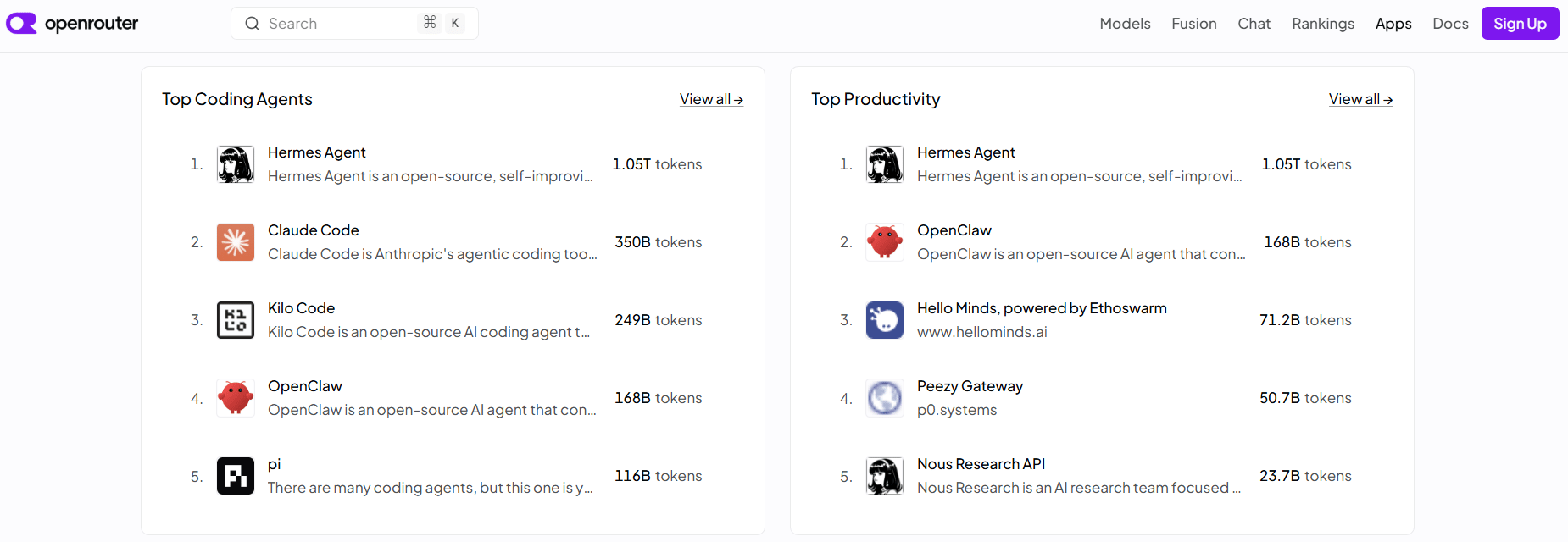
What makes Hermes Agent exciting is its built-in learning loop. It continuously builds reusable skills, executes automated workflows, and maintains context across your tools. Imagine you ask it to generate release notes from Git commits for every software release. After completing that workflow successfully a few times, Hermes can save it as a reusable skill, so future release notes follow the same process without you having to explain it again. Popular Hermes Agent use cases include research, coding, browser automation, scheduled workflows, and persistent personal-assistant tasks. OpenRouter’s App & Agent Rankings currently list it as the top coding and productivity agent.
Follow our tutorial to use Hermes Agent on DigitalOcean Serverless Inference, including how to connect your agent to a single OpenAI-compatible endpoint, which includes access to 70+ models.
Hermes Agent key features:
Hermes Agent’s feature set covers automation, multimodal workflows, and personalization:
-
Persistent memory and reusable skills: Retains long-term context across sessions using curated memory files. Converts repeatable workflows into reusable skills that can be shared and loaded on demand, to help conserve tokens.
-
Built-in safety: Creates checkpoints before file edits, simplifying the process to restore a previous project state.
-
Extensible integrations: Connects to browsers, MCP servers, GitHub, databases, messaging platforms, and other external tools.
Hermes Agent pricing:
Hermes Agent is an open source offering under the MIT License. There are no licensing fees for installing or using it. Costs are incurred based on the underlying infrastructure, such as server hosting and the AI models it uses for inference. If you deploy Hermes Agent through the DigitalOcean Marketplace 1-Click App, you’ll pay for the underlying Droplet and any AI model usage.
Probably, an AI startup builds agents, and cuts infrastructure costs 25% against AWS, and has their production API running in a day and a half after migrating to DigitalOcean.
Hermes Agent vs. OpenClaw
Hermes Agent and OpenClaw are both open-source, self-hosted agents that can run continuously, connect to messaging platforms, and automate work through external tools. While their capabilities overlap, their design philosophies differ. Hermes Agent is designed to learn and reuse successful workflows over time, while OpenClaw focuses on giving the agent broad access to your tools and environment to execute tasks you define.
| Factor | Hermes Agent | OpenClaw |
|---|---|---|
| Built by | Nous Research, an AI research company focused on open-weight models and capabilities research. | Peter Steinberger, an entrepreneur and developer who created OpenClaw before joining OpenAI. |
| Market adoption | Public release activity was underway by March 2026. Has ~26T tracked tokens, currently ranked ahead of other listed agent applications | Project began in November 2025 as “Clawdbot”, renamed “Moltbot”, and now goes by “OpenClaw” as of January 2026. Has ~4.71T tracked tokens— continues to be one of the larger tracked open-source agent applications |
| How the agent improves | Built around a self-improving loop that writes its own reusable skills | Organized around a control-plane gateway with human-authored OpenClaw skills |
| Backing | A funded research lab, reportedly in talks at a $1.5B valuation; MIT-licensed | Moved to an independent open-source foundation after Steinberger joined OpenAI; MIT-licensed |
| Use-case emphasis | Long-running research, coding, scheduled automation, and parallel subagent workflows | Personal assistance, messaging-based task execution, browser and computer-use automation, file management, and communication workflows |
Hermes Agent can help you migrate from OpenClaw with the hermes claw migrate command.
Run OpenClaw in a safer environment. Our How to Run OpenClaw with DigitalOcean tutorial shows how to deploy it using a Marketplace 1-Click App, a Droplet, or App Platform, with protections like hardened firewall rules and Docker isolation.
How Hermes Agent works
Hermes Agent follows a continuous execution loop. It builds context from previous interactions, selects the appropriate tools for the task, and improves future performance by learning from completed work. The result is an AI agent that becomes more capable over time as it handles complex, multistep workflows.
Persistent, cross-session memory
Hermes Agent stores selected information across sessions. Compared to something like ChatGPT, instead of simply remembering preferences, it combines that memory with reusable skills and long-running workflows. So that the agent builds on prior work rather than starting from scratch each time. The persistent memory helps the agent personalize future interactions without requiring you to repeat the same information. It helps reduce the need to restate preferences and project context in every prompt. However, the memory Hermes loads still counts toward input tokens, so keeping it concise helps control context size and inference spend.
Suppose you’re building a Python API. In an earlier session, you told Hermes that you use FastAPI, Black for formatting, and PostgreSQL. A week later, you ask it to add a new endpoint. Hermes recalls your preferences and generates code that fits your existing project, without asking you to explain your setup again.
Check out how Eric Siu, an entrepreneur in the marketing industry, uses Hermes to generate an outline, scripts, and diagrams from a single session. Because Hermes combines skills, memory files, and synchronized knowledge from Obsidian, it can reuse context instead of starting every research task from scratch.
Planning and task execution
Hermes first analyzes your request and determines how to complete it. If the task requires multiple steps, it breaks the work into smaller actions and executes them in sequence. Compared with a ChatGPT conversation, where you usually guide the work one prompt at a time, Hermes is designed to keep a workflow moving with less supervision. During execution, the agent decides when to request additional information, when to call external tools, and when to proceed to the next step without waiting for another prompt.
For example, you ask Hermes to summarize competitor pricing. Instead of generating an answer immediately, it may:
-
Search the web for the latest pricing.
-
Open the relevant product pages.
-
Extract pricing details.
-
Organize the information into a comparison table.
-
Write a concise summary.
Each step builds on the previous one until the task is complete. Hermes runs continuously; it can complete the workflow even if you’re no longer actively interacting with it.
Check out how Hermes Agent coordinates a four-agent team from a single prompt, moving tasks from the backlog through execution.
The self-improving skill loop
After completing a task, Hermes evaluates the outcome to determine whether the approach can be reused. If it identifies a repeatable workflow, it stores that knowledge as a reusable skill. The next time a similar request appears, Hermes can load the existing skill instead of having to reason through every step again.
For instance, let’s say you frequently ask Hermes to generate release notes from Git commits. After completing this workflow several times, Hermes can reuse the same process whenever you request release notes for a new software version.
Sharbel, an AI systems builder, demonstrates how Hermes Agent becomes more useful over time by turning repeated tasks into reusable skills. He built an AI agent that gradually requires less guidance while producing more consistent results for building an AI chatbot.
Task delegation through subagents
Some requests are easier to complete in parallel than in a single conversation. For certain tasks, Hermes launches isolated subagents, each with its own context, tools, and terminal session. Every subagent works independently before returning its results to the main agent. If you’ve used Cursor’s background agents, the concept is similar: multiple AI workers tackle different parts of a task simultaneously instead of relying on a single reasoning thread.
Suppose you ask Hermes to prepare a market research report:
-
One subagent collects competitor information
-
Another analyzes pricing trends
-
A third summarizes customer reviews.
The main agent combines these results into a single report.
AI educator Marcelo Oliveira explains when to use a single agent, subagents, or asynchronous execution in Hermes Agent. Follow along as he demonstrates how subagents split complex work into parallel tasks, while async mode lets long-running jobs continue in the background:
Compare how GitHub Copilot and Cursor handle code completion, multi-file editing, and GitHub workflows to choose the AI coding assistant that best fits your build.
Tool integration
Instead of relying solely on its internal knowledge, Hermes gathers live information and performs real actions to complete a task. Hermes can connect to external tools as needed to extend its capabilities and access relevant data for completing tasks. Depending on the task, it can search the web, automate a browser, execute code, edit files, or connect to external services through MCP servers.
For example, when you ask Hermes to monitor GPU prices, the agent searches online retailers, extracts the latest prices, compares them with previous results, and prepares a summary. It can repeat the workflow on a schedule if required. Think of it like Claude Codwork, which runs cloud-based scheduled tasks even when your computer is asleep. However, Cowork can only access local files or applications while your computer is running. By comparison, when Hermes Agent runs on an always-on VPS, it can continue using the files, scripts, and tools installed on that server after you close your laptop.
Developer Yashaswini Singh shares how to use Hermes Agent to power a WhatsApp grocery assistant. Using voice input, ElevenLabs, and Swiggy’s MCP tools, Hermes captures a grocery request and submits it only after approval.
Continuous learning across workflows
When a task finishes, Hermes updates its memory with any useful long-term information. It also records new reusable skills when appropriate and waits for the next instruction or scheduled task. The continuous cycle of remembering, executing, learning, and improving helps Hermes become more effective over time without requiring you to reconfigure it for every interaction.
In an X post, @witcheer showcases Hermes Agent’s /journey command, which visualizes everything the agent has learned over time. The timeline displays memories and reusable skills in chronological order, along with their relationships, so you can understand how the agent’s knowledge evolves across sessions.
Use DigitalOcean’s AI Agent Builder to easily integrate model access, function calling, multi-agent orchestration, and security controls in one platform. Connect agents to your AI project to test and monitor each step before production.
Hermes Agent use cases
Hermes Agent supports both individual and business workflows that require memory, tool use, or repeated execution.
Software development assistance
Hermes Agent can write and review code, investigate issues, and work across project files. It is useful for ongoing development work because it can retain project context and reuse learned workflows.
The newsletter Daily Dose of Data Science walked through setting up three fully isolated Hermes agents on one machine:
-
A programmer paired with Claude Code
-
A researcher
-
A designer
Each used its own dedicated memory, skills, and Telegram bot. One skill was built specifically for the step-by-step process of debugging a crashing Kubernetes pod. It captured the activation triggers, troubleshooting steps, common pitfalls, and verification checks so Hermes could reuse the same process later.
Research and knowledge management
Hermes Agent can gather information from multiple sources and organize it into structured notes or summaries. It can save results to connected tools such as Notion, Obsidian, or local Markdown files.
A Reddit user shares how they use Hermes Agent as an always-on research assistant alongside Claude Code. Hermes stays connected to tools such as Google Calendar, Gmail, Obsidian, Todoist, Telegram, and iMessage—coordinating workflows and updating information in the background while Claude Code handles software development tasks.
Workflow automation
Hermes Agent can run recurring processes through scheduled tasks and connected tools. These workflows can include email inbox processing, report generation, or updating spreadsheets and databases.
Read our tutorial for deploying Hermes Agent on a Droplet and connecting it to Telegram, with a working example that builds a grocery tracker. Every morning, a cron job checks stock levels. If something’s running low, Hermes messages you on Telegram to determine if it’s time to reorder through a connected delivery service.

Personal productivity
Hermes Agent helps organize daily work by coordinating tasks across calendars, messaging apps, and personal knowledge bases. It can also automate reminders and recurring personal workflows. With this build, instead of juggling multiple productivity tools, Hermes Agent coordinates daily work and keeps running even when you are away from your computer.
Business operations
Businesses can connect Hermes Agent to internal documentation, customer records, and operational tools. It can retrieve relevant information and automate routine administrative processes.
Chris Kim had a Hermes Agent running on a DigitalOcean Droplet to automate a legal contract review workflow. After connecting the agent to Box using the ChatGPT Codex plugin, Hermes reviewed 103 legal contracts in about 40 minutes, continuing to work even after his laptop was closed.
The DigitalOcean Agent Development Kit deploys the agent code you’ve already written as a hosted, production-ready service, no rebuilding required. Keep your LangGraph, CrewAI, or PydanticAI framework, install gradient-adk, and ship it with one command.
How to self-host Hermes Agent
Self-hosting Hermes Agent gives you complete control over where the agent runs, how it stores data, and which AI models or external tools it connects to. It also keeps the agent available around the clock, which makes it usable for scheduled automations and long-running workflows.
Install with the DigitalOcean Marketplace 1-Click App

The easiest way to self-host Hermes Agent is through the DigitalOcean Marketplace 1-Click App. DigitalOcean provisions a Droplet with Hermes Agent already installed with the required runtime and supporting packages. After deployment, you can configure your preferred model provider, API credentials, and optional messaging integrations before starting the agent. DigitalOcean Marketplace is well-suited if you want to start building quickly without manually installing Python, dependencies, or the Hermes runtime.
Install Hermes on your own Droplet

If you require complete control over the environment, provision a Virtual Private Server (VPS), like a standard Ubuntu Droplet, and install Hermes Agent using the official installation script. This approach gives you full control over the operating system, software versions, storage layout, and system configuration. A manual installation is useful when you want to customize the deployment, integrate additional services, or manage Hermes with other applications running on the same server.
Why build your environment when you can start building your application? DigitalOcean Marketplace has preconfigured 1-Click solutions for open-source software, AI agents, and developer tools. Launch a ready-to-use environment in minutes.
Hermes Agent best practices
Hermes Agent can interact with your AI system and external services; securing its environment is as important as configuring its workflows. The following Hermes Agent best practices focus on safely managing permissions, credentials, and autonomous actions in AI deployments.
| Best practice | Description | Example |
|---|---|---|
| Use separate models for delegated tasks | Subagents usually perform focused work, like summarization or research. Vision, session search, compression, and title generation don’t always require the same model as the main reasoning loop. | Configure Claude Opus as the primary model and Llama 3.3 70B for delegated research and summarization tasks. |
| Enable checkpoints before file editing | If you’ve used vibe coding tools like Replit, the concept is similar to restoring a previous workspace after an AI-generated edit goes wrong. Hermes can modify multiple files during autonomous workflows. Checkpoints provide a recovery point if a change introduces errors. | Before asking Hermes to refactor a codebase, enable checkpoints so you can restore the previous state if the update breaks the application. Learn more about how checkpoints on Hermes help with refactoring a codebase |
| Build reusable skills for recurring workflows | Skills eliminate the need for repeated prompting and ensure consistency across sessions. | Convert your Kubernetes troubleshooting process or release checklist into a reusable skill, so you don’t have to explain the workflow each time. |
| Review generated skills before reusing them | Hermes can automatically create skills, but generated workflows should be validated before becoming part of your long-term library. | Test a newly generated deployment skill in a staging environment before using it in production. |
| Keep long-term memory concise and relevant | Hermes loads persistent memory into every new session. Unused or outdated information can reduce the quality of future responses. | Replace an obsolete API endpoint in MEMORY.md instead of continually appending new notes about the same service. |
| Tune subagent concurrency carefully | Running too many subagents simultaneously can hit provider rate limits or overwhelm a small VPS. | Keep a limited number (eg, three) of concurrent subagents on a VM and increase the limit only after verifying CPU utilization and API quotas. |
Why tie your AI agent to a single model? DigitalOcean Inference Router automatically routes requests across supported models via a single endpoint, making it easier to optimize costs without changing your application code.
Limitations of Hermes Agent
Hermes Agent offers broad automation and customization. But that flexibility introduces operational trade-offs. Most limitations relate to setup, supervision, and the responsibility that comes with running an agent on your own infrastructure.
-
Steeper setup curve: Hermes requires more configuration than a consumer AI assistant. Beyond the initial installation, you’ll need to configure AI models, API keys, browsers, MCP servers, and other integrations depending on your workflow.
-
Self-hosted infrastructure: Running Hermes on your own server means you’re responsible for uptime, storage, software updates, and resource usage. Long-running automations can continue consuming compute and model credits even when you’re away.
-
Skills still require oversight: Hermes Agent improves workflows by creating and refining reusable skills. The process helps reduce repeated reasoning. But a generated skill may preserve an inefficient or incorrect approach if the task outcome is judged incorrectly.
-
Platform differences: Hermes supports Linux, macOS, and Windows, but some development workflows work more smoothly on Linux or WSL2 because they depend on POSIX tools and file systems. Moving between Windows and WSL might introduce path and permission differences.
-
Ongoing maintenance: A self-hosted deployment isn’t a “set it and forget it” system. Updates to Hermes, model providers, MCP servers, or external APIs can affect existing automations, so production deployments should be tested before rolling out changes.
-
Security responsibilities: Hermes executes commands, edits files, and accesses external services, so it should run with only the permissions it needs. Deploying the agent in an isolated environment and protecting secrets such as API keys should always be considered.
Hermes Agent FAQ
What is Hermes Agent?
Hermes Agent is an open-source AI agent developed by Nous Research. It combines persistent memory, tool use, and workflow automation to complete tasks that span multiple conversations. It also supports browser automation, scheduled tasks, and integrations with external services through MCP.
What do you use Hermes Agent for?
Hermes Agent is designed for software development, research, workflow automation, and personal productivity. It can write and review code, gather information, automate recurring tasks, and coordinate work across connected tools. Businesses can also use it to support customer operations and internal workflows. When you deploy Hermes Agent on a DigitalOcean Droplet or through the Marketplace 1-Click App, it can run these workflows continuously and integrate with storage and Managed Databases services.
Is Hermes Agent secure?
Hermes Agent includes security features such as user allowlists, command approval, and support for isolated execution environments. However, because it can execute commands and access external services, users should follow security best practices when deploying it. Restricting permissions, protecting API keys, and isolating untrusted workflows help reduce security risks. DigitalOcean offers the ability to isolate Hermes on its own VPS (Droplet), keeping the agent separate from your other workloads while simplifying updates and monitoring.
How much does Hermes Agent cost?
Hermes Agent is free and open source under the MIT License. There are no licensing fees to install, use, or modify the software. Your overall cost depends on the infrastructure where you host it and the AI models or external services you connect to.
How do I let an AI agent reach a private managed database without exposing it to the public internet?
Run your AI agent on the same private network as your managed database instead of exposing the database to the public internet. On DigitalOcean, deploy Hermes Agent on a Droplet, connect it to a Managed Database over private networking, and add the Droplet as a Trusted Source or disable the database’s public endpoint. Store credentials securely and grant the agent only the minimum database permissions it needs.
Is Hermes Agent better than OpenClaw?
Hermes Agent and OpenClaw are designed for different purposes, so one is not universally better than the other. Hermes Agent focuses on long-running automation, persistent memory, and broad tool integrations. OpenClaw specializes in computer-use tasks such as interacting with desktop applications and graphical user interfaces.
Can I self-host Hermes Agent on DigitalOcean?
Yes. DigitalOcean offers Hermes Agent as a Marketplace 1-Click App, which simplifies deployment by installing the required software on a preconfigured Droplet. After deployment, you can configure your preferred AI model provider, connect external tools, and run Hermes Agent continuously in the cloud.
Deploy Hermes Agent with DigitalOcean
DigitalOcean’s Marketplace 1-Click App provisions a preconfigured Droplet with Hermes Agent already installed. You can focus on configuring your preferred AI model, connecting tools, and building autonomous workflows instead of setting up the runtime.
DigitalOcean Hermes Agent 1-Click App key features:
-
Launch a preconfigured Hermes Agent instance in just a few clicks.
-
Connects your agent to a single OpenAI-compatible endpoint with access to 70+ models.
-
Integrates with messaging platforms such as Telegram, Discord, Slack, WhatsApp, Signal, and email.
-
Keep long-running agents and scheduled workflows online with an always-on Droplet.
-
Extend Hermes with browser automation, MCP servers, and custom tools as your workflows grow.
Start building with DigitalOcean.
Any references to third-party companies, trademarks, or logos in this document are for informational purposes only and do not imply any affiliation with, sponsorship by, or endorsement of those third parties.
About the author

Sujatha R is a Technical Writer at DigitalOcean. She has over 10+ years of experience creating clear and engaging technical documentation, specializing in cloud computing, artificial intelligence, and machine learning. ✍️ She combines her technical expertise with a passion for technology that helps developers and tech enthusiasts uncover the cloud’s complexity.
Start building today
From GPU-powered inference and Kubernetes to managed databases and storage, get everything you need to build, scale, and deploy intelligent applications.
