
Whether you’re a streaming service managing thousands of hours of video content, a fintech company tracking real-time market data, or a healthcare startup storing patient records, businesses increasingly rely on data storage infrastructure to securely house, organize, and access their critical information assets. With all this data comes the need to find a way to manage and scale without letting costs spiral out of control.
Companies must weigh the tradeoff between investing in fast storage that delivers instant data access during busy periods against the lower costs of standard solutions that may slow down when performance matters most. In addition to these concerns, decision-makers struggle with implementing proper backup systems that can quickly restore operations after outages without wasting resources protecting data that rarely needs recovery. If you’re navigating these problems and trying to build a storage strategy that stays fast, secure, and cost-efficient, let’s explore what you need to know to make the right choice.
Key takeaways:
-
Effective data storage management helps businesses balance performance, security, and cost by classifying data correctly and placing it on the right storage tier.
-
Automated lifecycle policies, compression, deduplication, and access controls reduce cloud waste while improving reliability and operational efficiency.
-
DigitalOcean’s storage suite with Spaces, Volumes, and scalable database storage offers predictable pricing and flexible capacity, helping teams control cloud costs while maintaining fast, reliable access to data.
What is data storage management?
Data storage management is the process of organizing and maintaining data so it performs well, stays protected, and avoids unnecessary storage and operational costs.
Data storage management involves creating clear policies about what files to keep, where to store them, and how long to retain them—whether that’s customer records needed for seven years or transaction logs required for just 30 days. The right toolkit includes specialized software like storage resource management applications that monitor capacity trends, performance analytics that identify bottlenecks, and automated tiering systems that shuffle data between fast SSD arrays and slower archival platforms. With these tools and strategies, companies can handle information growth without the need for constantly buying new hardware or watching their systems crawl when databases expand beyond planned capacity.
Businesses like Cheddar and Touch App trust DigitalOcean Spaces to address their object storage needs. Whether you’re storing large volumes of data or serving media files to your users, Spaces delivers a reliable and cost-efficient service within DigitalOcean’s user-friendly ecosystem.
→ Explore the power of simplified cloud storage with DigitalOcean Spaces
Benefits of data storage management
Effective data storage management helps you control growing storage demands while keeping performance high and costs predictable. By organizing and optimizing how your data is stored, you reduce waste and improve access to critical information. By governing data through policies, access controls, and lifecycle rules, you also strengthen security, meet compliance requirements, and ensure your infrastructure scales efficiently as your needs grow. Done well, data storage managment becomes one of the simplest ways to lower cloud spend without sacrificing reliability or speed:
-
Lower storage costs: By archiving rarely accessed data and removing redundant files, you avoid paying for unnecessary capacity. This helps stay within budget while maintaining access to critical information.
-
Improved application performance: Structuring your data according to actual access patterns ensures your workloads retrieve information quickly. As a result, your users experience faster load times and more responsive applications.
-
Greater scalability and flexibility: With well-managed storage, you can scale up or down based on your usage needs. This prevents performance bottlenecks and aligns infrastructure usage with business growth.
-
Better security and compliance: Managing permissions, encryption, and data retention policies helps protect sensitive data. The right approach reduces the risk of unauthorized access while staying aligned with regulatory requirements.
-
Improved visibility and control: Centralizing how you monitor usage, growth, and trends facilitates smarter decision-making. It enables forecasting future needs and adjusting storage strategies before costs escalate.
How data storage management works
Data storage management involves several steps to efficiently store, access, and maintain data while minimizing costs and ensuring reliability. The process varies depending on the storage solution used (cloud data, on-premises, or hybrid), but generally follows a structured sequence of tasks to optimize resource allocation, performance, and security.
Consider this simplified representation of a data storage management workflow, noting that specific configurations and data flow may vary based on the cloud service provider and your particular use case:
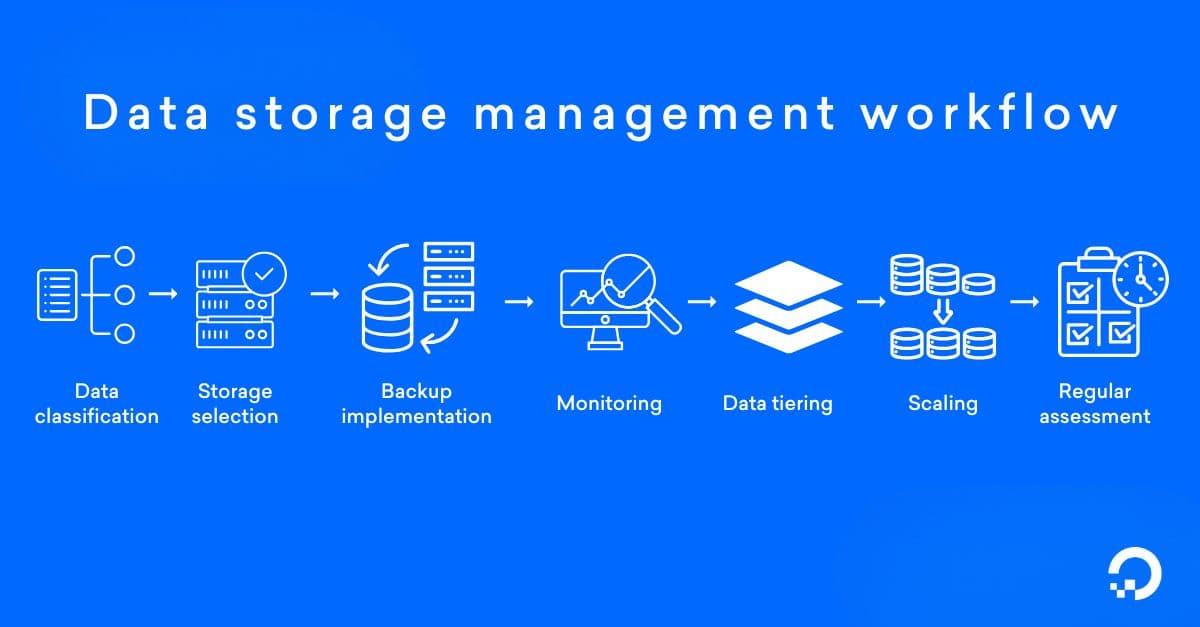
Data classification: Data is categorized based on its frequency of access and business importance, in terms of hot, warm, or cold data.
| Data type | Description | Recommended storage |
|---|---|---|
| Hot data | Frequently accessed data that requires instant availability and fast response times. | High-performance storage (e.g., SSDs, premium cloud storage). |
| Warm data | Accessed occasionally but not as frequently as hot data; requires a balance between performance and cost. | Medium-performance storage, such as standard cloud storage or traditional HDDs. |
| Cold data | Rarely accessed, long-term data that does not require high performance. | Low-tier or archival storage, such as cloud cold storage or physical tape drives. |
-
Storage selection: Storage solutions are chosen based on the data classification, with high-performance storage used for frequently accessed data and lower-tier storage for less frequently accessed data.
-
Backup implementation: Critical data is backed up on a scheduled basis to ensure it can be recovered in case of loss or system failure.
-
Tracking: Storage usage, performance, and costs are monitored continuously to identify trends and potential inefficiencies.
-
Data tiering: Data is automatically moved between storage tiers based on predefined rules like access frequency, age, performance requirements, or compliance needs. Frequently accessed data (i.e. active application logs, user-uploaded images, or database backups) stays in high-performance storage, while infrequently accessed data (i.e. archival reports, historical analytics data, or long-term backups) is shifted to lower-cost tiers.
-
Scaling: As data usage grows, additional storage resources are added or reconfigured to meet increasing demands without sacrificing performance.
-
Regular assessment: Storage strategies should be regularly reviewed and adjusted to align with changing business needs and to optimize cost and efficiency.
What’s the right storage solution for your applications? Consider your options with this quick walkthrough of DigitalOcean Volumes block storage and Spaces object storage.
Types of data storage management
When selecting your ideal data storage management configuration, consider factors like performance, cost, scalability, security, and the frequency of data access. The right choice depends on the data’s criticality to the business, user access patterns, and long-term retention needs.
| Type of Data Storage | Description | Use case |
|---|---|---|
| On-premises storage | Storage systems hosted and managed on-site, involving physical servers or network-attached storage (NAS). | Enterprises in regulated industries (e.g., finance, healthcare, government) that require complete control and security over their data. |
| Cloud storage | Data stored and managed remotely in the cloud by third-party service providers, with options like object, block, and file storage. | Businesses that need scalability, remote access, and lower upfront costs. |
| Storage area network (SAN) | High-performance non-cloud storage architecture that connects multiple storage devices to servers over a high-speed network. | Enterprises with large volumes of data that require high-speed access and scalability. |
| Cold storage | A low-cost storage option designed for data that is infrequently accessed and doesn’t require high performance. | Archival data, backup copies, and other rarely used information. |
| Object storage | A storage method where data is stored as objects rather than files or blocks, making it more scalable and accessible. | Large-scale data like media files, backups, and archives that require scalability and cost efficiency. |
| File storage | A storage system that organizes data in a hierarchy of files and folders, providing easy file sharing. | Companies with frequent file-based data access and collaborative workflows. |
| Block storage | Data storage at the block level (fixed-size blocks that the system can store, move, and retrieve independently), where each block is assigned a unique address, allows flexible storage. | High-performance applications that require fast, low-latency data access. |
| Hybrid storage | A combination of on-premises and cloud storage that allows data to be stored both locally and in the cloud, depending on needs. | Companies that want to deploy both on-premises security and cloud flexibility. |
What’s the right storage solution for your data? Choosing between block storage vs object storage is a critical decision. Both options offer unique advantages and should be considered based on whether you’re handling large datasets for real-time analysis, scaling storage for growing applications, or securing data for backup and disaster recovery.
Strategies for data storage management
Implementing effective data storage management practices helps reduce cloud costs and increase cloud ROI while maintaining optimal performance, security, and availability:
Choose your ideal cloud provider
Select a cloud provider that aligns with your storage needs. Many offer long-term storage commitments or pay-as-you-go, so understanding your usage patterns helps you select the most cost-efficient option. As your workloads evolve, regularly review your provider’s storage offerings and pricing to avoid unexpected cost increases. Using cloud cost calculators helps you compare providers and estimate expenses.
Automate data transitions
Use lifecycle policies to automatically transition data to lower-cost storage tiers based on predefined criteria. For example, data that has not been accessed in 30 days can automatically be moved from hot storage to cold storage. Set automated rules using your cloud provider’s tools or APIs to shift data across tiers, ensuring efficiency and reducing manual dependencies. For example, you can configure DigitalOcean Spaces lifecycle policies through the control panel or via the DigitalOcean API to move infrequently accessed data to lower-cost tiers.
Maximize storage efficiency
Deploy data compression and deduplication techniques to reduce storage consumption. Compression minimizes the file size, and deduplication eliminates duplicate copies of the same data, further reducing storage space and associated costs. Integrate cloud-native tools for automatic data compression and deduplication to improve storage efficiency for archival and backup data.
Use multi-cloud or hybrid-cloud strategies
Instead of relying solely on one cloud provider, consider using a multi-cloud or hybrid-cloud strategy to get the best pricing, service offerings, and performance characteristics from multiple cloud providers. By distributing workloads and data, you can reduce the overall cost of cloud storage and avoid vendor lock-in.
Implement granular user access controls
Ensure that only authorized users and applications have access to your data by implementing granular access controls. Use role-based access controls (RBAC) to enforce secure data access policies to manage permissions at a granular level. This minimizes the risk of data breaches and misuse while reducing unnecessary access to costly storage resources.
Optimize for data backup and disaster recovery
Backup and disaster recovery data require substantial storage, but can be optimized to reduce costs and are ultimately worth it in a situation where you need the data. Store backups in lower-cost storage tiers and implement retention policies to keep backups only as long as necessary. Also, implement automatic incremental backups to reduce storage needs and configure versioning for backups.
Consolidate storage resources
Storage consolidation combines multiple storage systems or devices into a single, unified platform. For example, you can merge fragmented storage systems like network-attached storage (NAS) or direct-attached storage (DAS) into a single, centralized repository. The goal is to eliminate redundancy and reduce the need to manage separate storage solutions.
Explore DigitalOcean storage solutions
DigitalOcean provides DigitalOcean Spaces for scalable object storage and DigitalOcean Volumes for high-performance block storage.
DigitalOcean Spaces: Scalable object storage for unstructured data
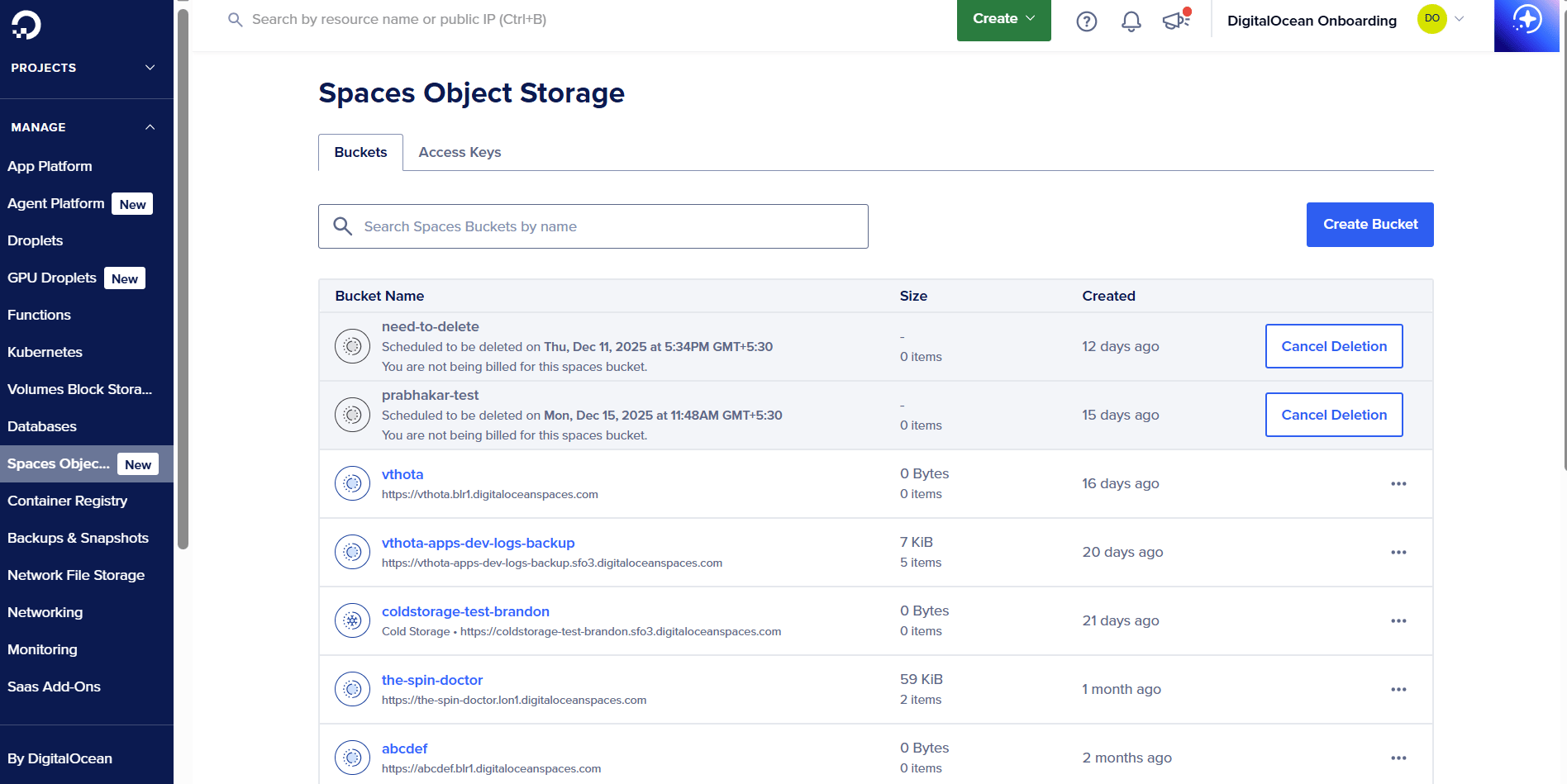
DigitalOcean Spaces is an S3-compatible object storage solution designed to simplify the management and delivery of unstructured data. It supports high-throughput read and write operations, handling up to 1,500 requests per second per client IP, making it ideal for serving images, videos, and other static assets at scale across global regions. Spaces helps teams control costs and improve security through per-bucket bandwidth billing and granular access controls, so you can track egress usage by bucket and apply least-privilege permissions for different users or applications. With features like Bucket Keys to reduce encryption-related key management system (KMS) requests, businesses handling sensitive data can securely store and deliver content while maintaining predictable pricing as their storage needs grow.
Marketcircle, a software company that makes the Daylite app for Mac and iOS, uses Spaces alongside Managed Kubernetes and Droplets. They specifically chose Spaces for its S3-compatible API, which allows them to avoid vendor lock-in while handling data storage for their productivity and relationship management software.
DigitalOcean Spaces key features:
-
Start with 250 GiB of storage and scale as needed so you’re paying only for what you use. Unlike with other well-known providers, outbound bandwidth costs (egress costs) are predictable.
-
Manage Spaces access keys programmatically using the DigitalOcean API, enabling automation through the DigitalOcean Terraform Provider, doctl CLI, DigitalOcean Go API Client (godo), and DigitalOcean’s Python library (PyDo).
-
Offers built-in content delivery network (CDN) that reduces webpage load times and improves performance by caching assets across 200+ geographically distributed servers.
-
Migrate data from other cloud providers to DigitalOcean Spaces with no downtime using tools like Flexify.IO.
DigitalOcean Spaces uses simple, predictable monthly pricing designed for scalable object storage. Inbound data transfer is always free, outbound transfer to Droplets in the same region is free, and the built-in CDN is included at no extra cost, using the same outbound transfer allowance:
-
Base plan: $5 per month, includes 250 GiB of standard storage and 1 TiB of outbound data transfer, shared across up to 100 buckets.
-
Additional standard storage: $0.02 per GiB per month.
-
Additional outbound data transfer (egress): $0.01 per GiB beyond the included allowance.
-
Cold storage (archival): $0.007 per GiB per month (archival), $0.01 per GiB (retrieval).
-
Early deletion fee (cold storage): $0.007 per GiB for objects deleted before the 30-day minimum retention period.
Looking for an Amazon S3 alternative with simpler pricing? If predictable costs, faster setup, and reduced management overhead matter more than complex tiering models, DigitalOcean Spaces offers a solid S3-compatible option.
DigitalOcean Volumes: High-performance block storage
DigitalOcean Volumes provide scalable block storage for persistent data and for applications that require high throughput, low latency, and reliability. Volumes are built on NVMe technology, with a 99.99% uptime SLA. They integrate with Kubernetes for persistent storage with minimal setup. With the DigitalOcean API, Volumes can be automated and integrated into existing workflows and infrastructure using the DigitalOcean API, Terraform, or doctl.
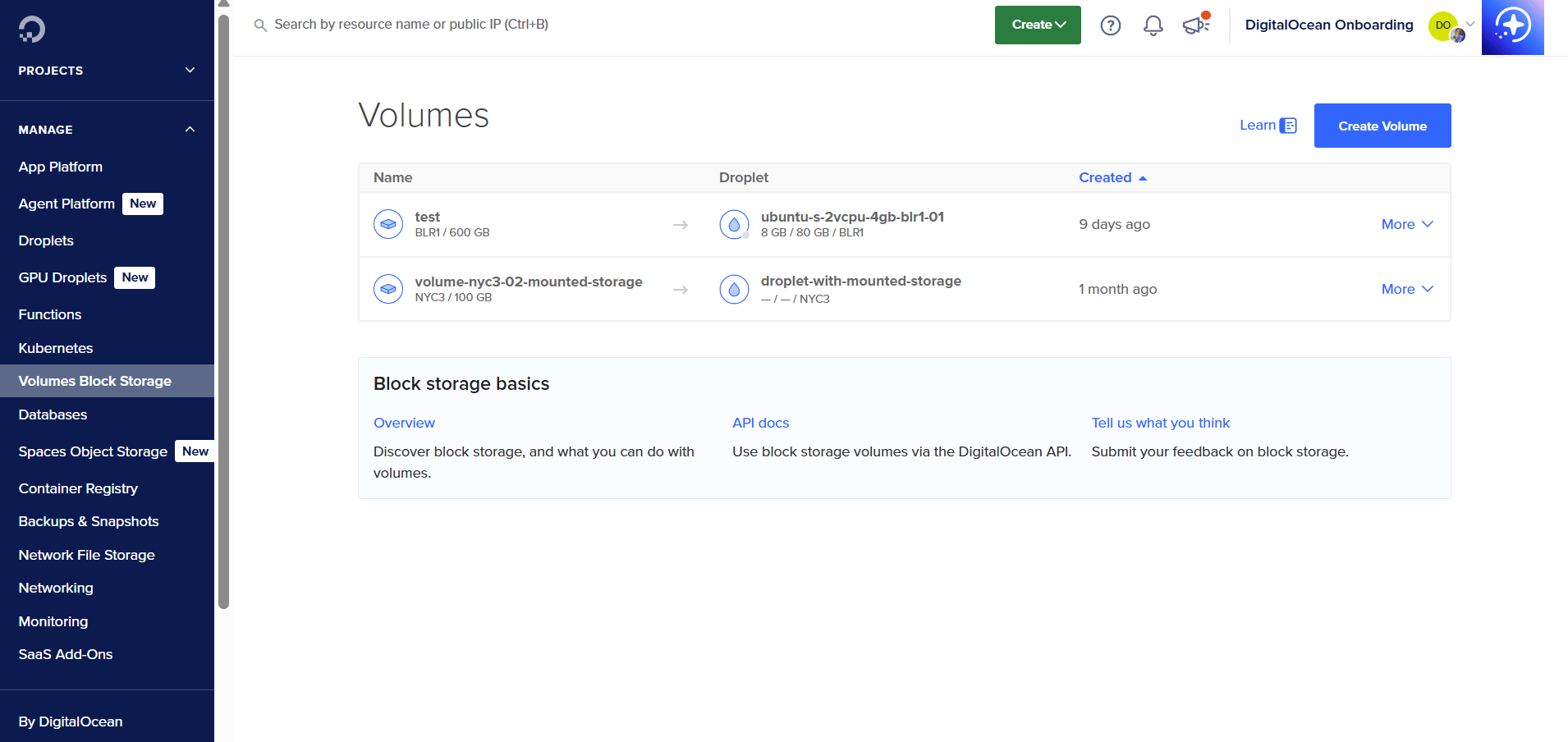
DigitalOcean Volumes key features:
-
Data is encrypted at rest and transmitted over isolated networks, ensuring high durability and availability.
-
Ideal for augmenting Droplet storage, hosting databases, machine learning, web applications, and backup solutions.
-
Create on-demand disk backups of your Volumes to protect data and quickly replicate storage for redundancy.
-
Transparent, flat-rate pricing that allows businesses to scale storage up or down without surprises.
DigitalOcean Volumes pricing is based on provisioned capacity with flat monthly rates across all data centers:
-
100 GiB volume: $0.015 per hour or $10 per month.
-
500 GiB volume: $0.074 per hour or $50 per month.
-
1,000 GiB volume: $0.149 per hour or $100 per month.
-
Volumes Snapshots are billed separately at $0.06 per GiB per month, with easy on-demand backups for persistent block storage needs
DigitalOcean Scalable Storage: For Managed Databases
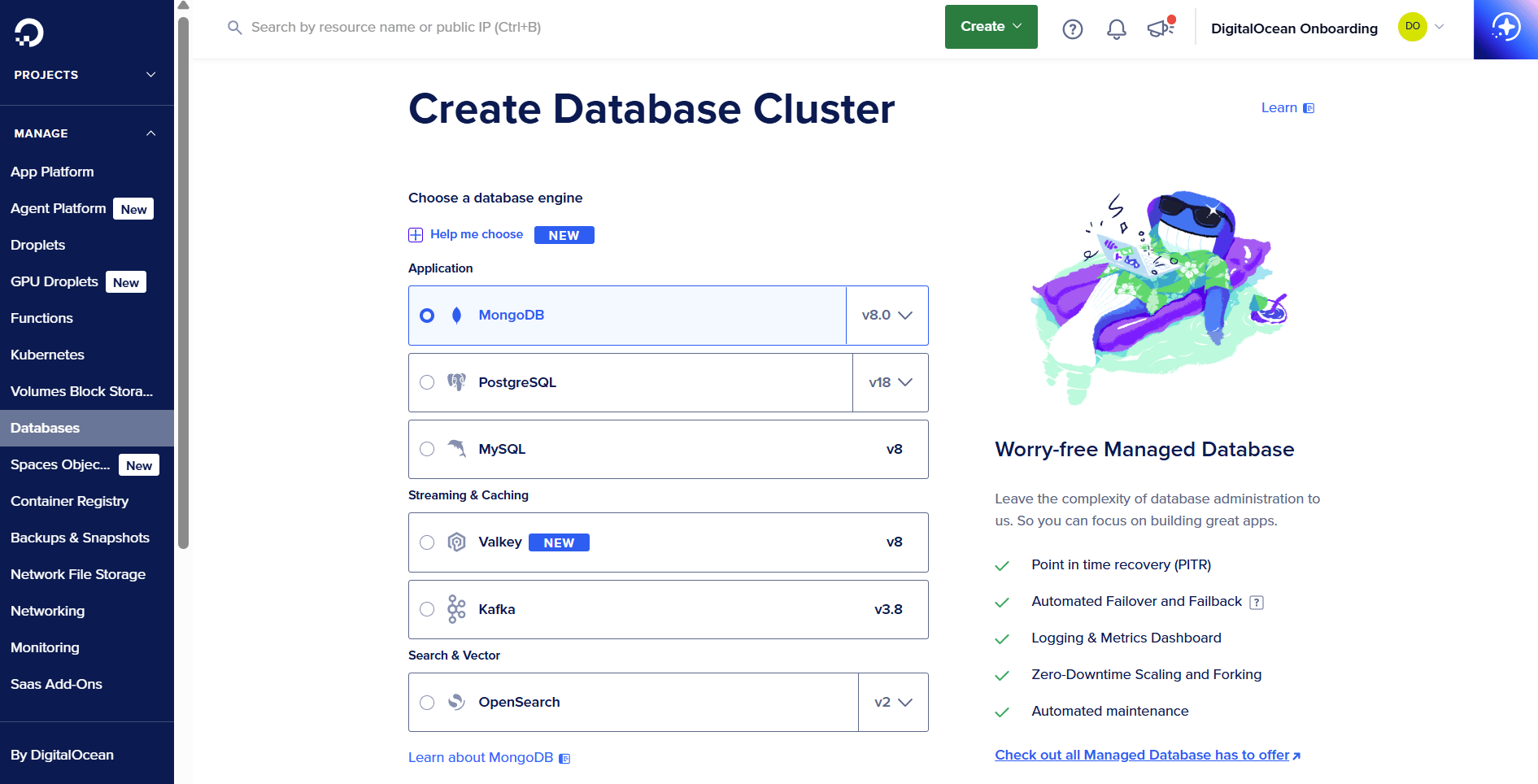
DigitalOcean’s Scalable Storage offers flexible and cost-effective solutions to meet the growing storage demands of your Managed Databases for MySQL, PostgreSQL, and MongoDB. With scalable storage, businesses can grow their database storage capacity without needing to add compute or memory resources.
Learn how to quickly get started with Scalable Storage for DigitalOcean Managed Databases to add capacity in small increments, avoid overprovisioning compute, and maintain consistent performance as your data grows.
DigitalOcean Scalable Storage key features:
-
Add storage in 10 GB increments without the need to scale compute or memory resources. Increase disk storage via the cloud console or API—a simple and intuitive way to adjust storage to meet business needs.
-
Managed Databases offer up to 15 TB (MySQL and PostgreSQL) and 16 TB of storage (MongoDB), which can be used by businesses to scale to handle large production workloads.
-
Monitor compute, memory, and disk utilization to set alerts and scale resources when necessary, optimizing both performance and costs.
-
Choose from multiple shared and dedicated compute configurations, including Basic CPU plans, Premium configurations, and Storage Optimized plans.
DigitalOcean Scalable Storage pricing:
-
MySQL and PostgreSQL: $2 per 10 GB per month, with clusters starting at $13 per month for compute and $2 for 10 GB of storage, and the option to scale storage in 10 GB increments up to 15 TB depending on the plan.
-
Managed MongoDB: $0.20 per GB per month, following the same incremental model with a minimum increment of 10 GB. Supports scaling up to 16 TB per instance.
DigitalOcean Network File Storage (NFS): Shared storage for AI/ML workflows
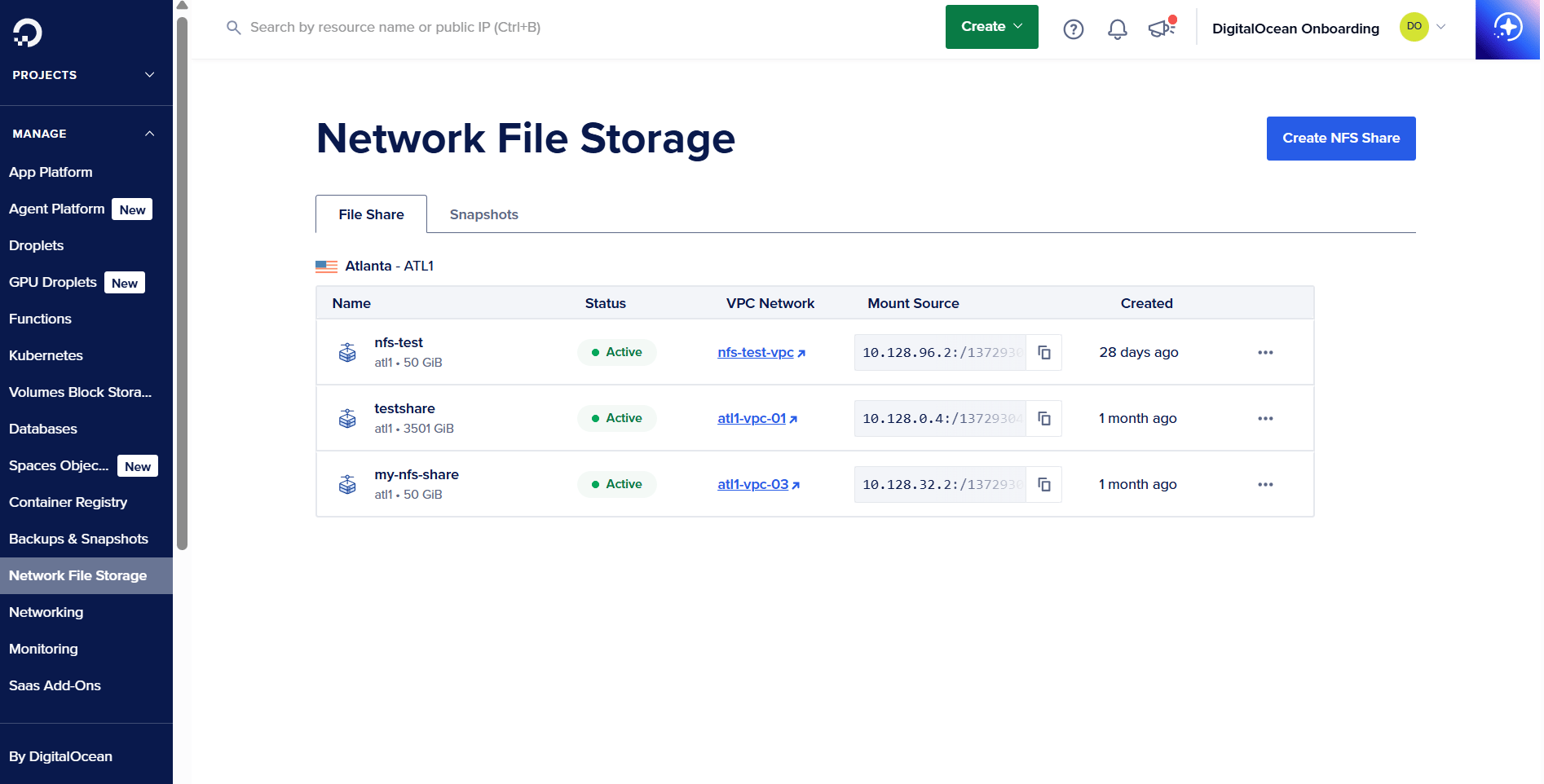
DigitalOcean Network File Storage (NFS) is a fully managed, POSIX-compliant shared file storage solution built for AI/ML, analytics, and other data-intensive workloads that require fast, concurrent access across multiple nodes. NFS centralizes and scales your datasets without managing complex storage infrastructure, offering predictable performance and secure access within a Virtual Private Cloud (VPC).
Learn how DigitalOcean Network File Storage delivers fast, high-throughput performance for GPU workloads, including a real FIO benchmark hitting 1 GB/s read speeds.
DigitalOcean NFS key features:
-
Mount a single NFS share across GPU Droplets, CPU Droplets, and DOKS clusters to support parallel AI/ML training, inference, and containerized workloads.
-
Delivers low latency and high throughput optimized for data-heavy pipelines that require continuous streaming and rapid access.
-
Supports traditional file semantics, making it ideal for workloads that need directory structures, file locking, and compatibility with standard tools.
-
Create point-in-time snapshots for quick restores and safe experimentation without interrupting active workloads.
-
DigitalOcean Network File Storage: Allocation-based pricing at $0.30 per GiB per month, with a minimum 50 GiB allocation and 10 GiB increments for scaling.
-
Snapshots: Billed separately at $0.06 per GiB per month.
-
No additional charges for operations, access requests, or data transfer within the same VPC, and discounts are available for GPU-committed customers.
Note: Pricing and feature information in this article are based on DigitalOcean’s offerings as of December 2025. For the most current pricing and availability, refer to each product’s page.
Data storage management strategies FAQ
How do I choose between block, object, and file storage? Selecting the right storage type depends on your workload’s performance and access needs, and it has a direct impact on total cloud spend. Object storage is ideal for large, infrequently accessed data, while block storage suits high-performance databases and file storage supports shared, hierarchical access. DigitalOcean offers all three options: Spaces for object storage, Volumes for block storage, and NFS-based solutions through our ecosystem, making it easy to choose a cost-efficient fit for your application.
How can I reduce cloud storage costs? Lower costs by choosing the right storage class, deleting unused data, applying lifecycle rules, and scaling storage only when needed. Monitoring usage patterns and right-sizing storage allocations helps avoid unnecessary spending. DigitalOcean makes this easier with predictable flat pricing and scalable storage options across Spaces, Volumes, and Managed Databases.
What are common storage management mistakes to avoid? Common mistakes include overprovisioning storage, keeping redundant or outdated data, and failing to use lifecycle policies to move data to cheaper tiers. Not monitoring usage can also lead to silent cost creep as workloads grow. DigitalOcean’s built-in monitoring and simple scaling controls help you avoid these pitfalls and maintain cost-efficient storage environments.
What are the most cost-effective cloud storage solutions?
The most cost-effective option depends on whether you need scalable object storage or high-performance block storage. DigitalOcean Spaces offers affordable, S3-compatible object storage with built-in CDN support for efficient handling of unstructured data. For virtual machines, DigitalOcean Volumes Block Storage provides secure, NVMe-backed performance that balances speed, scalability, and cost.
How do major cloud providers differ in storage pricing?
Cloud providers vary in pricing based on storage type (e.g., object storage, block storage), data transfer rates, and geographic location. Unlike AWS S3, where pricing becomes complicated as storage tiers and egress costs add up, DigitalOcean Spaces delivers transparent, flat pricing that’s easier for developers to forecast and control.
Take control of your cloud storage costs with DigitalOcean storage solutions
DigitalOcean offers simple, predictable, and scalable storage solutions designed to support everything from web apps and media hosting to AI/ML workloads and production databases. Choose the storage option that fits your workloads, and scale confidently without hidden fees or operational complexity.
-
With DigitalOcean Spaces, you store unstructured data with S3-compatible APIs, predictable pricing, per-bucket bandwidth billing, and a built-in global CDN.
-
DigitalOcean Volumes offer NVMe-powered block storage with low latency, independent scaling from compute, and snapshot-based backups for persistent workloads.
-
Scalable Storage for Managed Databases grows your MySQL, PostgreSQL, and MongoDB storage in 10 GB increments without scaling compute, with simple, transparent pricing.
-
DigitalOcean Network File Storage (NFS) provides fully managed, POSIX-compliant shared file storage for AI/ML and distributed workloads, delivering high throughput and flat, predictable pricing.
Start building with DigitalOcean storage, and simplify how you store, scale, and deliver data across your workloads.
About the author

Sujatha R is a Technical Writer at DigitalOcean. She has over 10+ years of experience creating clear and engaging technical documentation, specializing in cloud computing, artificial intelligence, and machine learning. ✍️ She combines her technical expertise with a passion for technology that helps developers and tech enthusiasts uncover the cloud’s complexity.
Start building today
From GPU-powered inference and Kubernetes to managed databases and storage, get everything you need to build, scale, and deploy intelligent applications.
