DigitalOcean MicroVMs: Fast, isolated compute for your AI agent infrastructure

By Shridhar Pandey
- Updated:
- 5 min read
Coding-agent platforms, sandbox products, and code-execution services all need the same thing: isolated machines that start up fast, retain their state between bursts of work, and don’t consume compute when idle. If you build it yourself, you’ll have to lease compute capacity and turn raw servers into isolated, on-demand compute. This often includes fleet management, snapshot, pause and resume, per-tenant isolation, placement, and recovery. This takes a lot of time that could be better spent on building your product.
Today, we’re announcing DigitalOcean MicroVMs in public preview so you don’t have to build and operate your own virtualization layer to run your agent infrastructure. A MicroVM is an isolated virtual machine built on open-source Firecracker that pauses when idle and resumes exactly where it left off when active.
In our previous blog post where we announced DigitalOcean MicroVMs private preview, we detailed multiple MicroVM use cases for agent infrastructure. Here, we’ll use a coding-agent platform as an example to see what building one looks like on MicroVMs. Each session consists of an agent reading a repository, writing code, and running the code and subsequent tests. This requires an isolated environment per session, which is created when the session starts and destroyed when it ends.
One MicroVM per session
When a session starts, you create a MicroVM from your container image. This packages your agent, its toolchain, and its dependencies. The MicroVM boots on Firecracker with its own kernel and a real hardware-virtualized boundary rather than a shared one. The agent inside can write and run whatever code it needs, and is designed to contain any potential bad steps to that single MicroVM, isolated from the host and other customers. The session is accessed over an authenticated HTTPS endpoint, so only requests with a valid DigitalOcean API token can reach it.
Pay only while it’s running, not while it’s paused
A coding agent spends most of its time during a session waiting, on the model to respond, on its code to run, or on a person to review its work. A MicroVM pauses when it has been idle for a time duration you set, and you don’t pay for compute while the MicroVM is paused. When the next request arrives, the MicroVM resumes in milliseconds and picks up where it left off with its memory, files, and running processes exactly where they were.
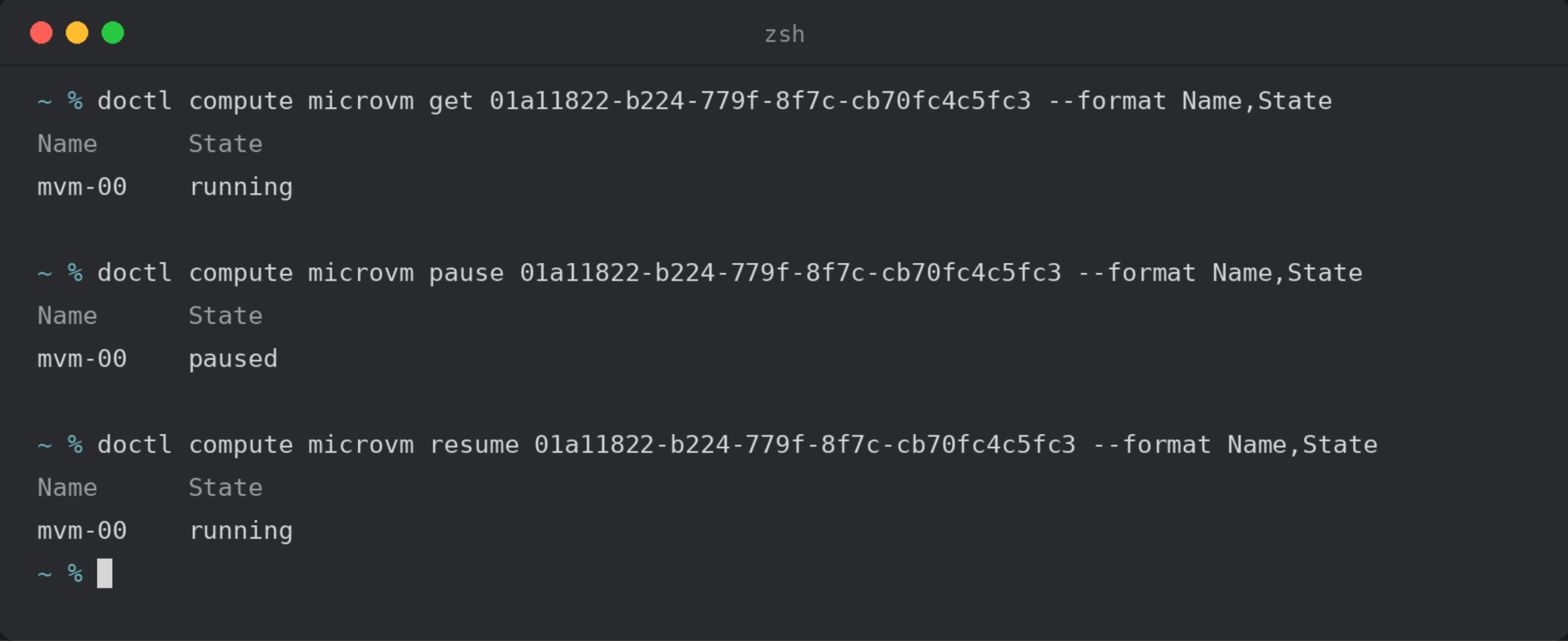
Fast startup and resume
A MicroVM starts in milliseconds, so it’s ready the moment a session begins. Resuming a paused MicroVM is just as fast, which makes it practical to pause between steps rather than holding a long-lived machine open for each session or user. It also means a burst of new sessions just spins up more MicroVMs on demand, up to your team’s MicroVM limit, instead of you having to provision capacity ahead of time.
Start every session warm, not from scratch
Creating an agent’s environment requires a lot of setup, and rebuilding everything for each new session is slow and inefficient. MicroVMs let you deal with the setup of the environment once, checkpoint it, and start new sessions from the checkpoint. Each session begins pre-warmed in the state you capture, ready for a task the moment it starts without any of the setup.
Built-in recovery and private networking
Moving coding agents beyond a proof of concept requires capabilities such as automatic recovery and private networking. If a workload crashes after it has started, the MicroVM restarts it automatically. However, with a MicroVM, a crashed workload stuck in a failure-loop will stop retrying to prevent a broken image from restarting endlessly. Additionally, MicroVMs can be run inside your VPC so they can reach your databases and internal services without exposing them to the public. If you don’t have a VPC, DigitalOcean can create one for you.
Already powering DigitalOcean Managed Agents
MicroVMs power DigitalOcean Managed Agents (available in public preview) so you have the same pause, resume, and isolation capabilities.
MicroVMs give you the virtual machine and its lifecycle: create one from an image, pause and resume it, checkpoint it, run commands inside it, and access it over its endpoint. Managed Agents is the upper layer, and its DigitalOcean Harness Runtime adds an agent control plane over the MicroVM. You don’t have to build anything to handle reading and writing files, uploading and downloading them, running and upgrading the agent harness, preserving session state across runs, and brokering governed access to tools.
Pricing
You only pay for compute usage while a MicroVM is running, at $0.022 per vCPU-hour and $0.0085 per GiB-hour, billed per second. Storage, billed at $0.05 per GiB-month on what you actually use, keeps each MicroVM’s disk and saved state available, so a paused MicroVM costs you only for its storage. Outbound data transfer on public networking is $0.01 per GiB.
| Resource | Rate |
|---|---|
| vCPU | $0.022 per vCPU-hour |
| Memory | $0.0085 per GiB-hour |
| Storage | $0.05 per GiB-month |
A MicroVM allocated 2 vCPU and 4 GiB memory, if run for a full hour, will cost $0.078 in compute usage. A coding-agent session with this vCPU and memory configuration, that runs for 15 minutes in that hour and is paused the rest of the time, will only cost $0.0195 in compute, plus the storage it uses. So, the longer a session is idle, the less you spend on compute.
Getting started
A coding-agent platform is just one example of what you can build with MicroVMs. You can use it for other use cases such as sandboxes for untrusted code, eval and reinforcement learning (RL) environments, CI/CD runners, and pull request (PR) preview environments.
Create your first MicroVM from the Control Panel, doctl, or the API (doctl example shown below). The default HTTP port is 8080. Use --http-port to match your container.
doctl compute microvm create my-agent-session \
  --oci-ref registry.digitalocean.com/your-team/agent:latest \
  --region <region> \
  --cpu 2 --memory 4096
From there you can pause and resume it, checkpoint it, and run commands inside it. Visit the MicroVMs Control Panel to get started or see the docs to learn more.
About the author

Related Articles

Account Control, Every Layer: From Your Organization to Every Session
- October 7, 2026
- 2 min read

Introducing Agent Droplets: everything an agent needs, one price, one bill
DigitalOcean
- October 1, 2026
- 8 min read

DigitalOcean MicroVMs: the Compute foundation for building your AI agent infrastructure (private preview)
Shridhar Pandey
- October 1, 2026
- 4 min read